
PKPOWER PENB1020B4800N02
Contents
PKPOWER AC/DC Adapter User Manual
Model: PENB1020B4800N02
1. Introduction
This user manual provides essential information for the safe and efficient operation of your PKPOWER AC/DC Adapter. This adapter is designed to convert AC power to 48V DC, suitable for various Ethernet PoE applications. Please read this manual thoroughly before use and retain it for future reference.
The PK Power AC DC Adapter is compatible with RoHS Ml 48VDC ETHNT PWR ADPT 100-240V 802.3af 51015131 SL Power Part Number PENB1020B4800N02 8023af 48V DC Ethernet PoE Power Supply.
2. Safety Information
Always observe the following safety precautions to prevent injury or damage to the product:
- Do not expose the adapter to water, moisture, or extreme temperatures.
- Ensure the input voltage (100-240V 50-60Hz) matches your power source.
- Do not disassemble or modify the adapter. Refer all servicing to qualified personnel.
- Keep out of reach of children.
- Disconnect the adapter from the power outlet when not in use for extended periods.
- This product is designed for indoor use only.
- Ensure proper ventilation around the adapter during operation.
Proposition 65 Warning: This product may contain chemicals known to the State of California to cause cancer and birth defects or other reproductive harm.
3. Package Contents
Verify that all items are present in the package:
- 1 x PKPOWER AC/DC Adapter (Model: PENB1020B4800N02)

Image 1: Front view of the PKPOWER AC/DC Adapter. This shows the compact black casing with ventilation grilles and the two-prong US-style plug.
4. Product Features
The PKPOWER AC/DC Adapter offers the following key features:
- Input: 100-240V 50-60Hz, providing wide compatibility with global power standards.
- Certifications: CE / FCC / RoHS certified, ensuring compliance with safety and environmental standards.
- Protection Features: Equipped with OVP (Over Voltage output Protection), OCP (Over Current output Protection), and SCP (Short Circuit output Protection) for enhanced safety and device longevity.
- OEM Specification Matching: Tested by the manufacturer to match and/or exceed OEM specifications for reliable performance.
- Compatibility: Designed for a wide range of compatible models, particularly those requiring 48V DC Ethernet PoE power supply.
5. Setup
Follow these steps to set up your PKPOWER AC/DC Adapter:
- Inspect the Adapter: Before connecting, visually inspect the adapter for any signs of damage. Do not use if damaged.
- Identify the Power Outlet: Locate a standard AC power outlet (100-240V) that is easily accessible.
- Plug in the Adapter: Insert the two-prong plug of the PKPOWER adapter firmly into the AC power outlet.
- Connect to Device: Connect the output cable of the adapter to the appropriate 48V DC input port of your compatible Ethernet PoE device. Ensure the connection is secure.
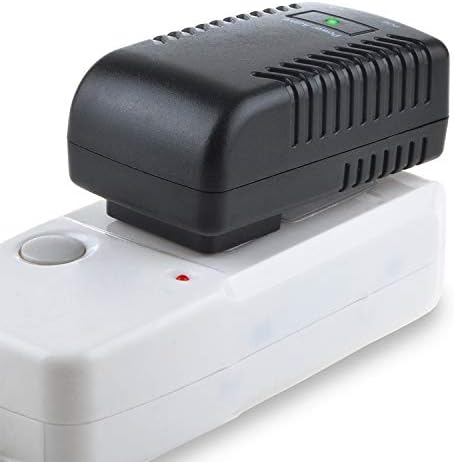
Image 2: The PKPOWER AC/DC Adapter plugged into a power strip. A green indicator light on the adapter signifies it is receiving power.
6. Operating Instructions
Once connected, the adapter operates automatically:
- The adapter will supply the necessary 48V DC power to your connected device.
- A green LED indicator on the adapter (if present) will illuminate to show that power is active.
- Ensure your connected device powers on and functions as expected.
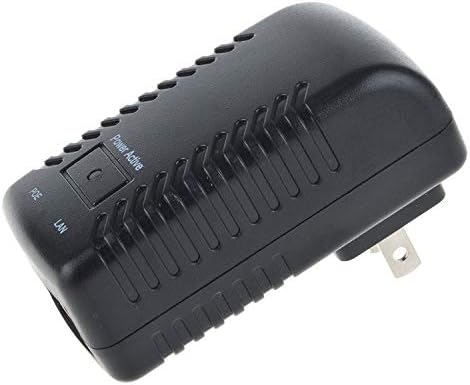
Image 3: Top-down view of the PKPOWER AC/DC Adapter, highlighting the "Power Active" indicator and labels for PoE and LAN ports, indicating its function in an Ethernet Power over Ethernet setup.
7. Maintenance
To ensure the longevity and optimal performance of your adapter:
- Cleaning: Disconnect the adapter from the power source before cleaning. Use a soft, dry cloth to wipe the exterior. Do not use liquid cleaners or aerosols.
- Storage: Store the adapter in a cool, dry place away from direct sunlight and extreme temperatures when not in use.
- Cable Care: Avoid bending or crimping the power cable excessively. Do not place heavy objects on the cable.
8. Troubleshooting
| Problem | Possible Cause | Solution |
|---|---|---|
| Adapter not powering on (no LED light) | No power from outlet; loose connection; faulty adapter. | Check the power outlet with another device. Ensure the adapter is firmly plugged in. If still no power, the adapter may be faulty. |
| Connected device not receiving power | Incorrect voltage/current; loose connection to device; faulty device. | Verify the device requires 48V DC. Ensure the output cable is securely connected. Test the device with another compatible power source if possible. |
| Adapter feels excessively hot | Overload; poor ventilation; internal fault. | Ensure the connected device's power requirements do not exceed the adapter's capacity. Provide adequate ventilation. Discontinue use if overheating persists and contact support. |
9. Specifications
| Attribute | Value |
|---|---|
| Brand | PKPOWER |
| Model Number | PENB1020B4800N02 (Compatible with 51015131 SL Power Part Number) |
| Input Voltage | 100-240V AC, 50-60Hz |
| Output Voltage | 48V DC |
| Compatibility | 802.3af Ethernet PoE Power Supply |
| Certifications | CE / FCC / RoHS |
| Protection | OVP, OCP, SCP |
| ASIN | B07PGCS46L |
| UPC | 751332956533 |
| Date First Available | March 5, 2019 |
10. Warranty and Support
Warranty Information: For details regarding the product warranty, please refer to the terms provided at the time of purchase or contact PKPOWER customer service directly.
Customer Support: Our friendly and reliable customer service team is available to assist you with any questions or issues. We aim to respond to all inquiries within 24 hours.
For support, please visit the PKPOWER Store on Amazon or contact us through the platform where you purchased the product.
Documents and downloads
Ask a question about this manual
Ask about setup, troubleshooting, compatibility, parts, safety, or missing instructions. Manuals+ will review the question and use this page’s manual context to help answer it.