
Introduction
The Garmin Bike Speed Sensor 2 and Cadence Sensor 2 are wireless devices designed to monitor your cycling performance. These sensors provide accurate speed, distance, and cadence data, which can be transmitted to compatible Garmin devices or other training applications via ANT+ and Bluetooth Low Energy technology. Their magnet-free design ensures easy installation, maintenance, and transfer between multiple bicycles.
What's in the Box
Upon unboxing your Garmin Speed 2 and Cadence 2 Sensor kit, you should find the following components:
- Speed Sensor 2
- Cadence Sensor 2
- 3 Cadence Sensor Bands (various sizes for crank arm attachment)

Image: Contents of the Garmin Speed Sensor 2 and Cadence Sensor 2 package, showing both sensors and the three different sized attachment bands.
Setup
1. Speed Sensor 2 Installation
The speed sensor attaches to the hub of either wheel. It is designed to be magnet-free for simplified installation.
- Locate the wheel hub.
- Place the speed sensor into its silicone mount.
- Securely attach the sensor and mount to the wheel hub using the integrated strap. Ensure it is snug and does not interfere with wheel rotation or other bike components.
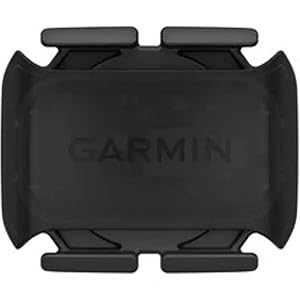
Image: Close-up view of the Garmin Speed Sensor 2, designed for hub mounting.
2. Cadence Sensor 2 Installation
The cadence sensor fastens to any size crank arm to measure pedal strokes per minute.
- Select the appropriate size band from the three included options that best fits your bicycle's crank arm.
- Place the cadence sensor into the selected band.
- Attach the sensor and band to the non-drive side crank arm. Ensure it is securely fastened and does not interfere with pedaling or shoe clearance.

Image: Close-up view of the Garmin Cadence Sensor 2, designed for crank arm attachment.
3. Pairing with a Device
The sensors transmit data using ANT+ and Bluetooth Low Energy technology. To pair them with your compatible device (e.g., Garmin Edge cycling computer, Garmin watch, or smartphone app):
- Ensure your receiving device (e.g., cycling computer, smartphone) has ANT+ or Bluetooth enabled.
- Wake up the sensors by rotating the wheel (for speed sensor) or pedaling (for cadence sensor) for a few seconds.
- On your receiving device, navigate to the sensor pairing menu.
- Select 'Add Sensor' or 'Search for Sensors'.
- Choose the Garmin Speed Sensor 2 and/or Cadence Sensor 2 from the list of detected devices.
- Follow any on-screen prompts to complete the pairing process.
Operating
Once installed and paired, the sensors will automatically begin transmitting data when activity is detected. The speed sensor will provide real-time speed and distance, while the cadence sensor will measure your pedal strokes per minute.
- Automatic Activation: The sensors activate automatically when motion is detected.
- Data Transmission: Data is sent wirelessly to your paired device, allowing you to view live metrics and record your rides.
- Odometer Feature: The speed sensor includes an odometer feature that tracks your total distance, which can be useful for planning bicycle maintenance schedules.
Maintenance
Battery Replacement
Both the Speed Sensor 2 and Cadence Sensor 2 use a replaceable CR2032 coin cell battery. Battery life can vary based on usage and environmental conditions.
- Carefully twist the sensor cover counter-clockwise to open it.
- Remove the old CR2032 battery.
- Insert a new CR2032 battery with the positive (+) side facing up.
- Align the marks on the cover and the sensor, then twist clockwise to securely close the sensor. Ensure the O-ring seal is properly seated to maintain water resistance.
Cleaning
To maintain optimal performance and longevity, clean the sensors periodically.
- Wipe the sensors with a damp cloth to remove dirt and debris.
- Avoid using harsh chemicals or abrasive cleaners, as these can damage the sensor casing or electronic components.
- Ensure the sensors are dry before storage or use.
Troubleshooting
Sensor Not Pairing or Connecting
- Check Battery: Ensure the battery is not depleted. Replace if necessary.
- Wake Up Sensor: Rotate the wheel (speed sensor) or pedal (cadence sensor) to activate the sensor before attempting to pair.
- Proximity: Ensure the sensor is within range of your receiving device.
- Interference: Move away from other electronic devices that might cause interference.
- Re-pair: Remove the sensor from your device's paired list and attempt to pair it again.
Inaccurate Readings
- Sensor Placement: Verify that the sensors are securely mounted and not shifting during your ride.
- Wheel Size (Speed Sensor): Ensure the correct wheel size is configured on your cycling computer or app for accurate speed and distance calculations.
- Firmware Update: Check if your receiving device or the sensors (if applicable) require a firmware update.
Specifications
| Brand | Garmin |
| Model Number | 010-12845-00 |
| Sensor Type | Cadence Sensor, Speed Sensor |
| Connectivity Technology | Bluetooth, Wireless (ANT+) |
| Battery Type | CR2032 (Lithium Manganese Dioxide) |
| International Protection Rating | IP54 (Dust and splash resistant) |
| Product Dimensions | 1.5 x 1.25 x 0.25 inches (approximate) |
| Item Weight | 0.704 ounces (approximate) |
Warranty Information
Garmin products are designed for reliability and performance. For detailed warranty information, including terms, conditions, and registration, please refer to the official Garmin website or the warranty card included with your purchase. Typically, Garmin offers a limited warranty against defects in materials and workmanship for a specified period from the date of purchase.
Support
For further assistance, technical support, or to access additional resources such as FAQs and software updates, please visit the official Garmin support website:
You may also contact Garmin customer service directly through the contact options provided on their support portal.