
Introduction
This manual provides instructions for the TOUMEI C800 Series replacement remote control, compatible with TOUMEI, COCAR, AEHR, Yaufey, and VANKYO mini projectors, including models C800S, C800W, C800A, and C800. Please read this manual carefully before use to ensure proper operation and longevity of your device.
Product Overview
The TOUMEI C800 Series remote control is designed for intuitive operation of your compatible mini projector, offering convenient access to various functions.
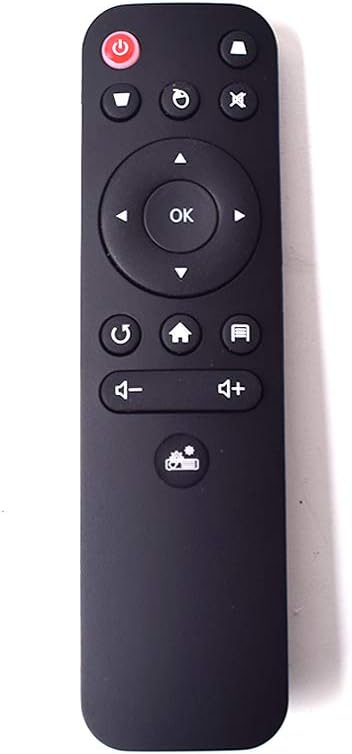
Image: Front view of the TOUMEI C800 Series remote control, showing all buttons including power, navigation, volume, and function keys.
Remote Control Layout
- Power Button: Turns the projector on or off.
- Mute Button: Mutes or unmutes audio output.
- Menu Button: Accesses projector settings or menu options.
- Source Button: Selects the input source (e.g., HDMI, USB).
- Navigation Pad (Up, Down, Left, Right): Navigates through menus and options.
- OK Button: Confirms selections or opens items.
- Return/Back Button: Goes back to the previous screen or menu.
- Home Button: Returns to the main home screen of the projector.
- Volume Down Button: Decreases the audio volume.
- Volume Up Button: Increases the audio volume.
- Focus/Keystone Correction Button: Adjusts image focus or keystone distortion.
Setup
Battery Installation
The remote control requires two AAA batteries (not included) for operation.
- Locate the battery compartment cover on the back of the remote control.
- Gently slide the cover downwards or press the tab and lift to open the compartment.
- Insert two AAA batteries, ensuring the positive (+) and negative (-) terminals align correctly with the markings inside the compartment.
- Replace the battery compartment cover by sliding it back into place until it clicks securely.

Image: Side view of the remote control, highlighting the battery compartment release tab for opening.

Image: The remote control with its battery compartment open, clearly showing the slots for two AAA batteries and polarity markings.
Operating Instructions
For optimal performance, point the remote control directly at the projector's infrared receiver.
Basic Functions
- Power On/Off: Press the Power Button once to turn the projector on or off.
- Navigation: Use the Navigation Pad (Up, Down, Left, Right arrows) to move through menus and options on the projector screen.
- Selection: Press the OK Button to confirm a selection or open an item.
- Volume Control: Use the Volume Up and Volume Down buttons to adjust the audio level.
- Mute Audio: Press the Mute Button to temporarily silence the audio. Press again to unmute.
- Home Screen: Press the Home Button to return to the projector's main interface.
- Return/Back: Press the Return/Back Button to go to the previous menu or screen.
- Input Source Selection: Press the Source Button to cycle through available input sources (e.g., HDMI 1, HDMI 2, USB, AV).
- Menu/Settings: Press the Menu Button to access the projector's settings menu.
- Focus/Keystone: Use the dedicated Focus/Keystone Correction Button to adjust image clarity or shape as needed.
Maintenance
Cleaning
Wipe the remote control with a soft, dry cloth. Do not use liquid cleaners, abrasive materials, or solvents, as these can damage the surface or internal components.
Storage
Store the remote control in a cool, dry place away from direct sunlight and extreme temperatures. If the remote control will not be used for an extended period, remove the batteries to prevent potential leakage and damage.
Troubleshooting
| Problem | Solution |
|---|---|
| Remote control is not responding. |
|
| Buttons are not working correctly or are sticky. |
|
| Remote control does not work with my TV. | This remote control is specifically designed for compatible TOUMEI C800 series mini projectors and is not intended for use with televisions or other non-projector devices. |
Specifications
- Brand: TOUMEI
- Model Name: C800S-RM (Compatible with C800S, C800W, C800A, C800 series projectors)
- Color: Black
- Connectivity Technology: Infrared
- Compatible Devices: Mini Projectors (TOUMEI, COCAR, AEHR, Yaufey, VANKYO C800 Series)
- Number of Buttons: 10
- Maximum Range: 10 Meters (approx. 33 feet)
- Battery Type: 2 x AAA batteries (not included)
- Remote Control Dimensions: 13.8 x 3.8 x 1.8 cm (approx. 5.43 x 1.50 x 0.71 inches)
- Item Weight: 100 Grams (approx. 3.53 ounces)
Warranty and Support
Specific warranty information for this replacement remote control is not provided in the product details. For warranty claims or technical support, please contact the seller or manufacturer directly through your purchase platform.
Please refer to the original product packaging or purchase documentation for detailed warranty terms and conditions, if available.
Important Notice
This remote control is designed exclusively for compatible mini projectors and is not suitable for televisions or other devices. Compatibility with specific projector models (C800S, C800W, C800A, C800) is confirmed. If you are unsure about compatibility with your specific projector model, please consult the seller before making a purchase to avoid inconvenience.