1. Product Overview
The UGREEN 90-Degree USB-A to USB-C Cable (Model 20855, 1.6FT) is designed for convenient charging and data transfer. Its right-angle connectors provide a more comfortable and space-saving connection, especially useful in tight spaces or while using your device.

Image: UGREEN 90-Degree USB-A to USB-C Cable, showcasing its design.
2. What's in the Box
- 1.6ft USB A to USB C Cable (1 unit)
- User Manual (1 unit)
3. Key Features
- Upgraded Right Angle Design: The 90-degree USB-C connector offers a more convenient and comfortable user experience, particularly when charging while holding the device. Note: The maximum allowable thickness of the device case is 0.08 inches (2mm).
- Fast Charging: Supports 18W fast charging, capable of fully charging compatible devices like the Samsung S22 in approximately 1.5 hours.
- True Data Sync: Achieves data transfer speeds of up to 480 Mbps, allowing for the transfer of 1GB of data in about 30 seconds. Note: Video transmission is not supported.
- Durable Construction: The cable has undergone over 20,000 bending tests and 3,000 plug/unplug tests, ensuring flexibility and longevity. Features nylon braiding, an aluminum shell, and reinforced connectors.
- Broad Compatibility: Compatible with a wide range of USB-C devices, including iPhone 15 series, Samsung Galaxy S/Note/Z Flip/Fold series, Google Pixel, iPad models, Nintendo Switch, and more.

Image: Right-angle connector for comfortable use while gaming or holding the device.

Image: Illustration of 3A fast charging, showing 65 minutes to 100% charge.

Image: Data transfer at 480 Mbps, transferring 1GB in 30 seconds.

Image: Features like nylon braided cable, aluminum shell, and reinforced connector for durability.
4. Setup & Usage
- Connect to Power Source: Insert the USB-A end of the cable into a compatible USB-A charger or a computer's USB-A port. Ensure the power source supports the desired charging speed (e.g., 18W for fast charging).
- Connect to Device: Insert the 90-degree USB-C end into your device's USB-C port. The right-angle design allows for a flush connection, reducing cable strain and improving ergonomics.
- Charging: Once connected, your device should begin charging automatically. The cable supports fast charging for compatible devices.
- Data Transfer: When connected to a computer, your device should be recognized for data transfer. You can then transfer files at up to 480 Mbps.
Important Note on USB-A Orientation: The USB-A connector is not reversible. When plugging into a USB-A port, ensure the correct orientation. The 90-degree bend on the USB-A end will direct the cable either upwards or downwards depending on the port's orientation. Consider this when planning your setup to ensure the cable bends in the desired direction.
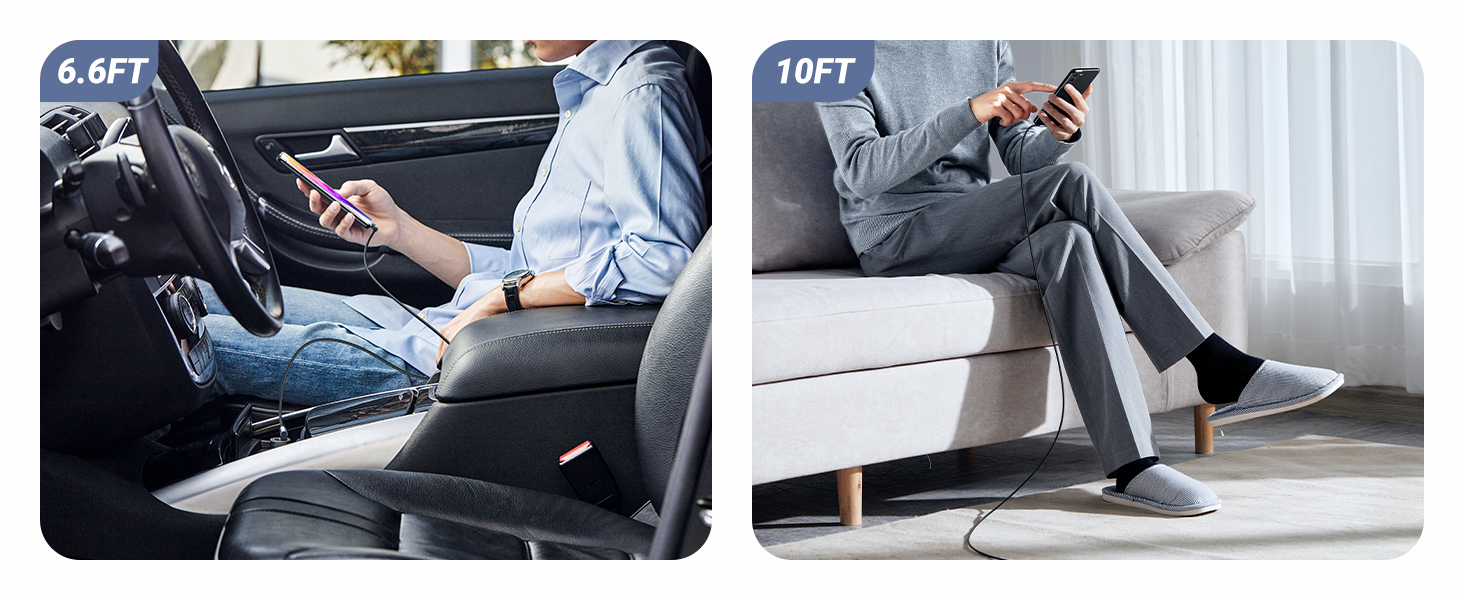
Image: Demonstrates the use of double 90-degree connectors for convenient charging and usage.
5. Compatibility
This UGREEN USB-A to USB-C cable is compatible with a wide range of devices featuring a USB-C port. This includes, but is not limited to:
- Smartphones: iPhone 15/15 Plus/15 Pro/15 Pro Max, Samsung Galaxy S24/S23/S22/S21/S10/S9/S8, Samsung Galaxy Z Flip 3/Z Fold 3, Note 20/10/9/8, A20/A10e/A52/A51/A50/A70/A71/A80, Motorola Moto Z Force/Moto Edge 20 Fusion/Moto G60S/G50/Moto Z Play, Google Pixel 5a/4a/4 XL/3a/3 XL/2 XL, TCL 30/20/10, LG G7/G8/V50/Stylo 4/5, Huawei Mate/P/Nova series, Xiaomi 11/10/9/8/MIX FOLD/MIX 4.
- Tablets: iPad Air 4, iPad Mini, iPad Pro 11"/12.9" (2020/2018), Microsoft Surface Duo, Samsung Galaxy Tab S3.
- Gaming Consoles: Nintendo Switch, PS5 Controller.
- Other Devices: GoPro Hero5 Black, DJI Osmo Pocket Handheld 3 Axis Gimbal Stabilizer.

Image: Visual representation of wide device compatibility.
6. Care and Maintenance
- Storage: Store the cable in a clean, dry place away from extreme temperatures. Avoid tightly coiling or bending the cable at sharp angles to prevent internal damage.
- Cleaning: Use a soft, dry cloth to clean the cable and connectors. Do not use liquid cleaners or solvents.
- Handling: Always grasp the connector head when plugging or unplugging the cable, rather than pulling on the cable itself.
7. Troubleshooting
- Device Not Charging/Connecting:
- Ensure both ends of the cable are securely plugged into the device and power source/computer.
- Verify that the power source (charger, USB port) is functional.
- Check if your device's case thickness exceeds 0.08 inches (2mm), as this may prevent the 90-degree connector from fully seating.
- Test the cable with another compatible device or power source to isolate the issue.
- Slow Charging:
- Ensure your power adapter supports fast charging (e.g., 18W or higher) and is compatible with your device's fast charging protocol.
- Confirm that your device itself supports fast charging.
- Data Transfer Issues:
- Ensure your device is set to "File Transfer" mode (if applicable) when connected to a computer.
- Verify that the computer's USB-A port is functioning correctly.
- Remember that this cable does not support video transmission.
8. Product Specifications
| Feature | Detail |
|---|---|
| Brand | UGREEN |
| Model Number | 20855 |
| Connector Type | USB Type C (Male) to USB Type A (Male) |
| Cable Type | USB Type C |
| Special Feature | 90 Degree Connectors, Fast Charging, Data Sync |
| Length | 1.6FT (0.5m) |
| Data Transfer Rate | 480 Megabytes Per Second (Mbps) |
| Wattage | 18 Watts (Max) |
| AC Adapter Current | 3 Amps (Max) |
| Material | Nylon Braided, Aluminum Shell, Reinforced Connector |
| Color | Black |
| Item Weight | 0.704 ounces (0.02 Kilograms) |
| Product Dimensions | 7.55 x 5.1 x 0.34 inches |
9. Warranty and Support
For warranty information or technical support, please refer to the official UGREEN website or contact UGREEN customer service directly. Details may also be available on the product packaging or purchase platform.


