
NETGEAR WAC540-100NAS
Contents
NETGEAR WAC540 Tri-Band Wireless Access Point User Manual
Model: WAC540-100NAS
Introduction
The NETGEAR WAC540 is a high-performance Tri-Band AC3000 Wireless Access Point designed for business environments requiring robust and reliable Wi-Fi connectivity. It supports up to 600 client devices and offers extensive coverage. Featuring 4x4 Multi-User MIMO (MU-MIMO) technology, it delivers aggregate speeds up to 3 Gbps. The WAC540 integrates with NETGEAR Insight for centralized cloud management, simplifying monitoring and configuration without the need for additional hardware.
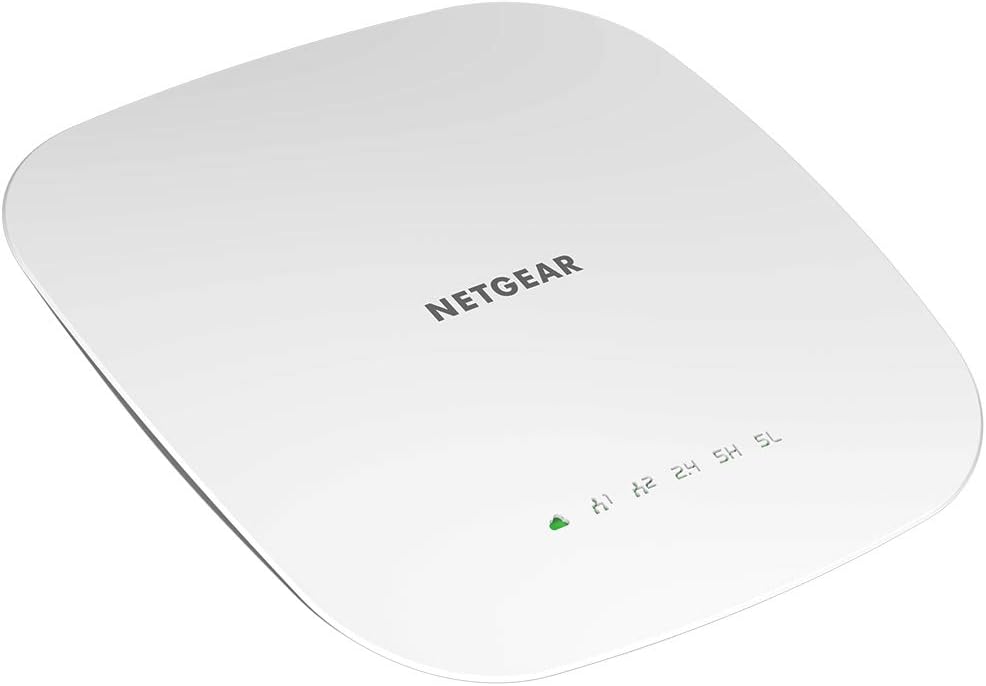
Image: Top view of the NETGEAR WAC540 Wireless Access Point, showing its sleek white design and indicator lights.
Package Contents
- NETGEAR Insight Managed Smart Cloud Tri-Band 4x4 Wireless Access Point (WAC540)
- Wall/ceiling mount kit
- Installation guide
Setup
Powering the Device
The WAC540 can be powered using Power over Ethernet Plus (PoE+) or an optional power adapter (model PAV12V, sold separately). For PoE+, connect an Ethernet cable from a PoE+ enabled switch or injector to the WAN/PoE+ compatible port on the access point.

Image: Underside view of the WAC540 showing the 1 Gigabit Ethernet Port (LAN), Internet (WAN) PoE+ Compatible Port, and the Optional Power Adapter port (model PAV12V).
Mounting Options
The WAC540 includes hardware for secure installation on either a wall or a suspended ceiling. Choose a central location for optimal Wi-Fi coverage.

Image: Diagrams illustrating how to mount the WAC540 on a wall or a suspended ceiling using the included hardware.
Operating the WAC540
Wi-Fi Performance
The WAC540 provides Tri-Band AC3000 speed, supporting up to 600 client devices and covering approximately 2,500 sq. ft. Its MU-MIMO technology ensures efficient data transfer to multiple devices simultaneously, enhancing overall network performance.

Image: Infographic highlighting the WAC540's key performance metrics: up to 3.0 Gbps streaming speed, maximum 600 client devices, and 2,500 sq. ft. coverage.
NETGEAR Insight Remote Management
Manage your WAC540 remotely using the NETGEAR Insight app or web portal. A 1-year free Insight subscription is included, allowing for centralized monitoring, configuration, and management from any location without additional hardware.

Image: Screenshot of the NETGEAR Insight management interface displayed on both a desktop monitor and a mobile phone, showing various network statistics and controls.
Key features of NETGEAR Insight include:
- Multi-Location Support
- Network Scan Device Discovery
- Configuration Copy & Cloning
- Load Balancing
- Firmware Scheduler
- SSID-level Client Isolation
- Client Roaming History
- Single Sign-on
- Dynamic VLAN
- Email Alerts/Push Notifications
Wired Connectivity
The WAC540 includes an additional 1 Gigabit Ethernet LAN port, allowing you to connect wired devices such as printers or storage for maximum speed and convenience.
Maintenance
To ensure optimal performance and longevity of your WAC540 Access Point, consider the following maintenance practices:
- Firmware Updates: Regularly check for and install the latest firmware updates through the NETGEAR Insight platform. Firmware updates often include performance improvements, security patches, and new features.
- Physical Cleaning: Keep the device free from dust and debris. Use a soft, dry cloth to gently wipe the exterior. Ensure ventilation holes are not obstructed.
- Environmental Conditions: Operate the device within its specified temperature and humidity ranges. Avoid exposing it to direct sunlight, excessive heat, or moisture.
- Network Monitoring: Utilize NETGEAR Insight to monitor network health, client activity, and potential issues. Address any alerts or warnings promptly.
- Secure Placement: Ensure the device is securely mounted and cables are properly routed to prevent accidental disconnections or damage.
Troubleshooting
This section provides solutions to common issues you might encounter with your NETGEAR WAC540 Access Point.
No Power/Device Not Turning On
- Check Power Source: If using PoE+, ensure your Ethernet switch or injector is PoE+ compliant and providing power. Verify the Ethernet cable is securely connected to the PoE+ port.
- Optional Power Adapter: If using the optional PAV12V power adapter, ensure it is correctly plugged into a working power outlet and the access point.
- Power Cycle: Disconnect and reconnect the power source (either PoE+ Ethernet cable or power adapter) to restart the device.
No Wi-Fi Signal or Poor Performance
- Check LED Indicators: Refer to the installation guide for the meaning of the LED lights. Ensure the Wi-Fi LEDs are active.
- Placement: Ensure the access point is centrally located and not obstructed by large metal objects or thick walls.
- Interference: Other wireless devices (cordless phones, microwaves, Bluetooth devices) can cause interference. Try changing Wi-Fi channels via NETGEAR Insight.
- Client Limit: While the WAC540 supports up to 600 clients, excessive simultaneous high-bandwidth usage can impact performance.
- Firmware: Ensure the latest firmware is installed.
Cannot Access NETGEAR Insight
- Internet Connection: Verify the access point has an active internet connection.
- Insight Subscription: Ensure your Insight subscription is active.
- Device Status: Check the physical status of the access point. If it's offline, troubleshoot power and network connectivity first.
- App/Browser: Try accessing Insight from a different device or web browser.
Specifications
| Feature | Detail |
|---|---|
| Brand | NETGEAR |
| Model Name | WAC540-100NAS |
| Wireless Communication Standard | 802.11ac (WiFi 5) |
| Frequency Band Class | Tri-Band |
| Max Speed | Up to 3 Gbps |
| Client Devices Supported | Up to 600 |
| Coverage Area | Up to 2,500 sq. ft. |
| Ethernet Ports | 2 x 1 Gigabit LAN Ports (one PoE+ compatible) |
| Power Options | PoE+ or Optional PAV12V Power Adapter (sold separately) |
| Form Factor | Ceiling Mountable, Wall Mountable |
| Dimensions (L x W x H) | 24.13 x 24.13 x 4.06 cm |
| Item Weight | 771 g |
| Security Protocol | WPA-PSK, WPA2-PSK |
| Special Features | WPS, MU-MIMO, Insight Remote Management |
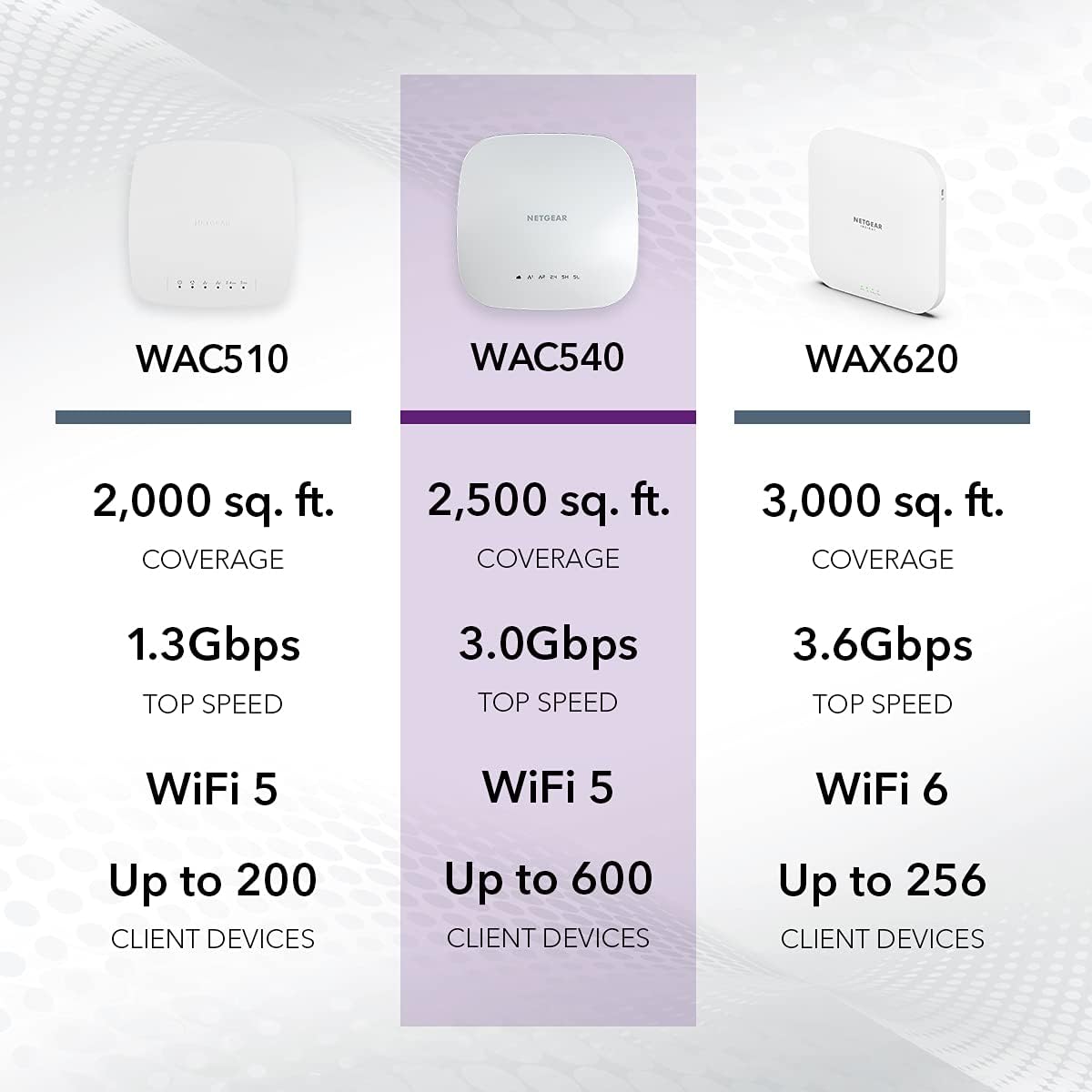
Image: A comparative chart showing the specifications of WAC510, WAC540, and WAX620 models, highlighting coverage, speed, and client device capacity.
Warranty and Support
The NETGEAR WAC540 comes with a market-leading 5-year limited hardware warranty. For technical support, product registration, and additional resources, please visit the official NETGEAR support website. You can also find frequently asked questions and community forums for further assistance.
Online Resources:
- NETGEAR Support Website: www.netgear.com/support
- NETGEAR Insight Information: www.netgear.com/insight
Ask a question about this manual
Ask about setup, troubleshooting, compatibility, parts, safety, or missing instructions. Manuals+ will review the question and use this page’s manual context to help answer it.