
Introduction
This manual provides essential information for the setup, operation, maintenance, and troubleshooting of your Jackson JS Series JS32T King V electric guitar. Please read this manual thoroughly to ensure proper use and care of your instrument.
1. Setup
1.1 Unboxing and Initial Inspection
Carefully remove the guitar from its packaging. Inspect the instrument for any signs of damage that may have occurred during shipping. Retain all packaging materials for future transport or storage.

Figure 1: Front view of the Jackson JS Series JS32T King V electric guitar. This image displays the V-shaped body, headstock, fretboard with sharkfin inlays, and the two humbucking pickups.
1.2 Tuning
Before playing, ensure your guitar is properly tuned. Use an electronic tuner for accuracy. The standard tuning for a 6-string guitar is E-A-D-G-B-e (from thickest to thinnest string).
1.3 Strap Attachment
Attach a guitar strap to the strap buttons located on the body of the guitar. One button is typically near the neck joint, and the other on the lower body wing. Ensure the strap is securely fastened before playing while standing.
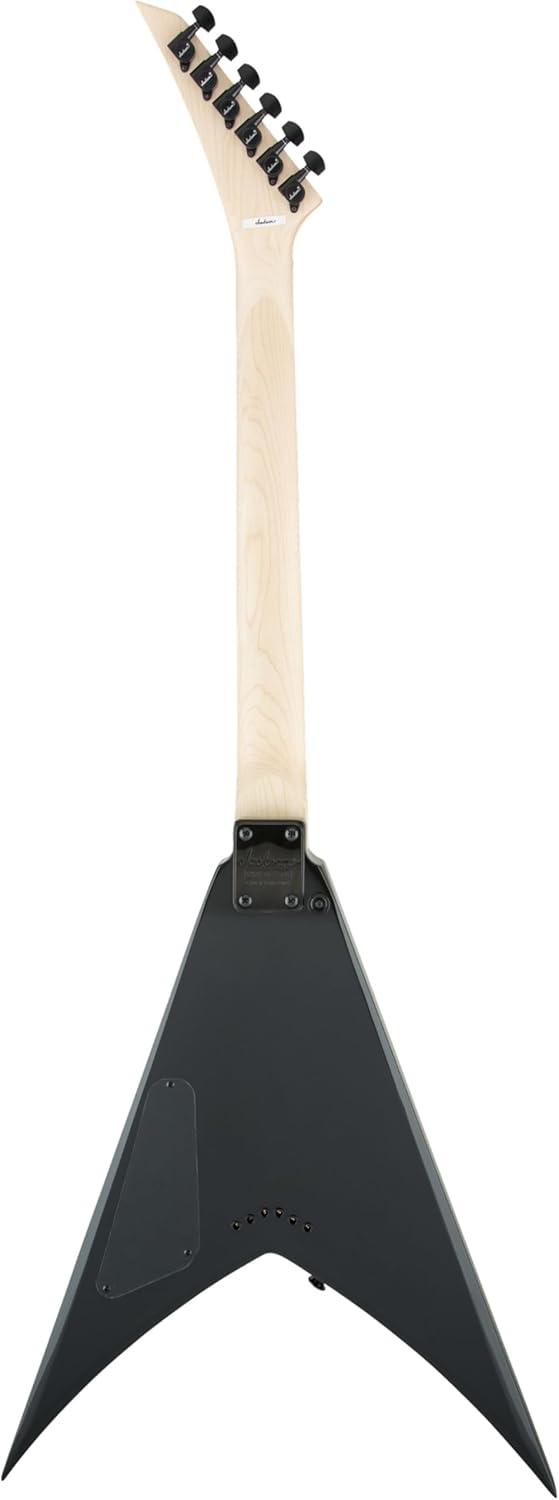
Figure 2: Back view of the Jackson JS Series JS32T King V electric guitar. This image shows the neck-through construction, the back of the V-shaped body, and the control cavity cover.
2. Operating the Guitar
2.1 Controls Overview
Your JS32T King V features a straightforward control layout:
- Volume Knob: Controls the overall output level of the guitar. Turn clockwise to increase volume, counter-clockwise to decrease.
- Tone Knob: Adjusts the treble response. Turn clockwise for brighter tones, counter-clockwise for warmer, darker tones.
- 3-Way Pickup Selector Switch: This switch allows you to select between the bridge humbucker, neck humbucker, or both.
- Position 1 (Bridge): Activates the bridge pickup for a brighter, more aggressive sound, often preferred for lead playing and heavy riffs.
- Position 2 (Middle): Activates both bridge and neck pickups for a fuller, balanced sound.
- Position 3 (Neck): Activates the neck pickup for a warmer, smoother tone, suitable for rhythm and bluesy leads.
2.2 Playing Position
The King V body shape is designed for comfortable playing, especially in a seated "classical" position where the V-wings rest on your legs, or while standing with a strap. Experiment to find the most comfortable and stable playing posture for you.
3. Maintenance
3.1 String Replacement
Strings should be replaced regularly to maintain optimal tone and playability. When replacing strings, do so one at a time to maintain neck tension. Use nickel-plated steel strings of appropriate gauge (e.g., .009-.042 or .010-.046).
3.2 Cleaning
- Body: Wipe the gloss black finish with a soft, lint-free cloth after each use to remove fingerprints and sweat. For deeper cleaning, use a guitar-specific polish.
- Fretboard: The amaranth fretboard can be cleaned periodically with a specialized fretboard cleaner and conditioner to prevent drying and cracking.
- Hardware: Keep bridge, tuners, and other metal parts clean and dry to prevent corrosion.
3.3 Storage
Store your guitar in a climate-controlled environment, ideally in a hard case or gig bag, to protect it from extreme temperature changes, humidity fluctuations, and physical damage.
4. Troubleshooting
This section addresses common issues you might encounter with your electric guitar.
- No Sound:
- Check if the amplifier is on and properly connected.
- Ensure the guitar cable is securely plugged into both the guitar and the amplifier.
- Verify that the guitar's volume knob is turned up.
- Test with a different cable or amplifier to isolate the problem.
- Buzzing or Fret Noise:
- Ensure proper fretting technique (pressing strings firmly behind the fret).
- Check for worn strings; replace if necessary.
- Extreme changes in temperature or humidity can affect neck relief, potentially causing fret buzz. If persistent, professional setup may be required.
- Poor Tuning Stability:
- Ensure strings are properly stretched after installation.
- Check for worn or improperly wound strings around the tuning posts.
- Verify that the tuning machines are functioning correctly.
For issues not covered here or for complex repairs, consult a qualified guitar technician.
5. Specifications
| Feature | Detail |
|---|---|
| Brand | Jackson |
| Model | JS32T King V |
| Body Material | Basswood |
| Neck Material | Maple |
| Fretboard Material | Amaranth |
| Number of Strings | 6 |
| Scale Length | 25.5 Inches |
| Pickup Configuration | HH (2 Humbucking Pickups) |
| Bridge System | String-through Hardtail |
| Color | Gloss Black |
| Item Weight | 14.24 pounds |
| Product Dimensions | 51.15 x 22.74 x 5.47 inches |
| Connector Type | 1/4" (6.35mm) Audio Jack |
| Hand Orientation | Right |
6. Warranty Information
Jackson guitars are covered by a manufacturer's warranty against defects in materials and workmanship. Specific warranty terms and conditions, including duration and coverage details, are typically provided with your purchase documentation or can be found on the official Jackson Guitars website. Please retain your proof of purchase for warranty claims.
7. Support
For further assistance, technical support, or service inquiries regarding your Jackson JS Series JS32T King V guitar, please visit the official Jackson Guitars website or contact their customer service department. You can often find FAQs, additional resources, and contact information on their support pages.
Official Jackson Guitars Website: www.jacksonguitars.com


