
FITHOOD CS-BRP400MD
Contents
FITHOOD Replacement Battery User Manual for Braun ThermoScan Pro 4000
Model: CS-BRP400MD
1. Introduction
This manual provides essential information for the proper use, installation, and maintenance of your FITHOOD replacement battery, model CS-BRP400MD. This battery is designed as a compatible power source for the Braun ThermoScan Pro 4000 and ThermoScan PRO 4000 Ear Thermometer. Please read these instructions carefully to ensure optimal performance and longevity of your battery.
2. Product Overview
The FITHOOD CS-BRP400MD is a high-quality Ni-MH (Nickel-Metal Hydride) replacement battery pack. It is engineered to meet or exceed the specifications of the original battery, providing reliable power for your compatible medical device.

Image 1: Top view of the FITHOOD CS-BRP400MD replacement battery. This image shows the overall shape and the label indicating "Nickel Metal Hydride Battery Pack" and "2.4VDC 700mAh 1.68Wh".
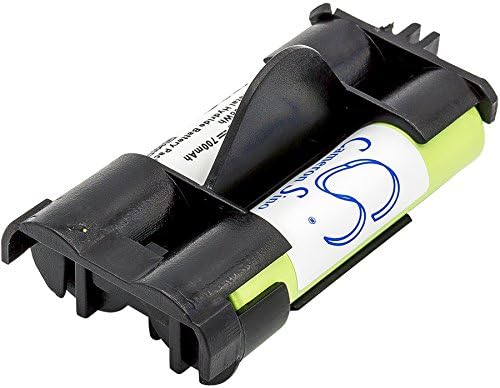
Image 2: Angled view of the FITHOOD CS-BRP400MD replacement battery. This perspective highlights the two individual battery cells encased in a black plastic holder.

Image 3: Close-up view of the FITHOOD CS-BRP400MD replacement battery label. The label clearly displays the model number CS-BRP400MD, part number 53020-0000, rating 2.4VDC 700mAh, and 1.68Wh.
3. Compatibility
This FITHOOD replacement battery is compatible with the following models and part numbers:
- Compatible Device Models:
- BRAUN ThermoScan Pro 4000
- BRAUN ThermoScan PRO 4000 Ear Thermometer
- Compatible Battery Part Number:
- BRAUN 53020-0000
Important: Always verify the model and part number of your device and existing battery before purchase and installation to ensure compatibility.
4. Installation (Battery Replacement)
Replacing the battery in your Braun ThermoScan Pro 4000 requires careful handling. Please follow these general guidelines. For specific instructions, always refer to the original user manual of your Braun ThermoScan device.
- Power Off Device: Ensure the Braun ThermoScan Pro 4000 is completely powered off and disconnected from any charging source.
- Locate Battery Compartment: Identify the battery compartment on your ThermoScan device. This is typically secured with screws or a latch.
- Open Compartment: Carefully open the battery compartment using appropriate tools if necessary (e.g., a small screwdriver).
- Remove Old Battery: Gently remove the old battery pack. Note its orientation to ensure correct installation of the new battery.
- Insert New Battery: Insert the FITHOOD CS-BRP400MD replacement battery into the compartment, ensuring the contacts align correctly. Do not force the battery.
- Close Compartment: Securely close the battery compartment.
- Initial Charge: It is recommended to fully charge the new battery before its first use.
Caution: Improper installation can damage the device or the battery. If you are unsure, consult a qualified technician.
5. Operating Guidelines
Once installed, the FITHOOD replacement battery operates similarly to the original. Follow these guidelines for optimal performance:
- Charging: Use only the charger supplied with your Braun ThermoScan Pro 4000 device. Ensure the battery is fully charged before extensive use.
- Discharge: Avoid completely draining the battery frequently, as this can reduce its overall lifespan.
- Temperature: Operate the device and battery within the recommended temperature range specified by the Braun ThermoScan manual.
6. Maintenance and Care
Proper care can extend the life of your FITHOOD replacement battery:
- Storage: If storing the device for an extended period, remove the battery and store it in a cool, dry place. Charge the battery to about 50% before storage and recharge every 3-6 months.
- Cleaning: Keep battery contacts clean and free from dust or corrosion. Use a dry, soft cloth for cleaning.
- Disposal: Dispose of old batteries responsibly according to local regulations. Do not dispose of batteries in household waste or by incineration.
7. Troubleshooting
If you encounter issues with your FITHOOD replacement battery, consider the following common solutions:
- Device Not Powering On:
- Ensure the battery is correctly installed and fully charged.
- Check battery contacts for dirt or corrosion.
- Verify the battery is compatible with your device model.
- Battery Not Charging:
- Confirm the charger is functioning correctly and properly connected.
- Check for any damage to the charging port or cable.
- Ensure the battery is seated correctly in the device.
- Short Battery Life:
- Ensure the battery has undergone a full charge cycle.
- Avoid extreme temperatures during operation.
- If the issue persists, the battery may need replacement.
If troubleshooting steps do not resolve the issue, please contact FITHOOD customer support or refer to the warranty information.
8. Specifications
| Feature | Specification |
|---|---|
| Brand | FITHOOD |
| Model Number | CS-BRP400MD |
| Battery Type | Ni-MH (Nickel-Metal Hydride) |
| Voltage | 2.4V |
| Capacity | 700mAh / 1.68Wh |
| Dimensions (L x W x H) | 55.64 x 28.54 x 23.94mm (2.19 x 1.12 x 0.94 inches) |
| Item Weight | Approximately 2.12 ounces |
| Certifications | RoHS, CE, ISO9001 |
| What's in the Box | 1 x FITHOOD Replacement Battery |
9. Safety Information
Observe the following safety precautions when handling and using the battery:
- Do not disassemble, crush, puncture, or short-circuit the battery.
- Do not expose the battery to high temperatures (above 60°C / 140°F) or direct sunlight.
- Do not expose the battery to water or moisture.
- Keep the battery away from children and pets.
- If the battery shows signs of damage, swelling, or leakage, discontinue use immediately and dispose of it properly.
- Use only with compatible devices as specified in this manual.
10. Warranty and Support
FITHOOD offers a one-month free replacement or full refund for any product problems that may arise. For warranty claims or technical support, please contact your retailer or FITHOOD customer service with your purchase details.
For further assistance, please refer to the contact information provided with your purchase or visit the official FITHOOD website.
Documents and downloads
Ask a question about this manual
Ask about setup, troubleshooting, compatibility, parts, safety, or missing instructions. Manuals+ will review the question and use this page’s manual context to help answer it.