
Introduction
The Bose Frames Rondo are innovative audio sunglasses designed to provide a unique open-ear listening experience. They integrate miniaturized Bose speakers within the temples, delivering rich, immersive sound directly to you while minimizing sound leakage to others. This design allows you to remain aware of your surroundings, making them ideal for various activities. The Rondo style features rounded lenses and a smaller fit, complemented by premium accents. These frames also include an integrated microphone for calls and voice assistant access, and they block up to 99% of UVA/UVB rays.
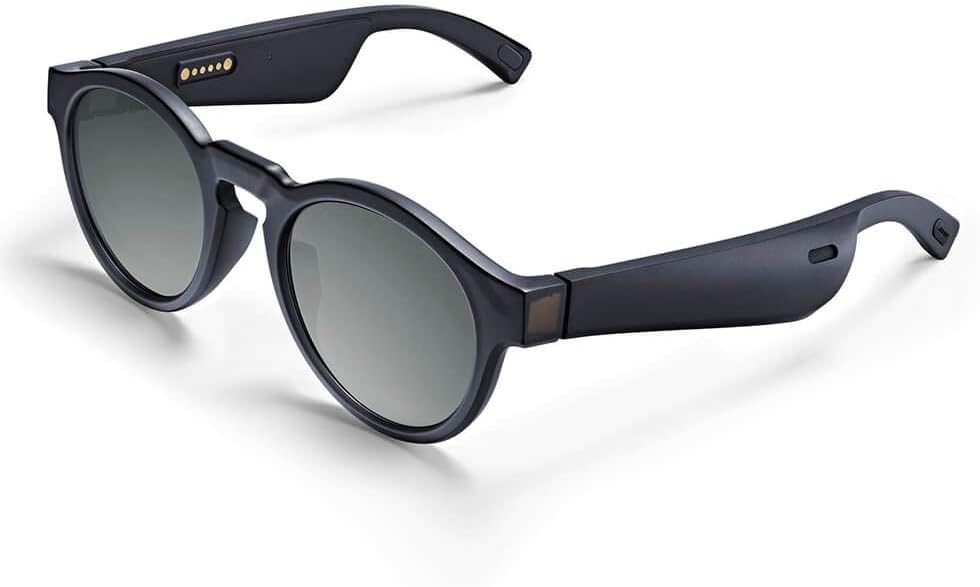
Figure 1: Bose Frames Rondo Audio Sunglasses, showcasing the sleek design and integrated audio technology.
Setup
Unboxing and Initial Charge
Upon unboxing your Bose Frames Rondo, you will find the sunglasses, a magnetic charging cable, and a protective carrying case. It is recommended to fully charge the device before first use. Connect the magnetic charging cable to the charging pins located on the temple of the frames and plug the other end into a USB power source. A full charge typically takes approximately 2 hours.

Figure 2: Side view of Bose Frames Rondo, highlighting the magnetic charging pins on the temple.

Figure 3: The protective carrying case included with Bose Frames Rondo, designed for safe storage and transport.
Bluetooth Pairing
To pair your Bose Frames Rondo with a mobile device:
- Ensure your Bose Frames are charged and powered on.
- Enable Bluetooth on your mobile device.
- Open the Bose Connect app (if installed) or go to your device's Bluetooth settings.
- Select "Bose Frames Rondo" from the list of available devices.
- Once connected, the frames will provide an audio confirmation. Bluetooth connectivity provides hassle-free pairing and seamless connection with your iPhone or Android device.
Bose Connect App
The Bose Connect app enhances your experience by allowing you to personalize settings, access future software updates, and manage connected devices. The app is compatible with iOS 9.0 or newer and Android 5.0 or newer operating systems. Download the app from your device's respective app store.
Operation
Audio Experience
The Bose Frames Rondo utilize an open-ear audio design, meaning sound is directed towards your ears without covering them. This allows you to enjoy your music or audio content while remaining fully aware of your surroundings. The sound quality is designed to be rich and immersive, providing a personal listening experience that is largely inaudible to those nearby.
Calls and Voice Assistant
An integrated microphone allows for clear phone calls and convenient access to your phone's virtual assistant (e.g., Siri, Google Assistant). Simply use the controls on the frames to answer/end calls or activate your voice assistant.
UV Protection
The lenses of the Bose Frames Rondo block up to 99% of UVA/UVB rays, providing essential eye protection during outdoor use.
Maintenance
Cleaning
To maintain the clarity of your lenses and the cleanliness of your frames, use the provided microfiber cloth or a soft, lint-free cloth. For stubborn smudges, a small amount of lens cleaning solution can be applied to the cloth, not directly to the lenses. Avoid abrasive materials or harsh chemicals.
Lens Replacement
The lenses in Bose Frames Rondo are designed to be easily interchangeable. Refer to the specific instructions provided with any replacement lenses for proper removal and installation. This feature allows for customization or replacement of damaged lenses.
Troubleshooting
Battery Life Issues
If you experience shorter than expected battery life, ensure the frames are fully charged before use. Continuous streaming will deplete the battery faster than standby mode. Expected battery life is approximately 3.5 hours for streaming and 12 hours on standby. If issues persist, try resetting the frames or updating firmware via the Bose Connect app.
Connectivity Problems
If your Bose Frames Rondo fail to connect via Bluetooth:
- Ensure Bluetooth is enabled on your device and the frames are within the 30 ft (9 m) range.
- Turn the frames off and on again.
- Forget the device in your phone's Bluetooth settings and re-pair.
- Restart your mobile device.
Sound Quality Concerns
While the open-ear design allows for environmental awareness, it may affect perceived volume in noisy environments. Ensure the frames are positioned correctly on your face. If sound is distorted or absent, check the connection and ensure the frames are charged. For persistent issues, consult the Bose Connect app for diagnostics or firmware updates.
Physical Durability
The frames are designed for daily use, but like any eyewear, they require careful handling. Avoid excessive bending or applying undue pressure to the temples, as this can lead to damage. Store them in the provided protective case when not in use to prevent scratches and physical stress.
Specifications
| Feature | Detail |
|---|---|
| Model Number | 833417-0100 |
| Product Dimensions | 2.8 x 7.1 x 3.2 inches; 10.56 ounces |
| Batteries | 1 Lithium Polymer battery required |
| Battery Life (Streaming) | Up to 3.5 hours |
| Battery Life (Standby) | Up to 12 hours |
| Charge Time | Approximately 2 hours |
| Bluetooth Range | Up to 30 ft (9 m) |
| Compatible Operating Systems | iOS 9.0 or newer / Android 5.0 or newer |
| Manufacturer | Bose Sunglasses |
Warranty and Support
Warranty Information
Bose products typically come with a limited warranty covering manufacturing defects. For specific details regarding the warranty period and terms for your Bose Frames Rondo, please refer to the warranty card included with your product or visit the official Bose website. Keep your proof of purchase for warranty claims.
Customer Support
For technical assistance, troubleshooting beyond this manual, or warranty service, please contact Bose customer support. You can find contact information and additional resources on the official Bose website: www.bose.com/support.


