1. Introduction
The Fosi Audio BR10C is a versatile Bluetooth 5.0 music receiver, digital-to-analog converter (DAC), and headphone amplifier designed to integrate wireless audio streaming into your home stereo system. It supports high-fidelity aptX and aptX Low Latency codecs, ensuring high-quality audio transmission with minimal delay. The BR10C features multiple output options, including analog RCA, optical S/PDIF, coaxial S/PDIF, and a 3.5mm headphone output, making it compatible with a wide range of audio equipment.
This manual provides detailed instructions for setting up, operating, and maintaining your BR10C device, along with troubleshooting tips and product specifications.

Image 1.1: Fosi Audio BR10C Bluetooth 5.0 Music Receiver DAC.
2. Package Contents
Before proceeding with the setup, please verify that all items are present in the package:
- 1x Fosi Audio BR10C Bluetooth Receiver
- 1x Bluetooth Antenna
- 1x USB Charging Cable (USB-A to Micro-USB)
- 1x Optical Cable
- 1x User Manual
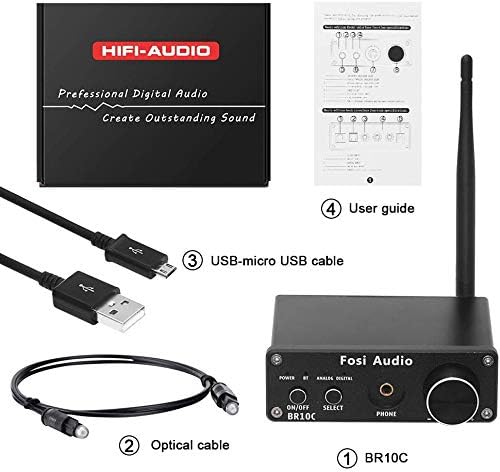
Image 2.1: Included accessories with the BR10C unit.
3. Device Overview
3.1 Front Panel

Image 3.1: Front panel controls and indicators.
- Power Indicator: Illuminates when the device is powered on.
- Bluetooth Indicator: Flashes during pairing, solid when connected.
- Analog Indicator: Illuminates when analog output is selected.
- Digital Indicator: Illuminates when digital output is selected.
- Power Switch (ON/OFF): Toggles the device power.
- Input Select Button: Switches between analog and digital outputs.
- Headphones Output (3.5mm): Connects to headphones.
- Volume Control: Adjusts the volume for both headphone and RCA outputs.
3.2 Rear Panel
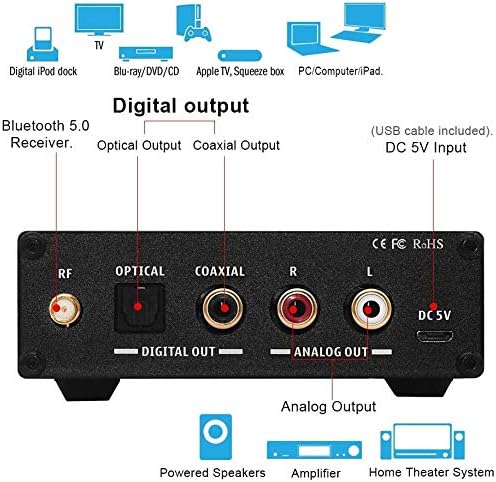
Image 3.2: Rear panel connections.
- RF Antenna Connector: For attaching the Bluetooth antenna.
- Optical Output (DIGITAL OUT): Connects to a DAC or amplifier with optical input.
- Coaxial Output (DIGITAL OUT): Connects to a DAC or amplifier with coaxial input.
- RCA Analog Output (R/L ANALOG OUT): Connects to active speakers or an amplifier.
- DC 5V Input: Power input for the device.
4. Setup Instructions
Follow these steps to set up your Fosi Audio BR10C:
- Attach the Antenna: Screw the provided Bluetooth antenna into the RF connector on the rear panel of the BR10C. Ensure it is securely fastened for optimal signal reception.
- Connect Power: Connect the USB charging cable to the DC 5V input on the rear panel. Plug the other end into a 5V USB power adapter (not included) or a computer's USB port. The Power indicator on the front panel will illuminate.
- Connect to Audio System:
- Analog Output: Use RCA cables (not included) to connect the R/L ANALOG OUT ports on the BR10C to the analog input of your amplifier, active speakers, or home theater system.
- Digital Output: Use the provided optical cable or a coaxial cable (not included) to connect the OPTICAL or COAXIAL DIGITAL OUT ports on the BR10C to the corresponding digital input of an external DAC or amplifier.
- Headphone Output: Plug your headphones into the 3.5mm HEADPHONE output on the front panel.

Image 4.1: Connection diagram for the BR10C with different audio systems.
5. Operating Instructions
Once the BR10C is set up, follow these steps to operate it:
- Power On: Press the ON/OFF power switch on the front panel. The Power indicator will light up.
- Select Output: Press the SELECT button to toggle between Analog and Digital outputs. The corresponding indicator (Analog or Digital) will illuminate.
- Bluetooth Pairing:
- The Bluetooth indicator will flash, indicating the BR10C is in pairing mode.
- On your Bluetooth-enabled device (e.g., smartphone, tablet, computer), go to the Bluetooth settings and search for available devices.
- Select "Fosi Audio BR10C" from the list.
- Once connected, the Bluetooth indicator on the BR10C will become solid.
- Play Audio: Start playing audio from your paired device. The sound will be transmitted wirelessly to the BR10C and output through the selected audio connection.
- Adjust Volume: Use the Volume Control knob on the front panel to adjust the output volume for both the headphone and RCA analog outputs.

Image 5.1: Wireless audio streaming setup with the BR10C.
6. Maintenance
To ensure the longevity and optimal performance of your Fosi Audio BR10C, follow these maintenance guidelines:
- Cleaning: Use a soft, dry cloth to clean the exterior of the device. Avoid using liquid cleaners or solvents, as they may damage the finish or internal components.
- Placement: Place the device on a stable, flat surface away from direct sunlight, heat sources, and excessive moisture. Ensure adequate ventilation around the unit.
- Antenna Care: Handle the Bluetooth antenna carefully. Do not bend or apply excessive force, as this can damage the connector or reduce signal quality.
- Power Supply: Always use a 5V, 1A or higher quality power adapter. Using an incorrect power supply can damage the device.
7. Troubleshooting
If you encounter issues with your BR10C, refer to the following troubleshooting tips:
- No Power:
- Ensure the power cable is securely connected to both the BR10C and the power adapter/USB port.
- Verify that the power adapter is functioning correctly and providing 5V.
- Press the ON/OFF switch firmly.
- Cannot Pair Bluetooth:
- Ensure the BR10C is powered on and the Bluetooth indicator is flashing.
- Make sure your source device's Bluetooth is enabled and within range (up to 35m unobstructed, 15m with obstruction).
- Try turning off and on Bluetooth on your source device, or restarting the BR10C.
- If previously paired, try "forgetting" the device on your source and re-pairing.
- No Sound Output:
- Check that the correct output (Analog or Digital) is selected on the BR10C (corresponding indicator should be lit).
- Verify all audio cables (RCA, optical, coaxial, headphone) are securely connected to both the BR10C and your audio system/headphones.
- Ensure your amplifier/active speakers/headphones are powered on and set to the correct input.
- Adjust the volume on both the BR10C and your audio source/system.
- If using digital output, ensure your external DAC/amplifier is compatible with the digital signal from the BR10C.
- Intermittent Audio / Poor Sound Quality:
- Ensure the Bluetooth antenna is securely attached.
- Reduce the distance between the BR10C and your Bluetooth source device.
- Remove any obstructions (walls, large furniture) between the devices.
- Avoid placing the BR10C near other wireless devices that may cause interference (e.g., Wi-Fi routers, microwaves).
- Ensure your source device is playing high-quality audio files.
- Clicking Sound (DAC Activation/Deactivation):
- Some users report a clicking sound when the DAC activates or deactivates, particularly when connected to a computer and system sounds trigger it. This is often a characteristic of the DAC chip's power management. While not a malfunction, minimizing system sounds or using a dedicated audio player might reduce its occurrence.
8. Specifications
| Feature | Specification |
|---|---|
| Inputs | Bluetooth 5.0 |
| Outputs | 3.5mm Headphone Output, Optical Output, Coaxial Output, RCA Analog Output |
| Frequency Response | 10Hz-20kHz (+/-0.5dB) |
| THD+N (1 KHz FS 96 kS/s) | <0.006% |
| SNR (CC at 20 KHz) | >100 dB |
| Crosstalk | >-86dB |
| D/A Converter Chip | PCM5102 |
| Bluetooth Chip | CSR QCC3008 |
| Supported Bluetooth Profiles | aptX, aptX Low Latency |
| Power Requirement | DC 5V, 1A or more |
| Headphone Impedance | 10 ohms to 64 ohms |
| Operating Range | Up to 35m (115ft) unobstructed, 15m (50ft) with obstruction |
| Dimensions (L x W x H) | 98mm x 73.5mm x 33mm (excluding antenna) |
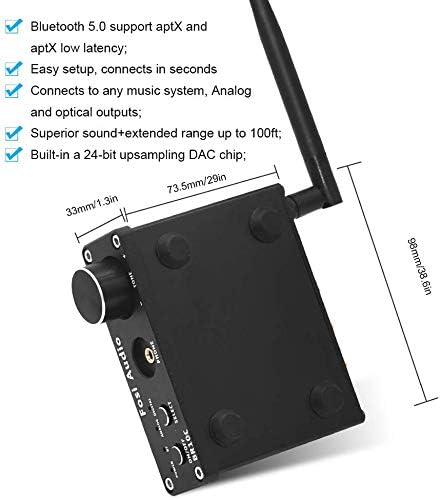
Image 8.1: Physical dimensions of the BR10C.
9. Warranty and Support
The Fosi Audio BR10C comes with an 18-month manufacturer's warranty. For warranty claims or technical support, please contact Fosi Audio directly.
Contact Information:
- Email: customer@fosiaudioshop.com
For additional specifications or further assistance, please reach out to our customer support team.


