
Introduction
This manual provides essential information for the safe and efficient operation of your Sony GTK-PG10 Portable Bluetooth Speaker. Designed for both indoor and outdoor use, this versatile speaker system features Bluetooth connectivity, an FM tuner, a microphone jack, and a USB port. Its unique design includes a splash-proof top panel with integrated cup holders and a "Party Mode" for enhanced sound dispersion.
Important Safety Information
Please read all safety instructions carefully before using the product. Keep this manual for future reference.
- Do not expose the unit to rain or moisture to reduce the risk of fire or electric shock.
- Do not install the appliance in a confined space, such as a bookcase or built-in cabinet.
- To reduce the risk of fire or electric shock, do not place objects filled with liquids, such as vases, on the apparatus.
- Do not expose batteries or apparatus with battery-installed to excessive heat such as sunshine, fire or the like.
- The top panel is splash-proof, but the entire unit is NOT waterproof. Avoid submerging or exposing the main unit to excessive water.
- Ensure proper ventilation. Do not block ventilation openings.
What's in the Box
- Sony GTK-PG10 Portable Bluetooth Speaker
- AC Cord
- Operating Instructions (this manual)
- Quick Set up Guide
- Warranty Card
Product Overview
The Sony GTK-PG10 features a robust design with intuitive controls and versatile connectivity options. Below are key components and their functions.

Image: Top panel controls of the Sony GTK-PG10 speaker. This view shows the various buttons and knobs for power, function selection, volume, bass/treble adjustment, microphone input, and playback controls.
Main Controls (Top Panel)
- (Power) button: Turns the unit on or off.
- FUNCTION button: Selects the input source (Bluetooth, FM, Audio In, USB).
- VOLUME knob: Adjusts the overall volume level.
- BASS/TREBLE knobs: Adjusts the bass and treble levels.
- MEGA BASS button: Enhances low-frequency sound.
- MIC jack: Connects an external microphone.
- MIC VOLUME knob: Adjusts microphone volume.
- ECHO knob: Adjusts the echo effect for the microphone.
- PLAY/PAUSE, SKIP buttons: Controls media playback.
- FM TUNER controls: For scanning and selecting FM radio stations.
Side Panel Connections
- USB Port: For playing music from a USB device or charging external devices.
- AUDIO IN (RCA) jacks: Connects external audio devices.
- DC IN port: Connects the AC power cord for charging and operation.
Unique Features
- Fold-out Top Panels with Cup Holders: Provides a convenient surface for drinks and snacks, and activates "Party Mode" for wider sound.
- Integrated Handle: For easy portability.
Setup
1. Charging the Speaker
- Connect the supplied AC cord to the DC IN port on the side of the speaker.
- Plug the AC cord into a wall outlet. The CHARGE indicator will light up, indicating charging is in progress.
- The CHARGE indicator will turn off once charging is complete. A full charge provides up to 13 hours of playback.
2. Powering On/Off
- Press the (Power) button on the top panel to turn the speaker on or off.
3. Bluetooth Pairing
- Turn on the speaker.
- Press the FUNCTION button repeatedly until "BLUETOOTH" appears on the display. The Bluetooth indicator will flash.
- On your Bluetooth device (smartphone, tablet, etc.), enable Bluetooth and search for available devices.
- Select "GTK-PG10" from the list of devices.
- Once paired, the Bluetooth indicator will stop flashing and remain lit.
4. Connecting External Devices
- Audio In: Connect an audio device using RCA cables to the AUDIO IN jacks on the side panel. Press FUNCTION to select "AUDIO IN".
- USB: Insert a USB device into the USB port on the side panel. Press FUNCTION to select "USB".
- Microphone: Connect a microphone to the MIC jack on the top panel. Adjust volume with the MIC VOLUME knob.
Operating Instructions
1. Basic Playback
- Play/Pause: Press the PLAY/PAUSE button.
- Skip Tracks: Press the SKIP buttons (forward/backward).
- Volume: Rotate the VOLUME knob.
2. Party Mode and Sound Enhancement
- Party Mode: Open the top panels to activate "Party Mode". This spreads the sound wider, ideal for outdoor gatherings. The panels also reveal cup holders.
- MEGA BASS: Press the MEGA BASS button to boost the bass.
- BASS/TREBLE: Use the dedicated knobs to fine-tune bass and treble.
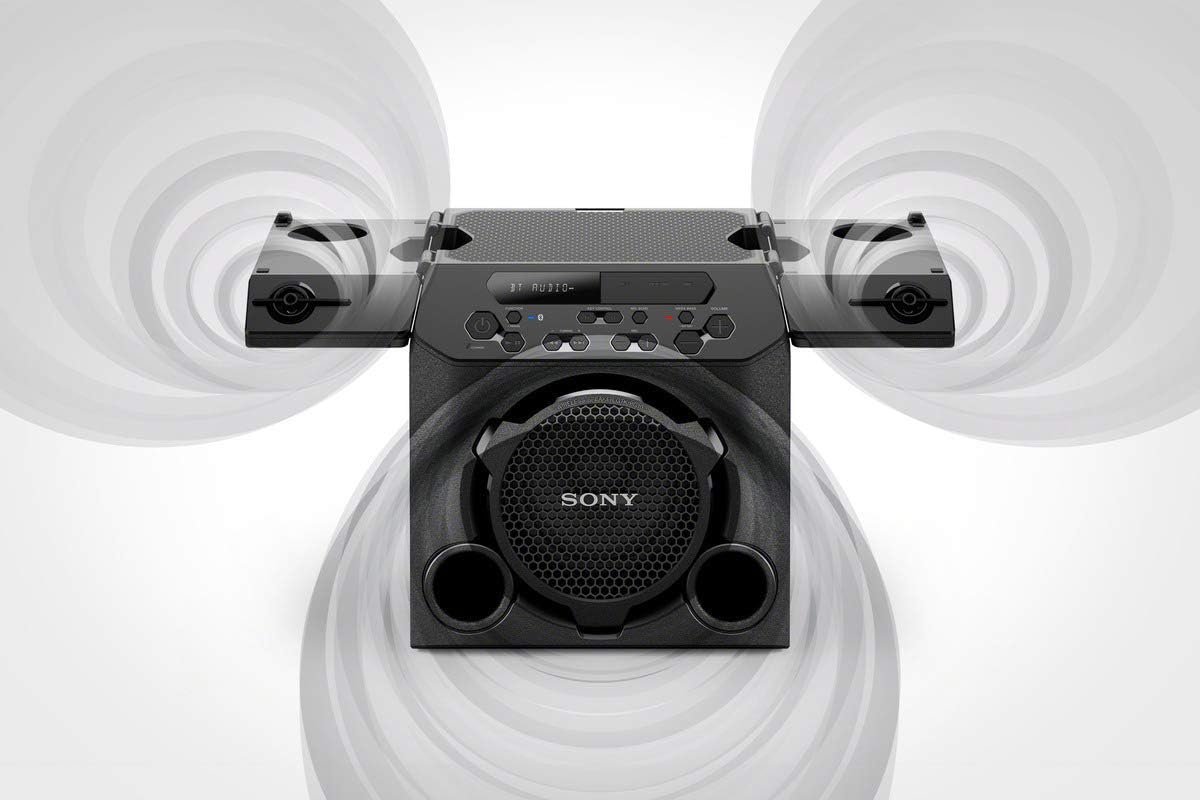
Image: The Sony GTK-PG10 speaker with its top panels extended, illustrating the "Party Mode" feature. Sound waves emanate from the side tweeters, indicating a wider sound stage. The extended panels also reveal integrated cup holders.
3. FM Radio
- Press FUNCTION to select "FM".
- Use the tuning buttons to scan for stations.
4. Microphone Use (Karaoke)
- Connect a microphone to the MIC jack.
- Adjust the MIC VOLUME and ECHO knobs to your preference.
- The speaker supports pitch control for karaoke, allowing you to adjust the key of the music to match your vocal range.
Maintenance
- Cleaning: Wipe the unit with a soft, dry cloth. Do not use abrasive pads, scouring powder, or solvents such as alcohol or benzine.
- Battery Care: To maintain battery life, fully charge the speaker before long periods of storage. Avoid completely draining the battery frequently.
- Storage: Store the speaker in a cool, dry place away from direct sunlight and extreme temperatures.
Troubleshooting
| Problem | Solution |
|---|---|
| No power | Ensure the AC cord is securely connected and plugged into a working outlet. Check battery charge level. |
| No sound | Increase the volume. Check if the correct input source is selected. Ensure Bluetooth device is connected and playing. |
| Bluetooth pairing fails | Ensure the speaker is in Bluetooth mode. Delete "GTK-PG10" from your device's Bluetooth list and try pairing again. Move devices closer. |
| Poor FM reception | Extend and adjust the FM antenna. Try moving the speaker to a different location. |
| Microphone not working | Ensure the microphone is properly connected and the MIC VOLUME knob is turned up. |
Specifications
- Model Name: GTKPG10
- Brand: Sony
- Material: Metal, Plastic
- Speaker Type: Tweeter
- Special Feature: Portable
- Recommended Uses: Indoor, Outdoor, Beach
- Compatible Devices: Smartphone, Tablet, Laptop
- Surround Sound Channel Configuration: 2.0
- Color: Black
- Item Weight: 1 pounds
- Is Waterproof: FALSE (Splash-proof top panel only)
- Control Method: Remote (if applicable, not explicitly listed as included but mentioned in specs)
- Wireless Communication Technology: Bluetooth
- Speaker Size: 3.5 Millimeters (Tweeter Diameter)
- Power Source: Battery Powered
- Number of Batteries: 1 Lithium Ion batteries required. (included)
- Audio Driver Type: Dynamic Driver
- Bluetooth Range: 10 Meters
- Speaker Maximum Output Power: 5 Watts
- Connectivity Technology: Bluetooth, Wireless
- Audio Output Mode: Stereo
- Mounting Type: Plug Mount, Freestanding
- Product Dimensions: 16.9 x 14.9 x 15.5 inches
Warranty and Support
This product comes with a Limited Warranty. Please refer to the included Warranty Card for detailed terms and conditions. For technical support, product registration, or further assistance, please visit the official Sony support website or contact their customer service. Contact information can typically be found on the Sony website or in the Quick Setup Guide.