
1. Introduction
Thank you for choosing the FITHOOD Replacement Battery. This battery is designed to provide reliable power for your compatible Sony camcorder. This manual will guide you through the proper use, care, and maintenance of your new battery to ensure its optimal performance and lifespan.
Compatible Camcorder Models:
- SONY CCD-TRV108
- SONY CCD-TRV108E
- SONY CCD-TRV116
- SONY CCD-TRV118
- SONY CCD-TRV126
- SONY CCD-TRV128
- SONY CCD-TRV138
- SONY CCD-TRV208
- SONY CCD-TRV208E
- SONY CCD-TRV218
- SONY CCD-TRV218E
- SONY CCD-TRV228
Compatible Battery Part Number: SONY NP-QM71D
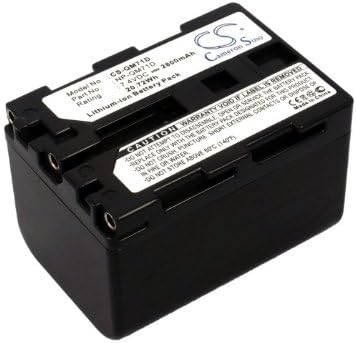
Image 1.1: Front view of the FITHOOD replacement battery, showing model and rating labels.
2. Important Safety Instructions
Please read and follow these safety instructions carefully to prevent damage to the battery, your device, or personal injury.
- Do not disassemble, open, or service the battery pack.
- Do not crush, puncture, short external contacts, or dispose of in fire or water.
- Do not store above 60°C (140°F).
- Use only with specified chargers and devices.
- Keep out of reach of children.
- If the battery leaks, and the fluid gets into your eyes, do not rub them. Instead, rinse them immediately with clean water and seek medical attention.
3. Setup
3.1 Unpacking
Carefully remove the battery from its packaging. Inspect the battery for any visible damage. If the battery appears damaged, do not use it and contact customer support.
3.2 Initial Charge
For optimal performance, it is recommended to fully charge the battery before its first use. Connect the battery to a compatible Sony camcorder charger or a dedicated battery charger for NP-QM71D type batteries.
3.3 Installation
Align the battery with the battery compartment of your compatible Sony camcorder. Gently slide the battery into place until it clicks securely. Ensure the battery is firmly seated to prevent accidental disconnection during use.
4. Operating
4.1 Charging the Battery
To charge the battery, insert it into your camcorder and connect the camcorder to its power adapter, or use an external battery charger compatible with NP-QM71D batteries. Charging indicators on your camcorder or charger will typically show the charging status.
4.2 Checking Battery Level
Some battery models feature a charge indicator. Press the 'PUSH' button on the battery to illuminate the indicator lights, which show the approximate remaining charge. Refer to your camcorder's manual for on-screen battery level indicators.

Image 4.1: Top view of the battery showing the 'PUSH' button and charge indicator lights.
4.3 Usage Tips
- Avoid completely draining the battery before recharging to prolong its lifespan.
- For best performance, operate the battery within a temperature range of 0°C to 40°C (32°F to 104°F).
- Remove the battery from the camcorder if it will not be used for an extended period.
5. Maintenance
5.1 Cleaning
Wipe the battery's exterior and metal contacts with a clean, dry cloth. Do not use liquid cleaners or solvents. Ensure contacts are free of dust and debris for proper connection.
5.2 Storage
Store the battery in a cool, dry place away from direct sunlight and extreme temperatures. For long-term storage, it is recommended to charge the battery to approximately 50% capacity. Avoid storing fully charged or completely depleted batteries for extended periods.
5.3 Battery Care
Lithium-ion batteries do not suffer from a 'memory effect', so you do not need to fully discharge them before recharging. Regular, partial charges are generally better for battery longevity than full discharge cycles.
6. Troubleshooting
6.1 Battery Not Charging
- Ensure the charger is properly connected to a power source and the battery.
- Verify that the charger and camcorder are compatible with this battery model.
- Check for any debris or corrosion on the battery and charger contacts. Clean if necessary.
- Try charging with a different compatible charger or camcorder if available.
6.2 Battery Not Holding Charge
- Battery capacity naturally degrades over time and with use.
- Ensure the battery is fully charged before use.
- Operating in extreme temperatures can reduce effective battery life.
- If the battery life has significantly decreased shortly after purchase, refer to the warranty information.
6.3 Battery Not Recognized by Camcorder
- Ensure the battery is correctly inserted and securely latched in the camcorder.
- Verify that the battery model (CS-QM71D) is compatible with your specific camcorder model.
- Clean the battery contacts and the camcorder's battery compartment contacts.
- Restart the camcorder.
7. Specifications
| Feature | Specification |
|---|---|
| Model Number | CS-QM71D |
| Battery Type | Li-ion |
| Capacity | 2800mAh (2850 Milliamp Hours) |
| Voltage | 7.4V |
| Dimensions (L x W x H) | 55.70 x 38.50 x 39.80mm (2.19 x 1.57 x 1.52 inches) |
| Item Weight | 5.8 ounces |
| Certifications | RoHS, CE, ISO9001 |
8. Warranty and Support
8.1 Warranty Information
We offer a one-month free replacement or full refund if any product problems arise from manufacturing defects or normal use within the first month of purchase. This warranty does not cover damage caused by misuse, accident, unauthorized modification, or improper storage.
8.2 Customer Support
If you have any questions, concerns, or require assistance with your FITHOOD replacement battery, please contact our customer support. For the most efficient service, please have your purchase details and the battery model number (CS-QM71D) ready.
Please refer to your purchase platform or product packaging for specific contact methods.