
Midea FS40-16CR
Midea FS40-16CR Silent Extreme DC Motor Pedestal Fan User Manual
Model: FS40-16CR
Important Safety Instructions
Please read all instructions carefully before using this appliance and retain for future reference. Failure to follow these instructions may result in electric shock, fire, or serious injury.
- Always ensure the fan is placed on a stable, flat surface to prevent it from tipping over.
- Do not operate the fan with a damaged cord or plug. If the cord or plug is damaged, it must be replaced by the manufacturer, its service agent, or similarly qualified persons to avoid a hazard.
- Unplug the fan from the power outlet when not in use, when moving it from one location to another, and before cleaning.
- Do not insert fingers or any other objects through the grille when the fan is operating.
- Keep the fan away from water or other liquids. Do not use it in bathrooms or other wet environments.
- This appliance is not intended for use by persons (including children) with reduced physical, sensory or mental capabilities, or lack of experience and knowledge, unless they have been given supervision or instruction concerning use of the appliance by a person responsible for their safety.
- Children should be supervised to ensure that they do not play with the appliance.
Product Overview
The Midea FS40-16CR Pedestal Fan is designed to provide powerful yet quiet air circulation for your home or office. Featuring a highly efficient DC motor, multiple speed settings, and convenient remote control, it offers customizable comfort and energy savings.

The Midea FS40-16CR Pedestal Fan, showcasing its sleek design, remote control, and effective air circulation.
Key Features
- DC Motor: Utilizes frequency conversion technology for higher efficiency, durability, and lower energy consumption, leading to energy cost savings. Integrated overheat protection ensures safe operation.
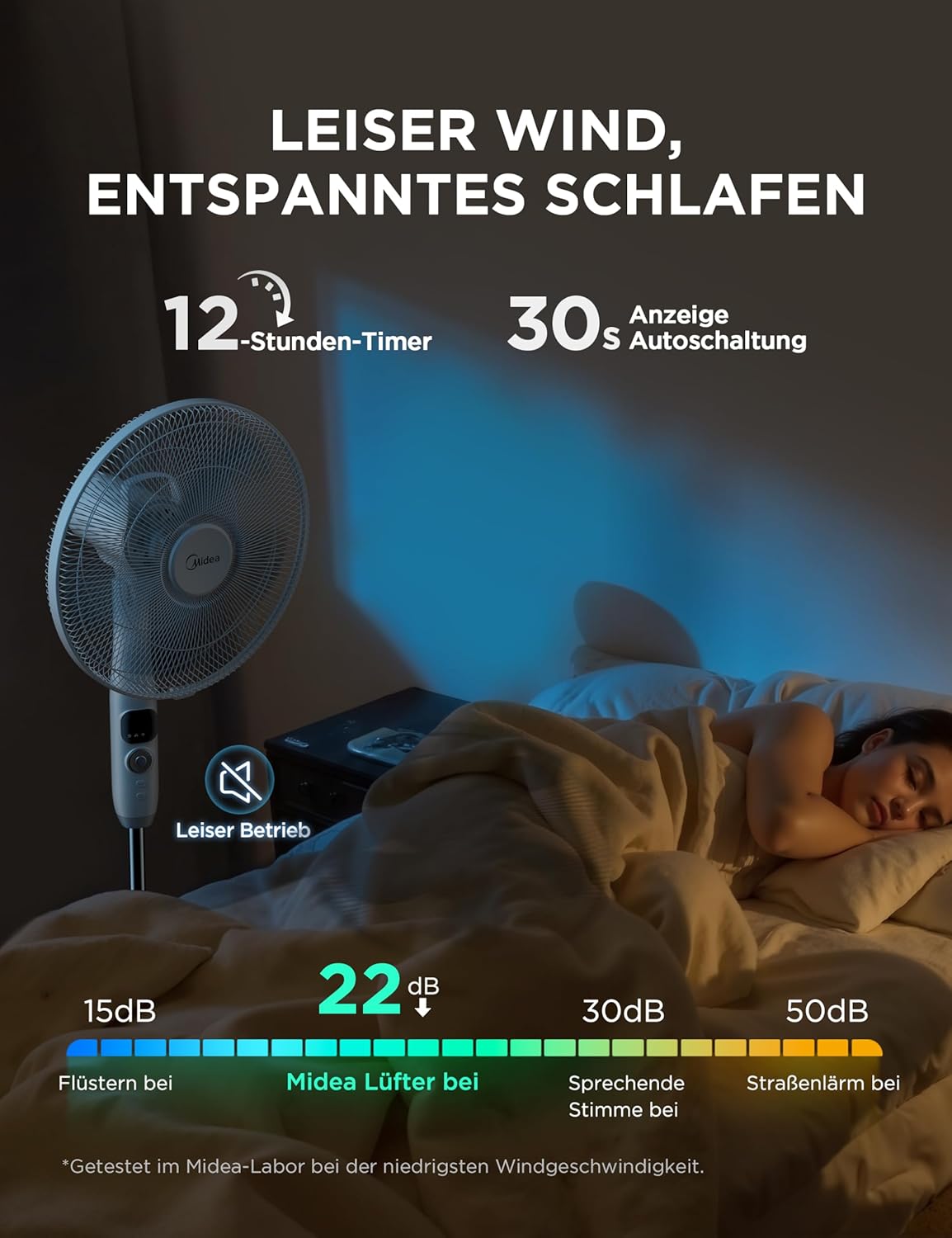
- Extremely Quiet Operation: Operates at only 27 dB(A) in sleep mode, making it ideal for bedrooms or offices.
- Powerful Airflow: Five rotor blades generate a strong and consistent airflow.
- Remote Control: Infrared remote control with a 6-meter range for convenient adjustment from a distance.
- 12-Hour Timer: Easily set the fan to turn off automatically after a desired period, up to 12 hours.
- 12 Speeds & 4 Modes: Choose from 12 wind speed levels in normal mode and select from Normal, Silent, Natural, or Sleep modes for tailored comfort.
- Adjustable Height & Tilting Head: Customize the fan's height and direct airflow precisely where needed with the tilting head.
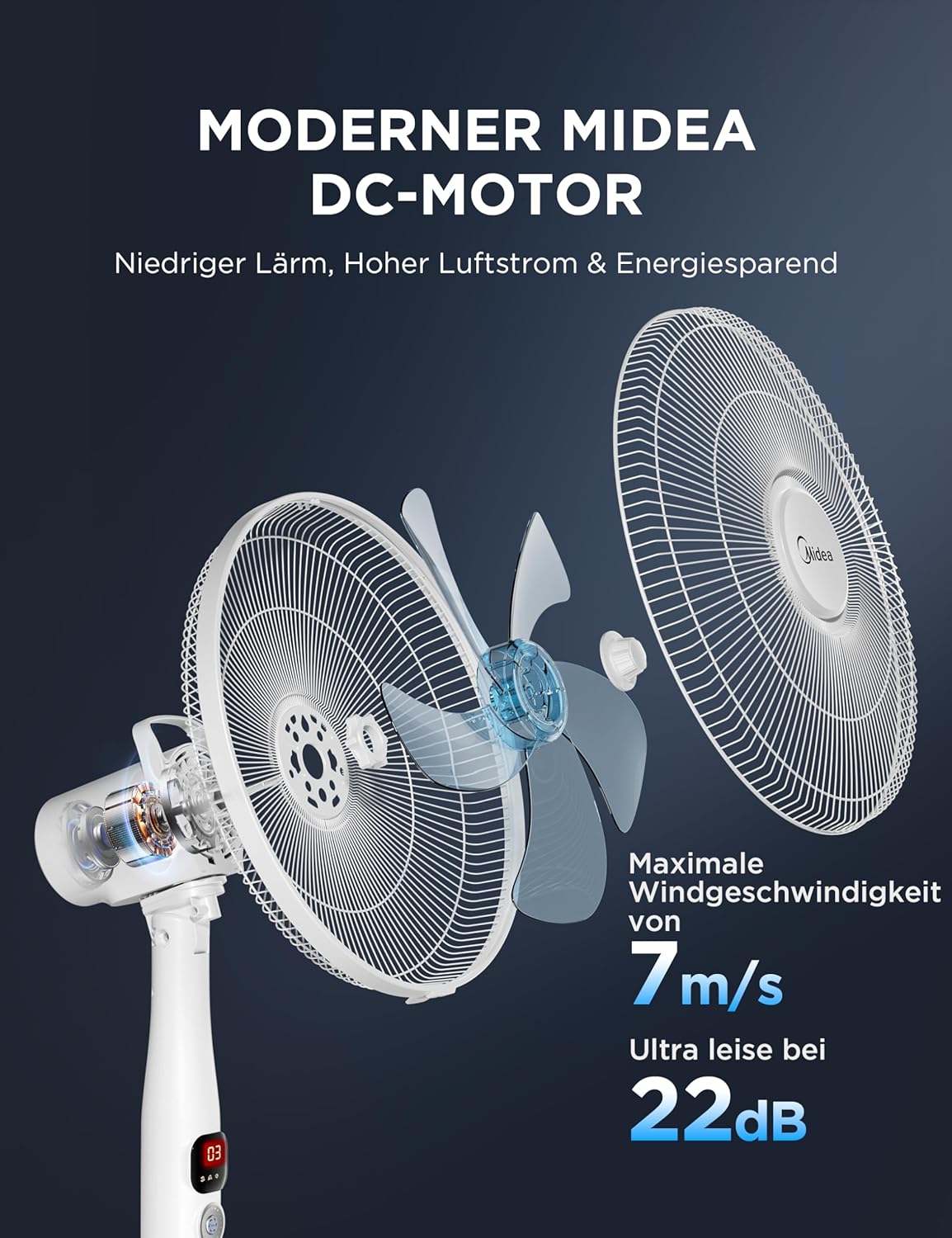
Illustration of the advanced DC motor, highlighting its quiet operation and energy efficiency.

Visual representation of the fan's four modes (Normal, Silent, Natural, Sleep) and 12 wind speed settings for customized comfort.

Demonstration of the fan's ultra-quiet operation at 27 dB and the convenient 12-hour timer function, ideal for undisturbed sleep.
Setup and Assembly
Follow these steps to assemble your Midea Pedestal Fan:
- Unpack Components: Carefully remove all parts from the packaging. Verify that all components listed in the packing list are present.
- Assemble the Base: Attach the fan pole to the base using the provided screws and tools. Ensure it is securely fastened.
- Attach the Fan Head: Mount the fan motor housing onto the top of the pole.
- Install Rear Grille and Blade: Place the rear grille onto the motor housing, ensuring it aligns correctly. Secure it with the retaining nut. Attach the fan blade to the motor shaft, then secure it with the blade cap.
- Install Front Grille: Attach the front grille to the rear grille, ensuring the clips or screws are securely fastened around the perimeter.
- Adjust Height: Loosen the height adjustment knob on the pole, extend or retract the pole to your desired height, and then tighten the knob firmly.

Diagram showing the adjustable height feature of the pedestal fan, allowing for personalized airflow direction from 116cm to 136cm.
Operating Instructions
Control Panel and Remote Control
The fan can be operated using the touch-control panel on the unit or the included infrared remote control. The LED display shows the current speed setting and mode.
- Power Button: Press to turn the fan ON or OFF.
- Speed Button: Press to cycle through the 12 available speed settings.
- Mode Button: Press to switch between Normal, Silent, Natural, and Sleep modes.
- Timer Button: Press to set the auto-off timer in increments up to 12 hours.
- Oscillation Button: Press to activate or deactivate the horizontal oscillation function.
A user operating the fan with the included remote control, demonstrating ease of use from a distance of up to 6 meters.
Modes and Speeds
The fan offers various modes to suit your preference:
- Normal Mode: Provides a constant airflow at your selected speed (1-12).
- Silent Mode: Operates at a barely audible speed, ideal for quiet environments.
- Natural Mode: Simulates natural wind by varying the fan speed intermittently.
- Sleep Mode: Gradually decreases fan speed over time to ensure comfortable sleep, operating at a very low noise level (27 dB).
Oscillation and Tilt
The fan features both horizontal oscillation and manual vertical tilt to distribute air effectively throughout the room.
- Horizontal Oscillation: Press the oscillation button to enable the fan head to swing horizontally up to 85 degrees, covering a wider area.
- Vertical Tilt: Manually adjust the fan head's vertical angle (up to 28 degrees) to direct airflow upwards or downwards as needed.

Detailed view of the fan's horizontal oscillation (85°) and vertical tilt (28°) capabilities for comprehensive air circulation.
Maintenance and Care
Regular cleaning and proper care will ensure the longevity and optimal performance of your fan.
- Cleaning: Before cleaning, always unplug the fan from the power outlet. Use a soft, damp cloth to wipe the exterior surfaces. For the fan blades and grilles, you may need to disassemble the front grille (refer to assembly instructions in reverse) to clean dust buildup. Do not use abrasive cleaners or solvents.
- Storage: When not in use for extended periods, store the fan in a cool, dry place, preferably in its original packaging, to protect it from dust and damage.
- Motor Lubrication: The fan's motor is permanently lubricated and requires no additional lubrication.
Troubleshooting
If you encounter any issues with your fan, please refer to the following table for common problems and solutions:
| Problem | Possible Cause | Solution |
|---|---|---|
| Fan does not turn on. | No power supply. Power button not pressed. | Check if the power cord is securely plugged into a working outlet. Press the power button on the control panel or remote. |
| Weak or no airflow. | Fan speed too low. Grilles are blocked by dust. | Increase the fan speed setting. Unplug the fan and clean the grilles and blades. |
| Unusual noise during operation. | Loose parts. Fan not on a stable surface. | Check if all assembly screws are tightened. Place the fan on a firm, level surface. |
| Remote control not working. | Batteries are dead or incorrectly inserted. Obstruction between remote and fan. | Replace batteries with new ones, ensuring correct polarity. Remove any obstructions and ensure the remote is pointed at the fan's receiver. |
Technical Specifications
| Specification | Value |
|---|---|
| Brand | Midea |
| Model Number | FS40-16CR |
| Color | White |
| Product Dimensions (L x W x H) | 136 x 45.2 x 40 cm |
| Power | 25 Watts |
| Voltage | 24 Volts |
| Number of Speeds | 26 (Note: Product title states 12 speeds, feature bullets state 12 speeds, but specifications list 26 speeds. Please refer to product packaging for exact number of speeds.) |
| Noise Level | 27 dB |
| Features | Portable |
| Item Weight | 6.9 Kilograms |
| Power Source | Corded Electric |
| Mounting Type | Floor Mount |
| Country of Origin | China |
Warranty and Customer Support
Midea products are manufactured to the highest quality standards. This product comes with a standard manufacturer's warranty against defects in materials and workmanship. Please refer to the warranty card included in your product packaging for specific terms and conditions.
For technical assistance, troubleshooting, or warranty claims, please contact Midea Customer Support:
- Website: Visit the official Midea website for support resources and contact information.
- Email: Refer to your product documentation for the customer service email address.
- Phone: Refer to your product documentation for the customer service phone number.
When contacting support, please have your product model number (FS40-16CR) and purchase date ready.
Related documentsFS40-16CR


Ask a question about this manual
Ask about setup, troubleshooting, compatibility, parts, safety, or missing instructions. Manuals+ will review the question and use this page’s manual context to help answer it.