1. Introduction
Thank you for choosing the Techsmarter 6-Port Charging Station Supreme. This device is designed to provide efficient and organized charging for multiple electronic devices simultaneously. Please read this manual thoroughly to understand the product's features, setup, and operation, ensuring safe and optimal use.
2. Product Overview
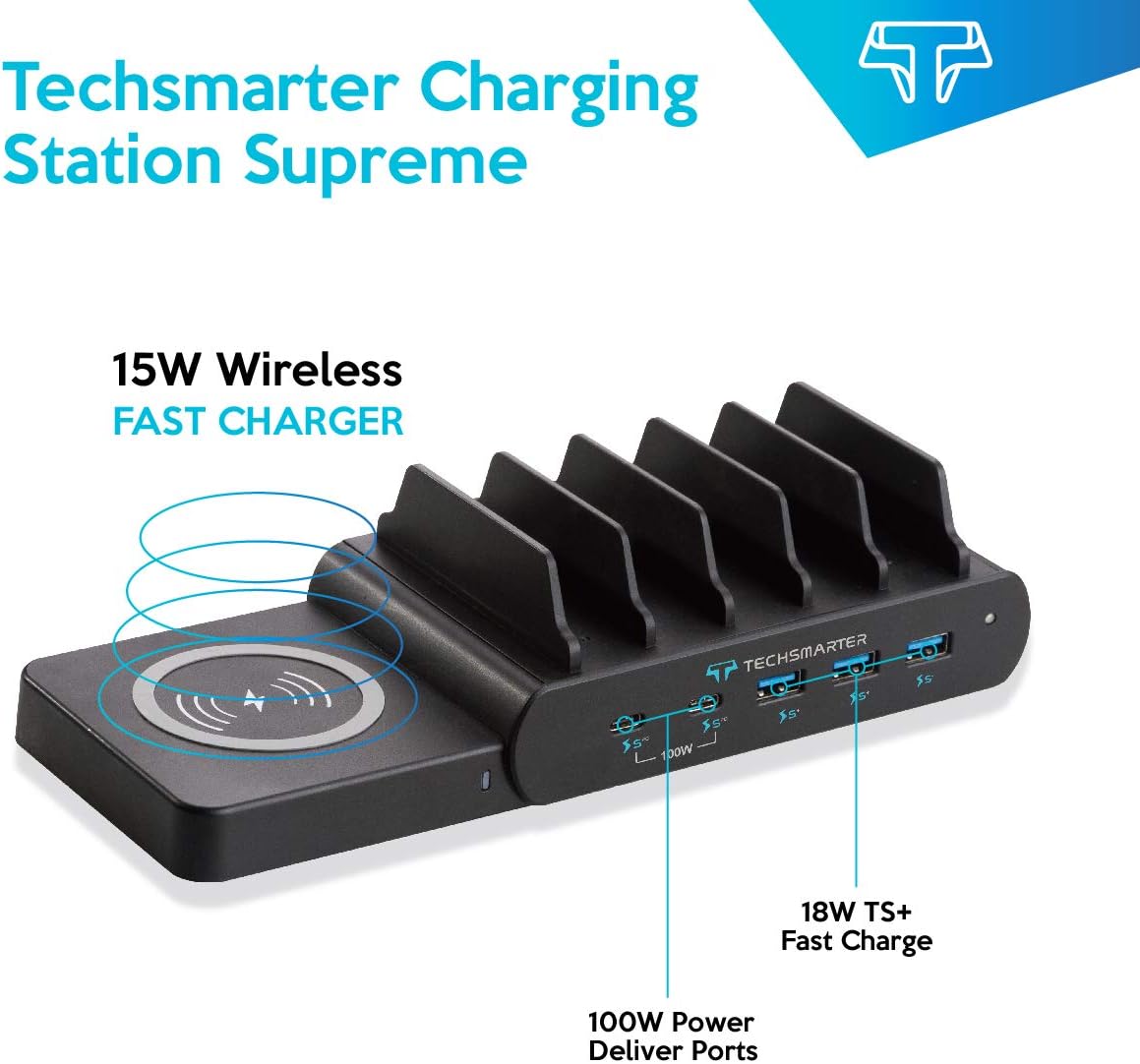
The Techsmarter Charging Station Supreme delivers a total output of 110W across six charging ports. It includes three 18W TS+ USB-A ports, two 100W USB-C Power Delivery (PD) ports, and a detachable 15W wireless charger. The Adaptive Intelligence Charge technology optimizes power distribution, providing up to 100W high-speed charging for a single USB-C device. The unit incorporates TurboGaurd, Techsmarter’s 11-point protection system, for device safety.

This image displays the Techsmarter 6-Port Charging Station Supreme in use, showcasing its ability to charge multiple devices simultaneously, including a tablet and a smartphone, within its integrated slots.
3. Package Contents
- Techsmarter Charging Station Supreme
- AC Adapter
4. Setup
- Connect the AC Adapter: Plug the provided AC adapter into the power input port on the back of the charging station. Connect the other end of the AC adapter to a standard wall outlet.
- Place the Charging Station: Position the charging station on a stable, flat surface with adequate ventilation.
- Attach Wireless Charger (Optional): The 15W wireless charging pad is detachable. Align the connectors and gently push the wireless charger onto the designated side port of the main unit until it clicks into place.
- Organize Devices: Utilize the integrated dividers to neatly place your smartphones, tablets, and other devices while they charge.
This image highlights the modular design of the charging station, featuring the detachable 15W wireless charging pad connected to the main unit, ready to charge compatible devices.
5. Operating Instructions
5.1. USB-C Power Delivery (PD) Ports
- The two USB-C PD ports deliver up to 100W when a single USB-C device is connected.
- When two USB-C devices are connected simultaneously, the power is intelligently allocated, providing up to 50W per port.
- These ports are compatible with devices such as MacBook Air/Pro, iPad Air/Pro, Samsung Tab, ThinkPad, Yoga, Surface, Chromebook, and XPS.
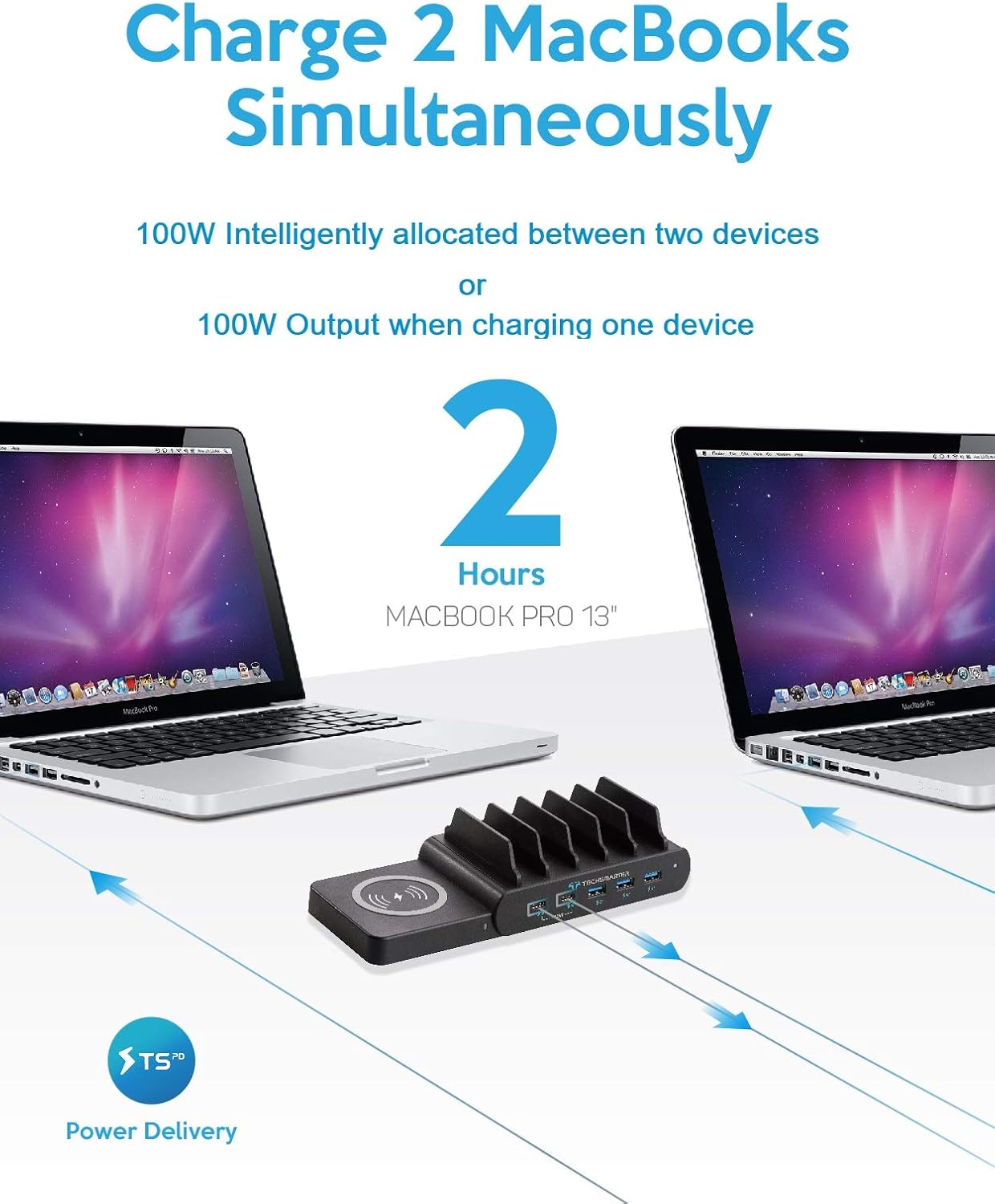
This image illustrates the charging station's capability to power two MacBook Pro 13-inch laptops simultaneously via its USB-C Power Delivery ports, highlighting its high-wattage output.
5.2. USB-A Fast Charging Ports
- The three USB-A ports feature TS+ technology, providing up to 18W fast charging.
- These ports are suitable for fast-charging smartphones and other USB-A compatible devices.

This image demonstrates the station's three 18W TS+ USB-A ports actively fast-charging three smartphones, including an iPhone XS, Samsung S10, and Pixel 3, showcasing its efficiency for mobile devices.
5.3. 15W Detachable Wireless Charger
- The detachable wireless charger provides up to 15W fast wireless charging for compatible devices.
- It supports charging through cases up to 5mm thick, excluding cases with magnetic or metal attachments.
- Place your wireless charging compatible device directly onto the wireless charging pad. Ensure the device is centered for optimal charging.

A detailed view of the Techsmarter Charging Station, showing the 15W wireless charging pad, the 100W USB-C Power Delivery ports, and the 18W TS+ Fast Charge USB-A ports, with labels indicating their functions.
6. Maintenance
- Cleaning: Disconnect the charging station from the power outlet before cleaning. Use a soft, dry cloth to wipe the surface. Avoid using abrasive cleaners, solvents, or harsh chemicals.
- Storage: Store the device in a cool, dry place away from direct sunlight and extreme temperatures when not in use for extended periods.
7. Troubleshooting
- Device Not Charging:
- Ensure the charging station is properly connected to a working wall outlet.
- Verify that the charging cable is securely connected to both the device and the charging port.
- Try a different charging cable or port to rule out cable or port issues.
- For wireless charging, ensure your device is centered on the pad and is wireless charging compatible. Remove any thick or metallic cases.
- Slow Charging:
- Ensure you are using the appropriate port for your device (e.g., USB-C PD for laptops, TS+ USB-A for fast-charging smartphones).
- When two USB-C devices are connected, the power output per port is reduced to 50W. For maximum speed on a single USB-C device, ensure only one is connected to a USB-C PD port.
- Use high-quality charging cables that support fast charging.
- Overheating:
- Ensure the charging station has adequate ventilation and is not covered.
- Avoid placing devices that are not compatible with wireless charging on the wireless pad, as this can cause excessive heat.
- If the device or charging station becomes excessively hot, disconnect it immediately and contact support.
- Unit Not Powering On:
- Check the AC adapter connection to both the charging station and the wall outlet.
- Test the wall outlet with another device to confirm it is functional.
8. Specifications
| Feature | Specification |
|---|---|
| Model Number | LS-PD110T-2C |
| Product Dimensions | 5.98 x 3.7 x 2.2 inches |
| Item Weight | 1.65 pounds |
| Total Power Output | 110W |
| USB-C PD Ports | 2 x 100W (50W per port when two devices connected) |
| USB-A Ports | 3 x 18W TS+ Fast Charging |
| Wireless Charger | 15W Detachable |
| Input Voltage | 12 Volts |
| Amperage | 12 Amps |
| Special Features | Fast Charging, Multi Device Charging, Short Circuit Protection, Wireless Charging |
9. Safety Information
- Use only the provided AC adapter. Using an incompatible adapter may damage the product or connected devices.
- Do not expose the charging station to water, moisture, or extreme temperatures.
- Avoid dropping or subjecting the device to severe impacts.
- Do not disassemble, repair, or modify the product. Contact customer support for service.
- Keep out of reach of children.
- Ensure proper ventilation around the charging station during use to prevent overheating.
- The integrated TurboGaurd system provides 11-point protection against overcharge, overcurrent, short circuit, and other electrical hazards.
10. Warranty and Support
The Techsmarter 6-Port Charging Station Supreme typically comes with a 1-year limited warranty from the date of purchase. Please refer to your purchase documentation for specific warranty terms and conditions.
For technical support, warranty claims, or any questions regarding your product, please contact Techsmarter customer service through their official website or the retailer where the product was purchased.


