
1. Introduction
This manual provides detailed instructions for the DROK Bluetooth Audio Receiver Module (Model: 200367AFA). This compact circuit board is designed to integrate Bluetooth audio reception capabilities into various DIY audio projects, including headphones, speakers, and home stereo systems. It supports both 3.5mm AUX and 2.54mm 3P audio input/output methods and operates within a DC 5V-12V input voltage range.
Please read this manual thoroughly before operation to ensure proper installation and safe usage.
2. Safety Information
Important: This product requires an external amplifier when connecting to speakers to prevent audio distortion, especially at high volume levels. Failure to use an amplifier may result in poor sound quality or damage to the module or speakers.
- Ensure correct voltage polarity when connecting power.
- Do not expose the module to moisture or extreme temperatures.
- Handle the circuit board with care to avoid damaging components.
- Disconnect power before making any wiring changes.
3. Key Features
- Input Voltage: DC 5V-12V, with support for Micro USB 5V power supply.
- Bluetooth Version: 4.2 for stable wireless connectivity.
- Audio Inputs: 3.5mm AUX input and 2.54mm 3P AUX input.
- Audio Outputs: 3.5mm audio output and 2.54mm 3P audio output.
- LED Indicator: Provides visual feedback on connection status (waiting, connected, playing).
- Decoding Formats: Supports AAC, FLAC, APE, WMA, WAV.
- Memory Connection: Remembers previously paired devices.
- Compact Design: Dimensions of 2.2 x 1.3 x 0.14 inches, suitable for various DIY projects.
4. Product Components and Layout
Familiarize yourself with the various components and connection points on the DROK Bluetooth Audio Receiver Module.

Figure 4.1: Overview of the DROK Bluetooth Audio Receiver Module with key components labeled. This image highlights the 3.5mm audio output, 2.54mm 3P audio output, 3.5mm AUX input, 2.54mm 3P AUX input, Micro USB DC 5V input, DC 5-12V wiring input terminal, Blue LED Indicator, NEC dedicated audio relay, and the on-board antenna.

Figure 4.2: A clear top-down view of the DROK Bluetooth Audio Receiver Module, showcasing its compact size and component arrangement. This image provides a general visual reference of the product.

Figure 4.3: This image illustrates the physical dimensions of the DROK Bluetooth Audio Receiver Module, indicating its length of 2.2 inches (5.5 cm) and width of 1.3 inches (3.2 cm). This is useful for planning integration into custom enclosures.
5. Setup and Wiring
Proper wiring is crucial for the functionality and safety of the module. Ensure all connections are secure and correct before applying power.
5.1 Power Connection
The module can be powered via the Micro USB port (5V DC) or the DC 5-12V wiring input terminal.

Figure 5.1: Diagram showing how to connect power to the module. The Micro USB port provides 5V DC input, while the screw terminal allows for DC 5-12V input. Observe polarity: red wire for positive (+), black wire for negative (-). When connecting wires to the spring clips, gently press down the parts to release the clips.
- Micro USB: Connect a standard Micro USB cable to a 5V power source.
- DC 5-12V Terminal: Connect your DC power supply (5V to 12V) to the terminal. Ensure the positive (+) and negative (-) wires are connected to the correct terminals. To insert wires, gently press down on the spring clips to open them, insert the wire, and release to secure.
5.2 Audio Output Connection (Headphones)
To connect headphones directly, use the 3.5mm audio output jack.

Figure 5.2: This diagram illustrates how to connect headphones to the module. The headphones plug into the 3.5mm audio output jack. Power is supplied via a battery connected to the DC 5-12V input terminal, ensuring correct polarity.
5.3 Audio Output Connection (Speakers with Amplifier)
For connecting to passive speakers, an external amplifier board is required. The module's audio output connects to the amplifier's input, and the amplifier then drives the speakers.

Figure 5.3: This diagram shows the wiring for connecting the Bluetooth module to speakers via an amplifier board. The module's 3.5mm audio output connects to the amplifier's input. The amplifier then connects to the left (L+) and right (R+) speaker terminals. Power for the module is shown coming from a battery. This setup is essential to prevent distortion and ensure proper speaker operation.
5.4 External Antenna Interface (Optional)
The module includes an on-board antenna. For applications requiring extended range or improved signal stability, an external antenna can be connected to the dedicated interface.
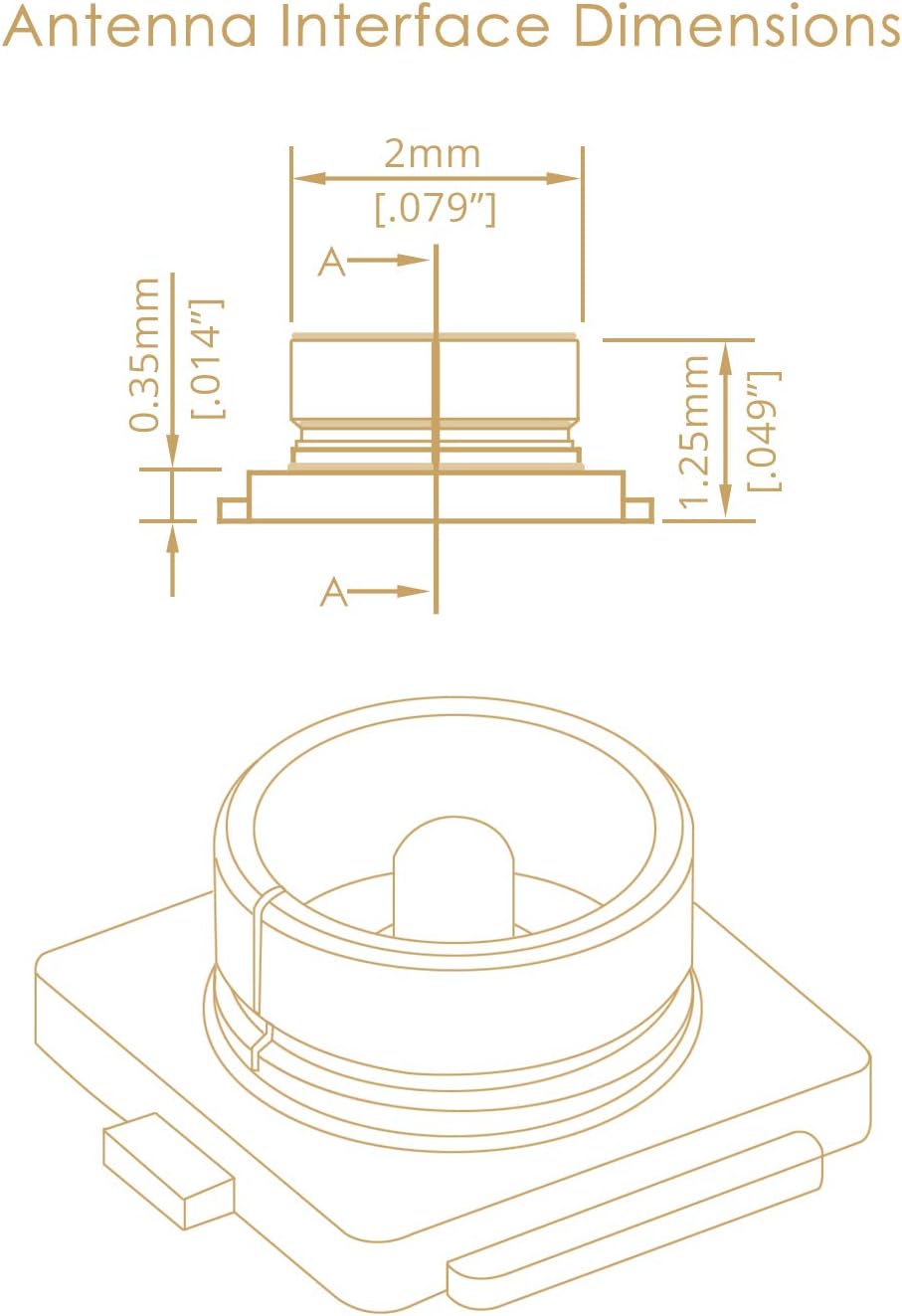
Figure 5.4: Detailed dimensions of the external antenna interface on the module. This provides precise measurements (e.g., 2mm width, 0.35mm height) for compatibility with external antenna connectors, ensuring a proper fit for enhanced wireless performance.
6. Operating Instructions
6.1 Bluetooth Pairing
- Power On: Apply power to the DROK Bluetooth Audio Receiver Module using either the Micro USB or DC 5-12V input.
- Pairing Mode: The blue LED indicator on the module will begin quick flashing, indicating it is waiting for a Bluetooth connection. The Bluetooth name for the module is "Drok_BT".
- Enable Bluetooth: On your audio source device (e.g., smartphone, tablet, computer), enable Bluetooth.
- Search and Connect: Search for available Bluetooth devices. Select "Drok_BT" from the list to connect.
- Connected: Once successfully paired, the blue LED indicator will remain constantly on. The module supports memory connection, meaning it will automatically attempt to connect to the last paired device when powered on.

Figure 6.1: This image displays a smartphone screen showing the "Drok_BT" device connected in the Bluetooth settings. It also provides a visual guide to the LED indicator states: quick flashing for waiting for connection, slow flashing for audio playing, and constant on for connected status. Supported decoding formats (AAC, FLAC, APE, WMA, WAV) are also listed.
6.2 Audio Playback
- Once connected, play audio from your source device. The blue LED indicator will show a slow flashing pattern during audio playback.
- Ensure your connected headphones or amplifier/speakers are powered on and properly configured for audio output.
- The module supports various audio decoding formats including AAC, FLAC, APE, WMA, and WAV.
7. Maintenance
- Cleaning: Use a dry, soft cloth to gently wipe the module. Do not use liquid cleaners or solvents.
- Storage: Store the module in a cool, dry place away from direct sunlight and extreme temperatures when not in use.
- Handling: Avoid dropping or subjecting the module to strong impacts.
- Ventilation: Ensure adequate ventilation if enclosing the module in a case, especially if it's part of a larger system that generates heat.
8. Troubleshooting
| Problem | Possible Cause | Solution |
|---|---|---|
| No power/LED off | Incorrect power connection; insufficient voltage; faulty power supply. | Check power wiring polarity. Ensure power supply is within DC 5V-12V range. Test with a different power supply or Micro USB cable. |
| Cannot find "Drok_BT" in Bluetooth list | Module not in pairing mode; too far from source device; interference. | Ensure module is powered on and LED is quick flashing. Move source device closer. Reduce interference from other wireless devices. |
| No audio output/Distorted audio | Incorrect audio wiring; no amplifier for speakers; volume too low on source/amplifier; faulty headphones/speakers. | Verify audio output connections. Ensure an amplifier is used for speakers. Increase volume on source device and amplifier. Test with different headphones/speakers. |
| Bluetooth connection drops frequently | Distance too great; obstacles; interference. | Reduce distance between module and source device. Remove obstacles. Minimize interference from other 2.4GHz devices. Consider using an external antenna if applicable. |
9. Specifications
| Parameter | Value |
|---|---|
| Model Number | 200367AFA |
| Input Voltage Range | DC 5V-12V (supports Micro USB 5V) |
| Bluetooth Version | 4.2 |
| Audio Input Methods | 3.5mm AUX, 2.54mm 3P AUX |
| Audio Output Methods | 3.5mm audio, 2.54mm 3P audio |
| Supported Decoding Formats | AAC, FLAC, APE, WMA, WAV |
| Dimensions (L x W x H) | 2.2 x 1.3 x 0.14 inches (5.5 x 3.2 x 0.35 cm) |
| Item Weight | 0.986 ounces (27.95 grams) |
| Number of Channels | 2 |
| Mounting Type | Surface Mount |
10. Warranty and Support
DROK offers a one-year long period service for products purchased. If there is any quality issue with your item, you may be eligible for a brand new replacement.
For technical support or warranty claims, please contact DROK customer service through the platform where you purchased the product or visit the official DROK store on Amazon: DROK Amazon Store.

