Download PDFFree PDF. The Save button below keeps a bookmark and private notes in your account.
Epson Home Cinema 5050UB 4K PRO-UHD Projector Instruction Manual
Model: 5050UB | Brand: Epson
Introduction
The Epson Home Cinema 5050UB 4K PRO-UHD projector is designed to deliver a high-quality 4K home theater experience. It features advanced processing for resolution enhancement, color, and image processing, producing exceptional brightness, color accuracy, and image detail. This manual provides essential information for setting up, operating, and maintaining your projector to ensure optimal performance.
What's in the Box
Verify that all items are included in your package:
Home Cinema 5050UB Projector
Power Cord
Two HDMI Cable Clamps
Remote Control with (2) AA Batteries
Quick Setup Guide
Figure 1: Included accessories with the Epson Home Cinema 5050UB projector.
The image above displays the projector and its accompanying accessories, ensuring you have everything needed for initial setup.
Product Overview
The Epson Home Cinema 5050UB is engineered for superior visual performance. Key features include:
4K PRO-UHD Projection Technology: Utilizes advanced processing for resolution enhancement, color, and image processing for an exceptional 4K home theater experience.
True 3-Chip Projector Design: Advanced 3LCD technology displays 100% of the RGB color signal for every frame, ensuring outstanding color gamut and brightness without rainbowing effects.
Pixel-Shift Processor: Precisely controls three high-definition LCD chips to parallel process millions of pixels, resulting in a sharp 4K visual experience.
HDR Processor: Full 10-bit HDR color processing faithfully reproduces HDR content for exceptional visual performance.
Digital Imaging Processor: Real-time 12-bit analog-to-digital video processing for smooth tonal transitions and elimination of compression artifacts.
Figure 2: An overview of the Epson Home Cinema 5050UB's core capabilities and specifications.
The projector is capable of projecting images up to 120 inches or larger, providing a cinematic experience in your home. The diagram below illustrates various projection sizes based on distance.
Figure 3: Projection distance guide for various screen sizes.
Setup
Follow these steps to set up your Epson Home Cinema 5050UB projector:
Placement: Position the projector on a stable surface or mount it to the ceiling. Ensure it is centered with your projection screen.
Power Connection: Connect the supplied power cord to the projector's power inlet and then to a grounded electrical outlet.
Connect Devices: Use HDMI cables to connect your video sources (e.g., Blu-ray player, streaming device, game console) to the HDMI ports on the back of the projector. The projector supports various connectivity options.
Initial Power On: Press the power button on the projector or remote control to turn on the unit.
Image Adjustment: Use the lens shift, zoom, and focus controls to adjust the image size and clarity on your screen. Refer to the Quick Setup Guide for detailed instructions on these adjustments.
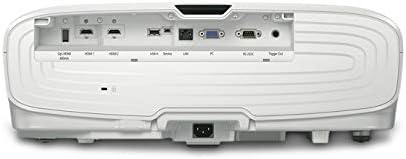
Figure 4: Rear panel of the projector with input/output ports.
The rear panel provides multiple connectivity options for your home theater devices. Ensure all cables are securely connected.
Figure 5: Compatibility and connectivity options for the projector.
This diagram illustrates the wide range of devices compatible with your projector and lists the available ports for connection.
Operating Instructions
Once the projector is set up, follow these steps for daily operation:
Power On/Off: Press the power button on the remote control or the projector's control panel to turn the unit on or off. Allow a few moments for the projector to warm up or cool down.
Source Selection: Use the 'Source' button on the remote or control panel to cycle through available input sources (HDMI 1, HDMI 2, etc.) until your desired device's image appears.
Menu Navigation: Press the 'Menu' button to access the projector's settings. Use the arrow keys to navigate and 'Enter' to select options. Adjust settings such as picture mode, color temperature, and aspect ratio as needed.
Volume Control: Adjust the volume using the dedicated volume buttons on the remote control.
Lens Adjustments: Fine-tune focus and zoom using the rings around the lens. Use the lens shift dials (if applicable) to vertically or horizontally adjust the image position without moving the projector.
Maintenance
Regular maintenance ensures the longevity and optimal performance of your projector:
Cleaning the Lens: Gently wipe the projector lens with a non-abrasive, lint-free cloth specifically designed for optical surfaces. Do not use liquid cleaners directly on the lens.
Cleaning the Air Filter: Periodically clean or replace the air filter to prevent overheating and maintain image quality. Refer to the Quick Setup Guide for filter location and replacement instructions.
Lamp Replacement: The projector lamp has a finite lifespan. When the lamp indicator lights up or the image becomes dim, replace the lamp according to the instructions in the user manual. Always use genuine Epson replacement lamps.
General Cleaning: Wipe the exterior of the projector with a soft, dry cloth. Avoid using harsh chemicals or abrasive materials.
Troubleshooting
If you encounter issues with your projector, try the following common troubleshooting steps:
No Image: Ensure all cables are securely connected and the correct input source is selected. Check if the lens cap is removed.
Dim Image: Verify the lamp mode setting (e.g., Eco mode might reduce brightness). Check the lamp life and replace if necessary. Ensure the air filter is clean.
Blurred Image: Adjust the focus ring on the lens. Ensure the projector is placed at the correct distance from the screen and the screen surface is flat.
Overheating Warning: Ensure the projector's vents are not blocked and there is adequate airflow around the unit. Clean the air filter.
Remote Control Not Working: Check and replace the batteries in the remote control. Ensure there are no obstructions between the remote and the projector's sensor.
For more detailed troubleshooting, refer to the comprehensive user manual or contact Epson customer support.
Specifications
Product Dimensions
17.7 x 20.4 x 7.5 inches
Item Weight
24.7 pounds
Item Model Number
V11H930020
Brand
Epson
Connectivity Technology
HDMI
Display Resolution
4096 x 2160
Manufacturer
Epson
Warranty and Support
Epson offers a 1-Year Limited Warranty with full unit replacement for the Home Cinema 5050UB projector. Additionally, free lifetime technical support is provided. For detailed warranty terms and to access support, please visit the official Epson website or refer to the documentation included with your product.
This video provides a brief tour of the Epson Home Cinema 5050UB projector, showcasing its design and features. It offers a visual overview of the product for potential users.
Ask about setup, troubleshooting, compatibility, parts, safety, or missing instructions. Manuals+ will review the question and use this page’s manual context to help answer it.