
1. Introduction
Thank you for choosing the McGrey PA-350BT Bluetooth Amplifier. This compact amplifier offers versatile audio playback options including Bluetooth, USB/MP3, and line-in, along with a dedicated karaoke function. With 200 watts of power, it is suitable for various applications from home use to small events. This manual provides essential information for safe and effective operation of your device.
2. Safety Instructions
- Power Supply: Ensure the amplifier is connected to a power source matching the specified voltage (AC230V/50Hz).
- Ventilation: Do not block ventilation openings. Ensure adequate airflow around the unit to prevent overheating.
- Moisture: Keep the device away from water, moisture, and high humidity. Do not operate with wet hands.
- Heat Sources: Avoid placing the amplifier near heat sources such as radiators, stoves, or other heat-producing appliances.
- Servicing: Do not attempt to open or service the unit yourself. Refer all servicing to qualified personnel. There are no user-serviceable parts inside.
- Speaker Connection: Always ensure speakers are connected correctly and have a minimum impedance of 4 Ohm. Incorrect impedance can damage the amplifier.
- Cleaning: Disconnect from power before cleaning. Use a dry, soft cloth. Do not use liquid cleaners or aerosols.
3. Setup
3.1 Unpacking
Carefully remove the amplifier from its packaging. Inspect the unit for any signs of damage during transit. Retain the packaging for future transport or storage.
3.2 Front Panel Overview
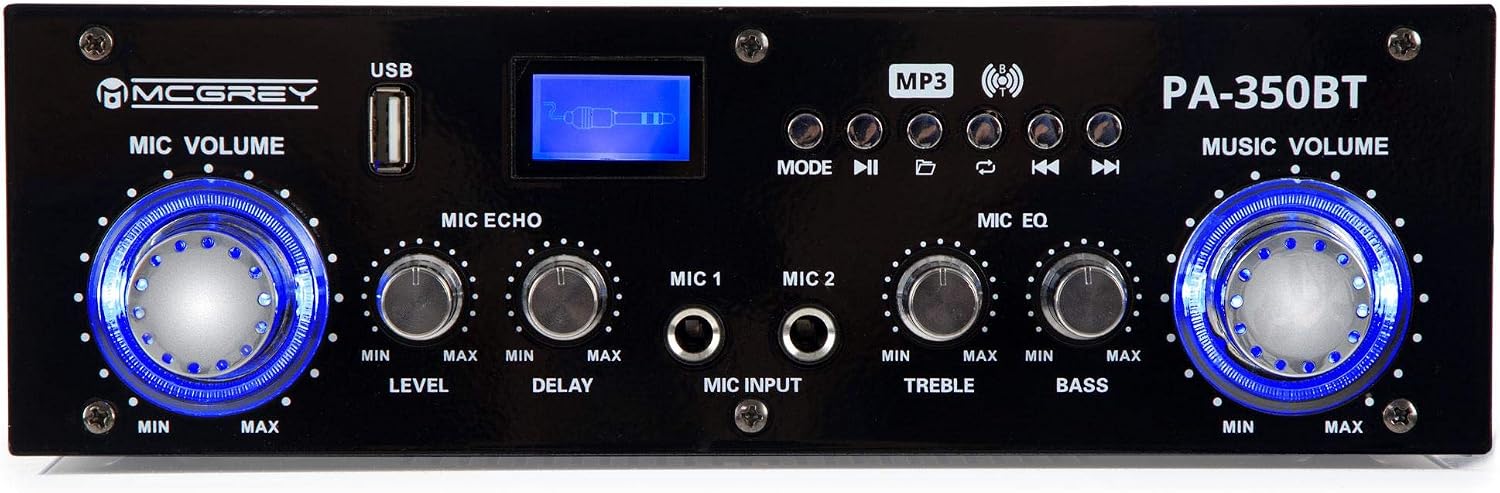
Figure 1: Front Panel Controls
The front panel features controls for microphone volume, echo, equalization (treble/bass), music volume, USB input, and mode selection buttons for media playback.
3.3 Rear Panel Overview

Figure 2: Rear Panel Connections
The rear panel includes the power input, speaker outputs, and RCA audio inputs for external devices.
3.4 Connecting Speakers
Connect your passive speakers to the SPEAKER OUTPUTS on the rear panel. Ensure the polarity is correct (R+ to R+, R- to R-, L+ to L+, L- to L-). The minimum impedance for connected speakers is 4 Ohm. Using speakers with lower impedance can damage the amplifier.
3.5 Connecting Audio Sources
- RCA Input: Use RCA cables to connect external audio devices (e.g., CD player, DVD player) to the AUDIO INPUT (L/R) on the rear panel.
- USB Input: Insert a USB flash drive containing MP3 files into the USB port on the front panel.
- Bluetooth: Activate Bluetooth on your smartphone or tablet and pair with the amplifier (see Section 4.3 for details).
3.6 Connecting Microphones
Connect up to two microphones to the MIC INPUT (MIC 1, MIC 2) 3.5mm jacks on the front panel.
3.7 Power Connection
After all audio and speaker connections are made, connect the power cable to the POWER INPUT on the rear panel and then to a suitable wall outlet. Ensure the power switch is in the OFF position before connecting.
4. Operating Instructions
4.1 Powering On/Off
Flip the POWER ON switch on the rear panel to the 'ON' position to power on the amplifier. The front panel display will illuminate. To power off, flip the switch back to 'OFF'.
4.2 Music Volume Control

Figure 3: Music Volume Control
Adjust the overall music playback volume using the large MUSIC VOLUME knob on the right side of the front panel. Turn clockwise to increase volume, counter-clockwise to decrease.
4.3 Source Selection and Media Playback
Use the MODE button on the front panel to cycle through input sources: Bluetooth, USB, and Line-in (RCA). The display will indicate the active source.
- USB Playback: Insert a USB drive. The amplifier will automatically switch to USB mode and begin playing MP3 files. Use the playback control buttons (Play/Pause, Previous, Next) to manage playback.
- Bluetooth Pairing: Select Bluetooth mode. The display will show 'BT'. On your device (smartphone, tablet), search for 'PA-350BT' in the Bluetooth settings and pair. Once connected, you can stream audio wirelessly.
- Line-in (RCA): Select Line-in mode. Audio from devices connected to the rear RCA inputs will be played.
4.4 Microphone Controls and Karaoke Function
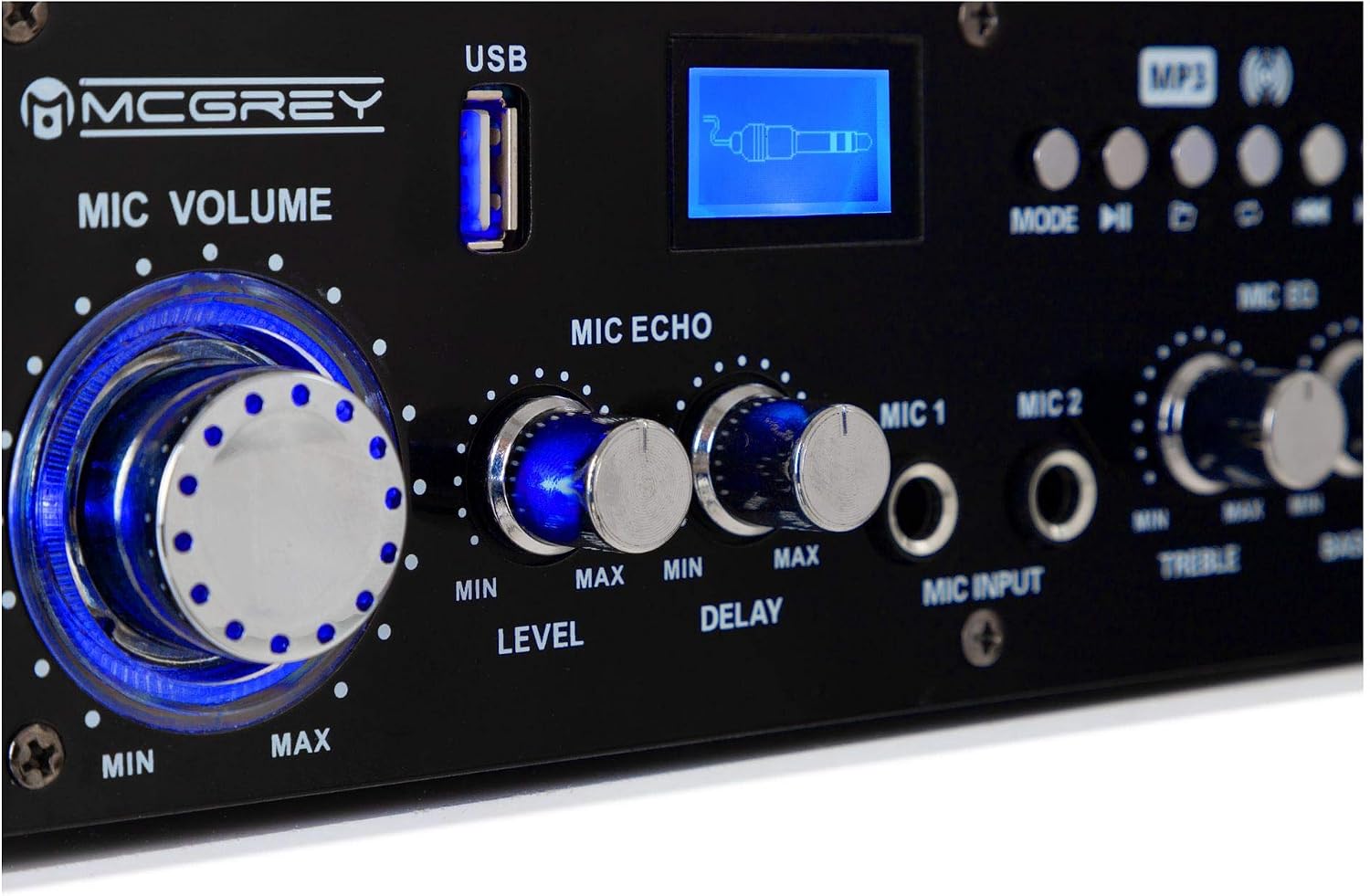
Figure 4: Microphone Controls
- MIC VOLUME: Adjust the overall volume of the connected microphones.
- MIC ECHO: Controls the echo effect applied to the microphone audio.
- LEVEL: Adjusts the input sensitivity for the microphone.
- DELAY: Controls the delay time of the echo effect.
- MIC EQ (TREBLE/BASS): Adjusts the high and low frequencies of the microphone audio for tone shaping.
5. Maintenance
5.1 Cleaning
To clean the amplifier, first disconnect it from the power outlet. Use a soft, dry, lint-free cloth to wipe the exterior surfaces. Do not use abrasive cleaners, solvents, or chemical sprays, as these can damage the finish or internal components.
5.2 Storage
If the amplifier will not be used for an extended period, disconnect it from the power supply and store it in a cool, dry place, away from direct sunlight and extreme temperatures. It is recommended to use the original packaging for storage to protect against dust and physical damage.
6. Troubleshooting
| Problem | Possible Cause | Solution |
|---|---|---|
| No power | Power cable not connected; Power switch off; Blown fuse | Check power cable connection; Turn power switch ON; Replace fuse (T2A) if necessary (refer to qualified technician). |
| No sound output | Speakers not connected; Speaker volume too low; Incorrect input source selected; Audio source issue | Check speaker connections and polarity; Increase MUSIC VOLUME; Select correct input source (Bluetooth, USB, Line-in); Verify audio source is playing. |
| Bluetooth not connecting | Not in Bluetooth mode; Device too far; Already connected to another device | Press MODE to select Bluetooth; Move device closer to amplifier; Disconnect from other devices and try pairing again. |
| USB playback not working | USB drive not inserted correctly; Incompatible file format; Corrupted USB drive | Re-insert USB drive; Ensure files are MP3 format; Try a different USB drive. |
| Microphone not working | Microphone not connected; MIC VOLUME too low; Microphone faulty | Check microphone connection; Increase MIC VOLUME; Test with another microphone. |
7. Specifications
- Brand: McGrey
- Model: PA-350BT
- Connectivity Technology: Bluetooth, USB
- Color: Black
- Compatible Devices: MP3 Player, Laptop, Smartphone
- Mounting Type: Floor Mount
- Power Source: Corded Electric
- Connector Type: RCA, USB
- Number of Channels: 2
- Audio Input: Microphone, Line Level
- Output Wattage: 200 Watts
- Minimum Speaker Impedance: 4 Ohm
- Part Number: 00057030
- Country of Origin: China
- Dimensions (approx.): 24.5 cm (W) x 7.5 cm (H) x 20 cm (D)
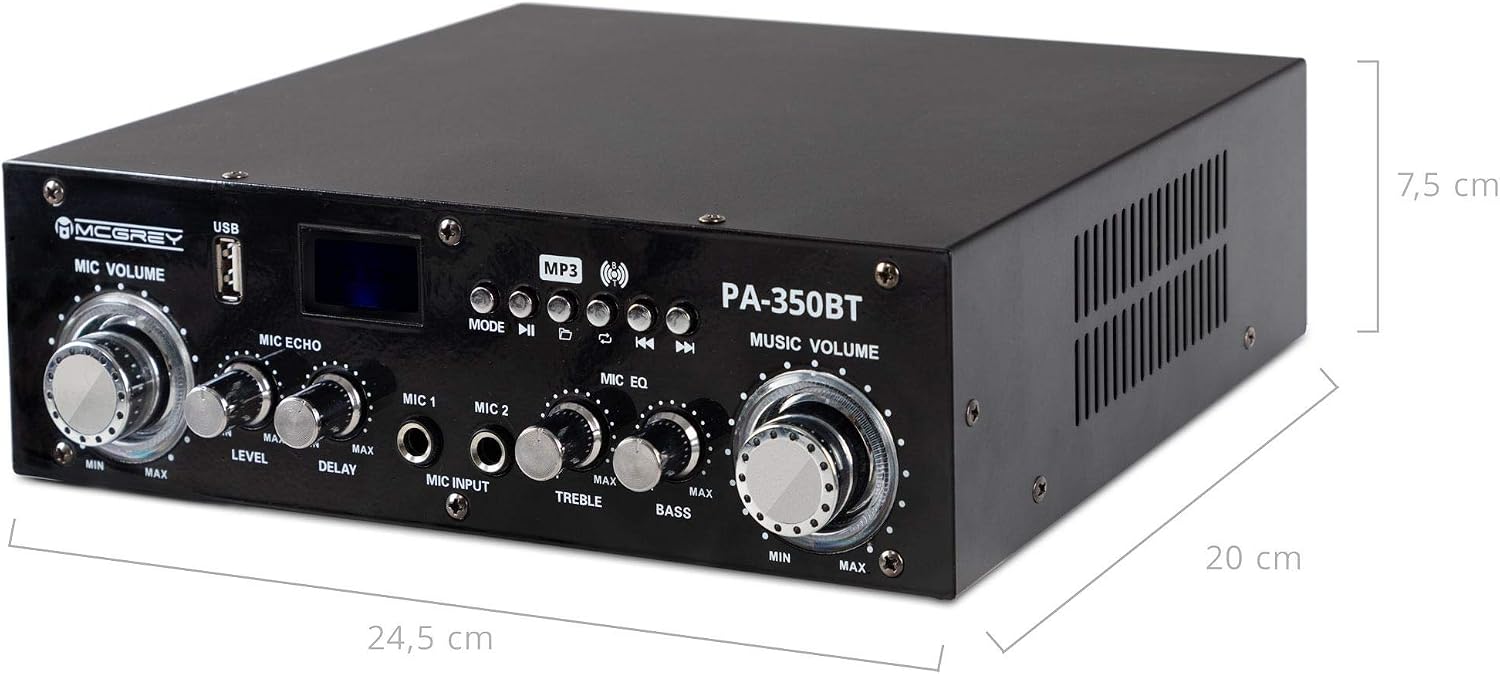
Figure 5: Amplifier Dimensions
8. Warranty and Support
For warranty information and technical support, please refer to the documentation provided at the time of purchase or contact your retailer. McGrey products are known for their robustness and ease of use. For further assistance, you may contact the manufacturer or the seller, Musikhaus Kirstein GmbH.
Manufacturer: McGrey
Seller: Musikhaus Kirstein GmbH


