1. Introduction
Thank you for choosing the Omars Portable Power Bank 10000mAh. This manual provides essential information for the safe and efficient use of your device. Please read it thoroughly before operation and retain it for future reference.
2. Product Overview
2.1 Key Features
- Slimline & Compact Design: Exceptionally thin 10000mAh power bank (1.35cm thin) for portability.
- High Capacity: 10000mAh capacity capable of charging most smartphones and tablets multiple times.
- Multi-Port Output: Features 3 output ports (2x USB-A, 1x USB-C) for simultaneous charging of multiple devices.
- Intelligent Charging Technology: USB-C port with 5V/3A bi-directional charging and USB-A ports with intelligent identification technology (compatible with USB BC 1.2, Apple 1A/2.1A/2.4A, and Android charging protocols).
- Safety Protections: Built-in NTC provides multi-protections including overcharge, undercharge, short-circuit, and over-temperature protection.
- LED Power Indicator: Easily shows battery level and charging status.
2.2 Components
Familiarize yourself with the components of your Omars Portable Power Bank:

Image: Diagram showing the power button, LED indicators, USB-A output ports, USB-C input/output port, and Micro USB input port.
- Power Button: Press to check battery level or initiate charging.
- LED Indicators: Four LED lights indicate the remaining battery capacity and charging status.
- USB-A Output Ports (x2): Standard USB ports for charging devices (5V/2.4A).
- USB-C Input/Output Port: Versatile port for charging the power bank or charging devices (5V/3A).
- Micro USB Input Port: Alternative port for charging the power bank.

Image: Front view of the Omars Portable Power Bank, showcasing its slim design and textured surface.

Image: Illustration demonstrating the slim profile of the Omars Power Bank, showing its dimensions (145mm length, 68.5mm width, 13.5mm thickness) compared to a smartphone.
3. Setup
3.1 Initial Charging of the Power Bank
Before first use, it is recommended to fully charge your Omars Portable Power Bank. This ensures optimal performance and battery longevity.
- Connect the power bank to a USB wall charger (not included) using either a USB-C cable or a Micro USB cable.
- The LED indicators will illuminate and flash, indicating the charging progress.
- When all four LED indicators are solid, the power bank is fully charged. This typically takes less than 5 hours using the USB-C port.
Note: The power bank comes with a partial charge from the factory, but a full charge before first use is advised.
4. Operating Instructions
4.1 Checking Battery Level
Press the power button once to check the remaining battery capacity. The LED indicators will light up:
- 1 LED: 0-25% capacity
- 2 LEDs: 25-50% capacity
- 3 LEDs: 50-75% capacity
- 4 LEDs: 75-100% capacity
4.2 Charging Your Devices
The Omars Portable Power Bank can charge various USB-powered devices, including smartphones, tablets, smartwatches, and Bluetooth earphones.
- Connect your device to one of the power bank's output ports (USB-A or USB-C) using a compatible charging cable.
- The power bank will automatically begin charging your device. If not, press the power button once to initiate charging.
- The LED indicators on the power bank will show its remaining charge while charging your device.
- Disconnect your device once it is fully charged.
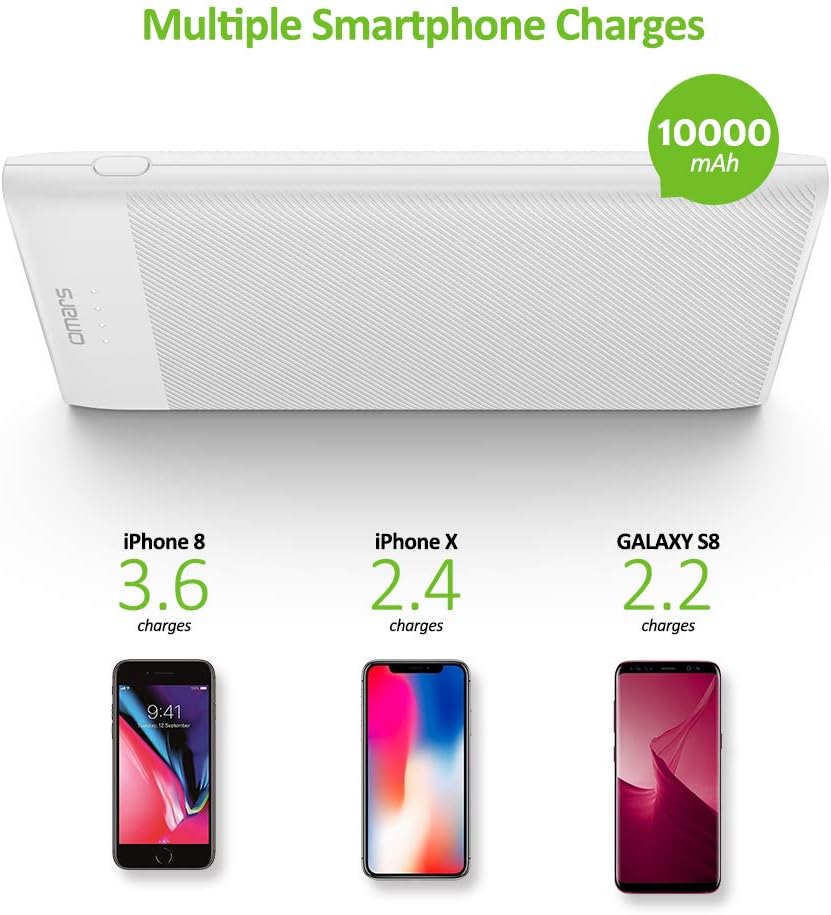
Image: Visual representation of the Omars 10000mAh power bank's charging capacity for different smartphones, showing it can charge an iPhone 8 3.6 times, an iPhone X 2.4 times, and a Galaxy S8 2.2 times.

Image: A person holding the Omars Portable Power Bank alongside a smartphone, illustrating its convenient and ultra-thin size for portability.
5. Maintenance
- Keep the power bank away from extreme temperatures (hot or cold), direct sunlight, and humid environments.
- Do not expose the power bank to water or other liquids.
- Clean the power bank with a soft, dry cloth. Do not use abrasive cleaners or solvents.
- Store the power bank in a cool, dry place when not in use. For long-term storage, charge it to about 50% every three months to preserve battery health.
- Avoid dropping or subjecting the power bank to strong impacts.
6. Troubleshooting
| Problem | Possible Cause | Solution |
|---|---|---|
| Power bank not charging |
|
|
| Device not charging from power bank |
|
|
| LED indicators flashing erratically | Internal error or protection mode activated. | Disconnect all cables, wait a few minutes, then try charging the power bank again. If the issue persists, contact customer service. |
7. Specifications
| Attribute | Value |
|---|---|
| Model Number | PW37Y5B |
| Battery Capacity | 10000 Milliamp Hours (mAh) |
| Input (USB-C) | 5V/3A |
| Input (Micro USB) | 5V/2.4A |
| Output (USB-A x2) | 5V/2.4A (each port) |
| Output (USB-C) | 5V/3A |
| Dimensions | Approx. 145mm x 68.5mm x 13.5mm (7 x 3.7 x 0.9 inches) |
| Weight | 8.8 ounces |
| Battery Type | Lithium Polymer |
| Color | White |

Image: Internal diagram highlighting the safety features of the Omars Power Bank, including overcharge protection, overheat protection, and short-circuit protection.
8. Warranty and Support
8.1 Warranty Information
The Omars Portable Power Bank 10000mAh comes with a 12-month warranty from the date of purchase. This warranty covers manufacturing defects and issues arising from normal use.
Please note: The warranty does not cover damage caused by misuse, accidents, unauthorized modifications, or natural disasters.
8.2 Customer Support
If you have any questions, concerns, or require assistance with your Omars product, please contact our professional and responsive Omars customer service team. Refer to the product packaging or the Omars official website for the most current contact information.
For general inquiries, you may also visit the Omars Store on Amazon.
