
Oraimo OEB-H66D
Contents
Oraimo OEB-H66D Wireless Studio Sound Bluetooth Headset
User Manual
Introduction
Thank you for choosing the Oraimo OEB-H66D Over-ear Wireless Studio Sound Bluetooth Headset. This manual provides essential information for setting up, operating, and maintaining your headphones to ensure an optimal audio experience. Please read this manual thoroughly before use.
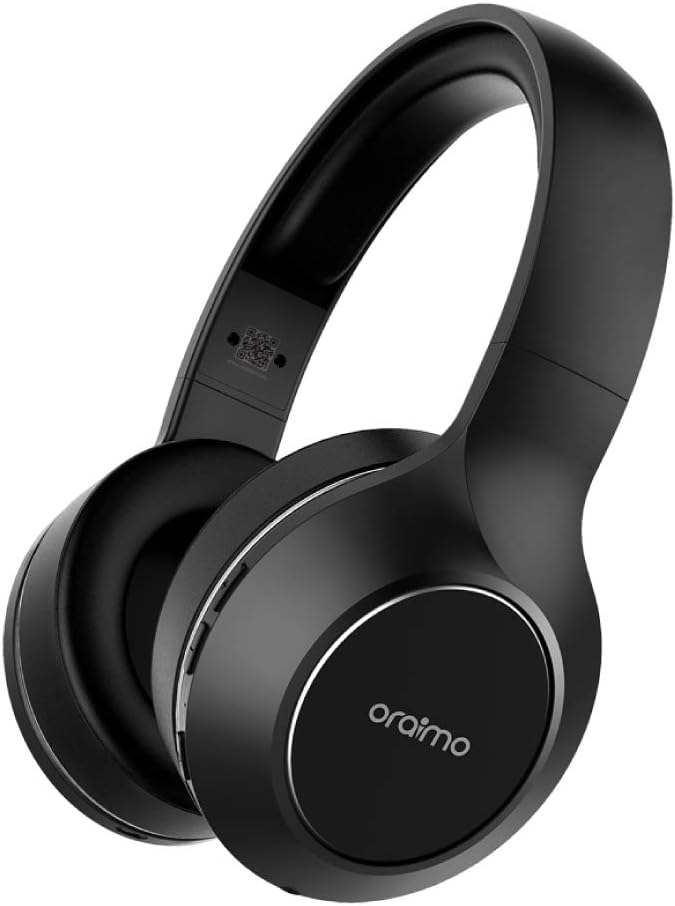
Image: The Oraimo OEB-H66D Over-ear Wireless Headset, showcasing its sleek black design and comfortable earcups.
Safety Information
- Do not expose the headphones to extreme temperatures or humidity.
- Avoid dropping or subjecting the headphones to strong impacts.
- Do not disassemble or modify the headphones. This will void the warranty.
- Clean with a soft, dry cloth. Do not use harsh chemicals.
- Listen at moderate volume levels to prevent hearing damage.
Package Contents
Please check the package for the following items:
- Oraimo OEB-H66D Over-ear Wireless Headset
- USB Charging Cable
- 3.5mm Audio Cable (AUX cable)
- User Manual (this document)
Setup
1. Charging the Headphones
Before first use, fully charge your Oraimo OEB-H66D headphones. Connect the provided USB charging cable to the charging port on the headphones and the other end to a USB power source (e.g., computer USB port, wall adapter). The LED indicator will show charging status and turn off when fully charged.
- Battery Capacity: 500mAh
- Standby Time: Up to 200 hours
- Talk Time: Up to 20 hours
- Music Playing Time: Up to 20 hours
2. Bluetooth Pairing
To connect your headphones to a Bluetooth-enabled device:
- Ensure the headphones are charged and powered off.
- Press and hold the Power button on the headphones until the LED indicator flashes blue and red, indicating pairing mode.
- On your device (smartphone, tablet, computer), enable Bluetooth and search for available devices.
- Select "Oraimo OEB-H66D" from the list of found devices.
- Once connected, the LED indicator will turn solid blue.
Bluetooth Version: V4.2
Talk Range: 10 meters

Image: A person wearing the Oraimo OEB-H66D headphones, emphasizing the wireless freedom and high-definition sound experience.
Operating Instructions
Controls
The ear cup controls provide convenient management of your audio and calls:
- Power On/Off: Press and hold the Power button.
- Play/Pause: Single click the Play/Pause button.
- Answer/End Call: Single click the Play/Pause button during a call.
- Volume Up: Long press the Volume Up button.
- Volume Down: Long press the Volume Down button.
- Next Track: Double click the Volume Down button.
- Previous Track: Double click the Volume Up button.

Image: Detailed view of the ear cup controls on the Oraimo OEB-H66D, showing buttons for volume, track control, and call management.
Audio Experience
The Oraimo OEB-H66D headphones are designed to deliver a rich and immersive audio experience, bringing near studio levels of sound quality to your home. They feature active noise cancellation for an enhanced listening environment.

Image: The Oraimo OEB-H66D headphones set against a backdrop of vibrant sound waves, symbolizing their "Studio Sound" capabilities.
Comfortable Fit
These headphones feature a round-ear design and comfort-cushion ear cups, ensuring a comfortable fit for extended listening sessions. The adjustable headband allows for a personalized and secure fit.

Image: A person comfortably resting on a couch while wearing the Oraimo OEB-H66D headphones, demonstrating the comfortable fit for long listening sessions.
Maintenance
- Cleaning: Use a soft, lint-free cloth to wipe the headphones. Do not use liquid cleaners or sprays directly on the headphones.
- Storage: Store the headphones in a cool, dry place away from direct sunlight and extreme temperatures.
- Battery Care: To prolong battery life, avoid fully discharging the battery frequently. Charge the headphones regularly, even if not in use for extended periods.
Troubleshooting
| Problem | Possible Solution |
|---|---|
| Headphones do not power on. | Ensure the headphones are fully charged. Connect to a power source and check the charging indicator. |
| Cannot pair with device. |
|
| No sound or low volume. |
|
| AUX cable not working. | Ensure the 3.5mm AUX cable is fully inserted into both the headphone jack and the audio source. Try a different AUX cable if available. |
Specifications
| Model Name | OEB-H66D (Over-Ear) |
| Brand | Oraimo |
| Connectivity Technology | Wireless (Bluetooth) |
| Bluetooth Version | V4.2 |
| Talk Range | 10m |
| Battery Capacity | 500mAh |
| Standby Time | 200 hours |
| Talk Time | 20 hours |
| Music Playing Time | 20 hours |
| Headphones Ear Placement | Over Ear |
| Noise Control | Active Noise Cancellation |
| Headphones Jack | 3.5 mm Jack |
| Color | Black |
| Included Components | Ear Cushions, Headband |
| Manufacturer | Oraimo |
| First Available Date | 21 June 2019 |
Warranty and Support
Oraimo products come with a limited warranty. For detailed warranty information, product support, or service inquiries, please refer to the warranty card included with your purchase or visit the official Oraimo website. Keep your proof of purchase for warranty claims.
For further assistance, please contact Oraimo customer support through their official channels.
Documents and downloads
Ask a question about this manual
Ask about setup, troubleshooting, compatibility, parts, safety, or missing instructions. Manuals+ will review the question and use this page’s manual context to help answer it.