Introduction
This manual provides essential information for the safe and efficient operation, installation, and maintenance of your Carrier 1.5 Ton Emperia Neo Plus 3 Star Split Air Conditioner. Please read this manual thoroughly before using the appliance and retain it for future reference.
Important Safety Information
Always follow basic safety precautions to reduce the risk of fire, electric shock, or injury. This includes, but is not limited to:
- Ensure the unit is properly grounded.
- Do not operate the AC with wet hands.
- Keep children away from the unit.
- Do not insert objects into the air outlet.
- Only qualified personnel should perform installation and servicing.
Product Overview
The Carrier Emperia Neo Plus is a 1.5 Ton, 3-star rated split air conditioner designed for efficient cooling. It features an indoor unit, an outdoor unit, and a remote control for convenient operation.
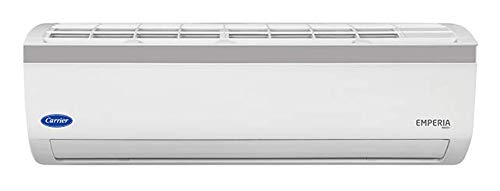
Image: Front view of the Carrier Emperia Neo Plus indoor unit, showing the display panel and air outlet.
Key Components:
- Indoor Unit: Houses the evaporator coil, fan, and control panel.
- Outdoor Unit: Contains the compressor, condenser coil, and fan.
- Remote Control: Used to operate the AC functions such as power, mode, temperature, and fan speed.
Setup and Installation
Installation of this split air conditioner requires professional expertise. Do not attempt to install the unit yourself. Refer to the separate installation manual provided with the product for detailed instructions for qualified technicians.
Pre-Installation Checks:
- Ensure the installation site meets all electrical and structural requirements.
- Verify that the power supply matches the unit's specifications (Voltage: 100 Volts).
- Confirm all included components are present: Indoor and Outdoor Unit, Manual.
Operating Instructions
Your Carrier AC is operated primarily using the provided LCD remote control.
Remote Control Functions:
- Power Button: Turns the unit ON or OFF.
- Mode Button: Cycles through operating modes (Cool, Fan, Dry, Auto).
- Temperature Adjustment: Use ▲ and ▼ buttons to set desired temperature.
- Fan Speed: Adjusts fan speed (Low, Medium, High, Auto).
- Swing Button: Controls the louver movement for air direction.
- Sleep Mode: Optimizes temperature and fan speed for comfortable sleep.
- Power Save Mode: Activates energy-saving operation.
- Auto Restart: If power is interrupted, the unit will automatically restart with previous settings once power is restored.
Initial Operation:
- Insert batteries into the remote control.
- Point the remote control towards the indoor unit.
- Press the Power button to turn on the AC.
- Select your desired mode and temperature.
Maintenance
Regular maintenance ensures optimal performance and longevity of your air conditioner.
Air Filter Cleaning:
- Turn off the AC and disconnect power.
- Open the front panel of the indoor unit.
- Remove the air filters.
- Clean filters with a vacuum cleaner or wash with lukewarm water.
- Allow filters to dry completely before reinserting.
- Close the front panel.
Frequency: Clean air filters every two weeks or more frequently depending on usage and air quality.
Outdoor Unit Cleaning:
Periodically check the outdoor unit for obstructions like leaves or debris. Ensure the area around the outdoor unit is clear for proper airflow. For deep cleaning of coils, contact a qualified service technician.
Troubleshooting
Before contacting service, review the following common issues and solutions:
| Problem | Possible Cause | Solution |
|---|---|---|
| AC does not turn on. | No power, remote control batteries dead, circuit breaker tripped. | Check power supply, replace remote batteries, reset circuit breaker. |
| Insufficient cooling. | Dirty air filters, blocked outdoor unit, wrong mode selected, low refrigerant. | Clean air filters, clear outdoor unit, select Cool mode, contact service for refrigerant check. |
| Unusual noise. | Loose parts, fan obstruction, compressor issue. | Turn off unit and inspect for loose parts or obstructions. If noise persists, contact service. |
If the problem persists after attempting these solutions, please contact authorized Carrier service personnel.
Specifications
Detailed technical specifications for the Carrier Emperia Neo Plus 3 Star Split AC (Model: CAI18EN3R39F0).
| Feature | Specification |
|---|---|
| Brand | Carrier |
| Model | CAI18EN3R39F0 |
| Capacity | 1.5 Tons |
| Energy Efficiency | 3 Star |
| Installation Type | Split System |
| Special Features | Auto Restart, Power Save Mode, LCD Remote |
| Colour | White |
| Voltage | 100 Volts |
| Wattage | 1058.16 |
| Item Weight | 38 kg |
| Item Dimensions (LxWxH) | 20.5 x 94 x 27.5 Centimeters |
| Included Components | Indoor and Outdoor Unit; Manual |
Warranty and Support
For warranty information, please refer to the warranty card included with your product or visit the official Carrier website. Keep your purchase receipt as proof of purchase for warranty claims.
Customer Support:
For technical assistance, service requests, or spare parts, please contact Carrier customer support. Contact details can typically be found on the official Carrier website or in the documentation provided with your AC unit.


