
1. Introduction
The V-Guard Smart Pro 1200s is an advanced IoT-enabled pure sine wave solar inverter designed to provide reliable power backup for homes and offices. This inverter features smart mobile app control, an LED display for status monitoring, and solar compatibility for energy efficiency. This manual provides essential information for the safe installation, operation, maintenance, and troubleshooting of your V-Guard Smart Pro 1200s Solar Inverter.

Figure 1: Front view of the V-Guard Smart Pro 1200s Solar Inverter. This compact unit features a sleek white and black design, suitable for various home environments.
2. Key Features
- IoT Sinewave Solar Inverter: 1000VA/12V capacity, supporting a single 12V battery with a maximum peak load of 780 Watts.
- Smart IoT with Mobile App Control: Wi-Fi and Bluetooth connectivity enable switching modes, controlling performance, and monitoring operations remotely.
- Pure Sine Wave Output: Provides stable and clean power, ideal for sensitive electronic equipment.
- Solar Compatibility: Designed to integrate with solar panels for eco-friendly and cost-effective power generation. (Note: Solar panels must be purchased and installed separately.)
- Graphical LED Display Panel: Offers instant alerts and status indications for UPS Mode, Mains On, Charge, Backup, Low Battery, Overload, and Solar.
- Battery Water Topping Reminder: Helps prevent last-minute issues by reminding users to top up distilled water.
- Turbo Charging: Increases charging speed by up to 30% for faster battery replenishment.
- Holiday Mode: A power-saving feature to maintain battery health during extended periods of inactivity.
- Wide Appliance Support: Capable of running various household appliances including refrigerators, TVs, fans, and lighting.
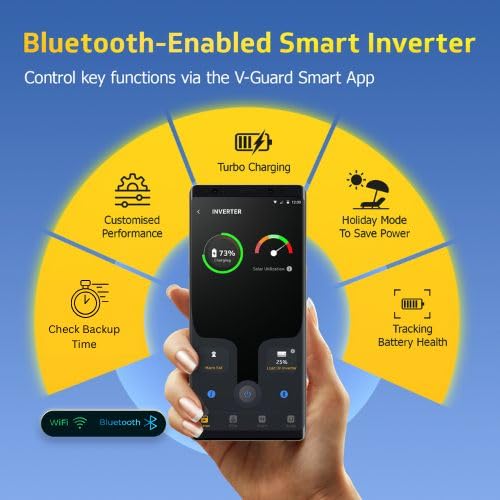
Figure 2: The V-Guard Smart App interface on a smartphone, demonstrating control over features like Turbo Charging, Customised Performance, Holiday Mode, Check Backup Time, and Battery Health Tracking via Wi-Fi and Bluetooth connectivity.

Figure 3: The inverter's front panel, featuring a graphical LED display with audio indicators for instant alerts. It shows status for UPS Mode, Mains On, Charging, Backup, Low Battery, Overload, and Solar operation. An On/Off button is also present for easy control.
3. Installation
3.1 Safety Precautions
- Ensure the inverter is placed in a well-ventilated area, away from direct sunlight, moisture, and flammable materials.
- Do not operate the inverter with damaged cables or if the casing is compromised.
- Always disconnect the mains power before performing any connections or maintenance.
- Observe correct polarity when connecting the battery.
3.2 Connection Steps
Refer to the rear panel diagram (Figure 4) for connection points.
- Battery Connection: Connect the positive (+) terminal of the battery to the red terminal of the inverter and the negative (-) terminal of the battery to the black terminal of the inverter. Ensure connections are tight and secure.
- Mains Input: Connect the AC mains supply cable to the 'MAINS INPUT' port on the rear panel.
- Load Output: Connect your appliances to the 'UPS OUTPUT' socket.
- Solar Panel Connection (Optional): If using solar panels, connect them to the designated solar input terminals as per the solar panel manual and local electrical codes.
- Initial Power On: After all connections are secure, switch on the mains power. Then, press the On/Off button on the inverter's front panel to power it on.

Figure 4: The back panel of the inverter, detailing the Mains Circuit Breaker (RCB), AC Input, UPS Output socket, 12V Battery terminals (+ and -), and switches for High Performance Mode and Dual Charging. A QR code for product information is also present. For more details, visit vguard.in/product-details/4565422334708274.
4. Operating Instructions
4.1 Powering On/Off
- To Power On: Press the On/Off button on the front panel. The LED indicators will illuminate, and the inverter will begin operation.
- To Power Off: Press and hold the On/Off button until the inverter shuts down.
4.2 LED Display Indicators
The graphical LED display provides real-time status updates:
- UPS Mode: Indicates the inverter is providing power from the battery.
- Mains On: Indicates the inverter is receiving power from the utility grid.
- Charge: Indicates the battery is currently being charged.
- Backup: Indicates the remaining battery backup time.
- Low Battery: Alerts when the battery charge is critically low.
- Overload: Indicates that connected appliances exceed the inverter's capacity.
- Solar: Indicates active solar power generation or charging.
4.3 Mobile App Control (V-Guard Smart App)
The V-Guard Smart App allows remote monitoring and control of your inverter via Wi-Fi and Bluetooth.
- Download App: Download the 'V-Guard Smart' app from your smartphone's app store.
- Pairing: Follow the in-app instructions to pair your inverter using Bluetooth or Wi-Fi. Ensure Bluetooth and Location services are enabled on your phone during pairing.
- Features: Through the app, you can:
- Monitor battery status and backup time.
- Activate Turbo Charging for faster battery charging.
- Enable Holiday Mode to conserve power.
- Receive battery water topping reminders.
- Track power cut duration and frequency.
- Monitor solar savings and plan according to weather forecasts (for solar-enabled units).
5. Maintenance
- Battery Water Level: For lead-acid batteries, regularly check and top up distilled water as indicated by the battery water level indicators or the app reminder.
- Cleaning: Keep the inverter and its vents clean and free from dust to ensure proper airflow and prevent overheating. Use a dry cloth for cleaning.
- Ventilation: Ensure the inverter is placed in a well-ventilated area to dissipate heat effectively.
- Connections: Periodically check all cable connections for tightness and signs of corrosion.
6. Troubleshooting
This section addresses common issues you might encounter. For problems not listed here, please contact customer support.
| Problem | Possible Cause | Solution |
|---|---|---|
| Inverter not turning on | Loose battery connection, discharged battery, no mains input. | Check battery connections, ensure battery is charged, verify mains power supply. |
| Overload alarm | Too many appliances connected. | Reduce the number of connected appliances. Press the Mains Circuit Breaker (RCB) if tripped. |
| Low battery alarm | Battery needs charging. | Allow the battery to charge from mains or solar. |
| No power output | Inverter off, battery discharged, output breaker tripped. | Turn on inverter, charge battery, check output breaker. |
7. Technical Specifications
| Specification | Value |
|---|---|
| Inverter Type | IoT Sinewave Solar Inverter |
| Capacity | 1000VA / 12V |
| Maximum Peak Load | 780 Watts |
| Voltage | 12 Volts |
| Frequency | 50 Hz |
| Battery Support | Single 12V battery (Tall Tubular Plate, SMF, FP) |
| Max Battery Capacity | 230 Amp Hours |
| Inverter Dimensions (LxDxH) | 27.5 x 25 x 11.5 cm |
| Item Weight | 9.5 kg |
| Material | High grade ABS with CRCA Cabinet |
| Connectivity | Wi-Fi, Bluetooth |
| Country of Origin | India |
8. Warranty and Support
8.1 Warranty Information
The V-Guard Smart Pro 1200s Solar Inverter comes with a 3-year warranty on the inverter unit. Please retain your purchase receipt for warranty claims. All inverter units purchased on or after April 1, 2025, shall be covered under this warranty period.
8.2 Free Installation and Demo
V-Guard provides free installation and a complete product demo by company-trained technicians. To avail this service, please contact V-Guard customer care:
- Call Center: 1800 103 1300 (Toll Free) or 1860 180 3000 (Toll)
- Website: www.vguard.in
- E-mail: customercare@vguard.in
8.3 Manufacturer Contact
In case of consumer complaints, contact the Senior Engineer - Customer Service at V-Guard Industries Ltd. 42/962, Vennala High School Road, Vennala, Kochi- 682028, Kerala, India.
Video 1: Official product overview showcasing the V-Guard Smart Pro 1200s Solar Inverter's features, including Wi-Fi and Bluetooth connectivity, solar compatibility, pure sine wave output, and free installation offer.