
1. Product Overview
The YETOR DC 12V-72V/40A Remote Control Switch is designed for wireless control of various electrical appliances. It features robust RF technology, allowing signals to pass through walls, floors, and doors, providing stable control within a maximum range of 328 feet without obstacles. Equipped with a 40A relay, this receiver can handle high-power electrical loads, ensuring long-term stability and reliable operation.
This system includes two remote controls for flexible use and incorporates a high-security learning code mechanism. If a remote control is lost, the old code can be deleted and a new one learned, maintaining control over your devices.
It is suitable for a wide range of applications operating within 12V-72V, including industrial control, security systems, lighting, motors, water pumps, and wireless door alarms.

Image: YETOR DC 12V-72V/40A Remote Control Switch receiver and two remote controls.

Image: YETOR wireless remote switch system demonstrating strong signal, responsiveness, and stable performance.
2. Setup and Installation
2.1 Wiring Instructions
The remote control switch is designed for straightforward wiring. Connect the DC power source to the 'DC Input' terminals and your appliance to the 'DC Output' terminals. Ensure correct polarity (+ and -) for both input and output connections.
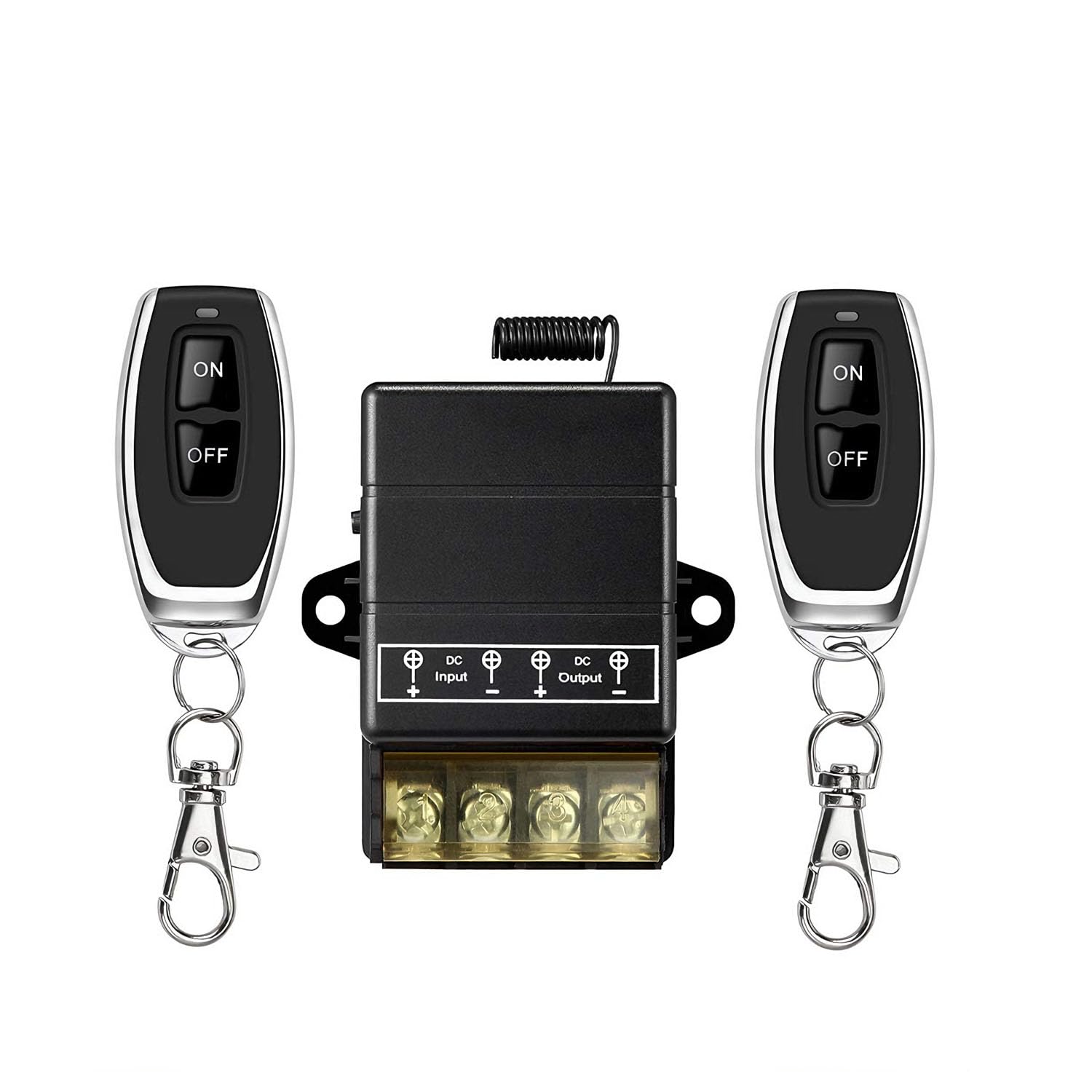
Image: Wiring diagram for the YETOR DC 12V-72V/40A Remote Control Switch.
2.2 Learning and Relearning Remote Codes
The device supports learning and relearning remote control codes for enhanced security and flexibility. Refer to the specific instructions provided with your product for the exact procedure to pair new remotes or delete existing codes. This feature allows you to maintain control even if a remote is lost, by deleting its code and pairing a new one.
3. Operating Instructions
Once properly installed and paired, operate the switch using the provided remote controls. Each remote typically features 'ON' and 'OFF' buttons to control the connected appliance.
- Press the ON button to activate the connected device.
- Press the OFF button to deactivate the connected device.
The remote control offers a working distance of up to 328 feet (100 meters) in open areas, allowing for convenient operation from a distance.

Image: Remote control operating range up to 328 feet.

Image: Remote operation diagram.
4. Maintenance
4.1 Remote Control Battery Replacement
If the remote control's red indicator light does not illuminate when a button is pressed, it indicates that the battery needs replacement. The remote control uses a CR2016 3V battery.
- Carefully open the remote control casing.
- Remove the old CR2016 3V battery.
- Insert a new CR2016 3V battery, ensuring correct polarity.
- Close the remote control casing securely.

Image: Two YETOR remote controls.
5. Troubleshooting
- Remote control not working: Check the remote control battery (CR2016 3V). If the red indicator light does not turn on when a button is pressed, replace the battery.
- Switch makes a 'TI TA' sound: This sound is normal during operation and indicates the relay is engaging or disengaging. It does not signify a malfunction.
- Reduced remote range or intermittent operation: Ensure there are no significant obstacles between the remote and the receiver. Large metal objects, thick walls, or other RF interference sources can reduce the effective range. Verify that the receiver's antenna is unobstructed.
- Device not responding after wiring: Double-check all wiring connections for correct polarity and secure terminals. Ensure the power supply to the receiver is within the specified 12V-72V range. Confirm that the remote control is properly paired with the receiver.
6. Specifications
| Feature | Specification |
|---|---|
| Model | MZWX-F1-1 |
| Brand | YETOR |
| Operating Voltage | DC 12V-72V |
| Current Rating | 40A |
| Wattage | 360 watts |
| Remote Control Range | Up to 328 feet (100 meters) without obstacles |
| Connectivity Protocol | RF |
| Switch Type | Kill Switch |
| Terminal Type | Screw |
| Material | Metal (Silver contact material) |
| Item Dimensions (L x W x H) | 2.5 x 1.5 x 0.78 inches |
| International Protection Rating | IP54 |
| Remote Battery Type | CR2016 3V |

Image: Dimensions of the YETOR DC 12V-72V/40A Remote Control Switch receiver.
7. Warranty Information
Specific warranty details for the YETOR DC 12V-72V/40A Remote Control Switch are not provided in the available product information. Please refer to the seller or manufacturer's official website for any applicable warranty terms and conditions.
8. Support and Contact
For technical assistance, troubleshooting beyond this manual, or product inquiries, please contact YETOR customer support through the retailer's platform or the official YETOR website. Specific contact information is not provided in this document.