
1. Product Overview
The Cisco SG220-26P PoE+ Smart Switch is designed to provide secure and energy-saving switching capacity for small to mid-size corporate networks. This smart switch features 24 Gigabit PoE+ RJ45 ports and two Gigabit combo RJ45/SFP uplink ports, offering a total switching capacity of 52 Gb/s and a forwarding capacity of 38.69 Mpps. Equipped with 128MB of processor RAM, it includes robust security features such as 802.11x authentication, guest VLANs, access control lists, and denial of service protection. Support for Energy-Efficient Ethernet helps to conserve power during periods of low network activity, reducing operational costs.
Key features include:
- Power over Ethernet (PoE+): Connects and powers network endpoints like wireless access points, IP phones, and IP video cameras directly through the Ethernet cable.
- IPv6 Support: Ensures compatibility with the latest network protocols.
- Energy Efficient: Incorporates technology to save power and reduce costs.
- Quality of Service (QoS): Basic QoS features to improve network performance for critical applications.
- Security: Advanced security features to protect against unauthorized access and network threats.
- Easy-to-Use Management: Includes a web-based management interface for quick and easy setup and configuration.
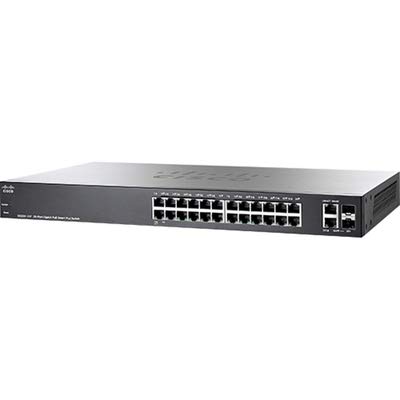
Front view of the Cisco SG220-26P PoE+ Smart Switch, showing the 26 Gigabit Ethernet ports.
2. Setup Instructions
2.1 Unpacking and Inspection
Carefully unpack the switch and inspect its contents. Ensure all components are present and undamaged. If any items are missing or damaged, contact your vendor immediately.
2.2 Physical Installation
- Mounting: The SG220-26P switch can be placed on a desktop or mounted in a standard 19-inch equipment rack. Ensure adequate ventilation around the device.
- Power Connection: Connect the provided power cord to the switch's power input and then to a grounded electrical outlet.
- Network Connections: Connect your network devices (computers, servers, access points, IP cameras, IP phones) to the RJ45 Ethernet ports using standard Ethernet cables. For uplink connections to other switches or routers, use the Gigabit combo RJ45/SFP ports.
2.3 Initial Configuration
The switch can be configured via its web-based management interface. To access it:
- Ensure your computer is connected to one of the switch's Ethernet ports.
- Configure your computer's IP address to be in the same subnet as the switch's default IP address (refer to the Quick Start Guide for default IP).
- Open a web browser and enter the switch's default IP address.
- Log in using the default credentials (username and password, typically 'cisco'/'cisco' or 'admin'/'admin').
- Follow the on-screen wizard for initial setup, including changing default credentials and configuring basic network settings.
3. Operating Instructions
Once configured, the Cisco SG220-26P switch operates automatically to forward data traffic between connected devices. The Power over Ethernet (PoE+) ports will automatically detect and power compatible devices, simplifying deployment of IP phones, wireless access points, and IP cameras.
3.1 Monitoring Switch Status
The front panel LEDs provide visual indications of the switch's status:
- System LED: Indicates overall system health.
- Link/Act LEDs (per port): Indicates network link status and activity.
- PoE LEDs (per port): Indicates PoE power status.
For detailed monitoring and advanced configuration, access the web-based management interface. Here you can:
- View port status and statistics.
- Configure VLANs for network segmentation.
- Set up Quality of Service (QoS) policies to prioritize traffic.
- Manage security features like Access Control Lists (ACLs) and 802.1X authentication.
- Perform firmware upgrades.
4. Maintenance
Regular maintenance ensures optimal performance and longevity of your Cisco SG220-26P switch.
4.1 Firmware Updates
Periodically check the Cisco website for firmware updates. Firmware updates often include performance enhancements, bug fixes, and new features. Always follow the provided instructions for firmware upgrade procedures to avoid damaging the device.
4.2 Physical Cleaning
Keep the switch clean and free from dust. Use a soft, dry cloth to wipe the exterior. Ensure ventilation openings are not obstructed. Do not use liquid or aerosol cleaners directly on the switch.
4.3 Environmental Considerations
Operate the switch within its specified environmental conditions (temperature, humidity) to prevent overheating and ensure reliable operation. Avoid exposing the switch to direct sunlight, excessive heat, or moisture.
5. Troubleshooting
This section provides solutions to common issues you might encounter with your switch.
5.1 No Power
- Check Power Cord: Ensure the power cord is securely connected to both the switch and the electrical outlet.
- Verify Outlet: Test the electrical outlet with another device to confirm it is functioning.
- System LED: Check if the System LED on the front panel is illuminated. If not, contact support.
5.2 No Network Connectivity
- Cable Connections: Ensure Ethernet cables are securely connected to both the switch port and the connected device.
- Link/Act LED: Verify that the Link/Act LED for the connected port is illuminated and blinking, indicating a valid link and activity.
- Device Configuration: Check the network settings (IP address, subnet mask, gateway) of the connected device.
- Switch Configuration: Access the web-based management interface to check port status, VLAN assignments, and other network settings.
5.3 PoE Device Not Receiving Power
- PoE LED: Check the PoE LED for the specific port. If it's not illuminated, the device might not be receiving power.
- Device Compatibility: Ensure the connected device is PoE or PoE+ compatible.
- Cable Quality: Use a high-quality Ethernet cable (Cat5e or higher) for PoE connections.
- Power Budget: Verify that the switch's total PoE power budget has not been exceeded. This can be checked in the web-based management interface.
6. Specifications
| Feature | Specification |
|---|---|
| Model Number | SG220-26P-K9-NA |
| Brand | CISCO DESIGNED |
| Number of Ports | 26 (24 x Gigabit PoE+ RJ45, 2 x Gigabit combo RJ45/SFP uplink) |
| Interface Type | RJ45 |
| Data Transfer Rate | 52 Gigabits Per Second (Switching Capacity) |
| Item Weight | 10.78 pounds |
| Package Dimensions | 21.5 x 15.5 x 4.5 inches |
| Manufacturer | CISCO SYSTEMS - ENTERPRISE |
| UPC | 635492897571 |
| Compatible Devices | Camera, Desktop, Gaming Console, Laptop, Printer, Smartphone, Tablet |
| Case Material | Plastic |
7. Warranty Information
The Cisco SG220-26P PoE+ Smart Switch comes with a Limited Lifetime Warranty. This warranty covers defects in materials and workmanship under normal use and service. For specific terms and conditions, please refer to the official Cisco warranty documentation included with your product or available on the Cisco website.
8. Support and Additional Resources
For further information, technical support, and additional resources regarding the Cisco 200 Series Smart Switches and small business solutions, please visit the official Cisco website:
www.cisco.com/go/smallbusiness
Product Overview Video
An overview video demonstrating the features and capabilities of the Cisco 200 Series Smart Switches, including Power over Ethernet (PoE), IPv6 support, energy efficiency, quality of service, security, and web-based management.


