1. Introduction
This manual provides essential instructions for the safe and efficient operation of your Petoneer Nutri Smart Pet Feeder FDW010. Please read this manual thoroughly before using the device and retain it for future reference.
2. Safety Information
- Ensure the feeder is placed on a stable, level surface.
- Do not immerse the main unit in water or other liquids.
- Use only the provided power adapter.
- Keep out of reach of children and pets to prevent tampering.
- This device is designed for dry pet food only. Do not use with wet food, canned food, or treats.
- Regularly inspect the power cord for damage.
3. Package Contents
Verify that all items are present in the package:
- Petoneer Nutri Smart Pet Feeder Main Unit
- Food Bowl
- Power Adapter (USB cable and wall adapter)
- User Manual (this document)
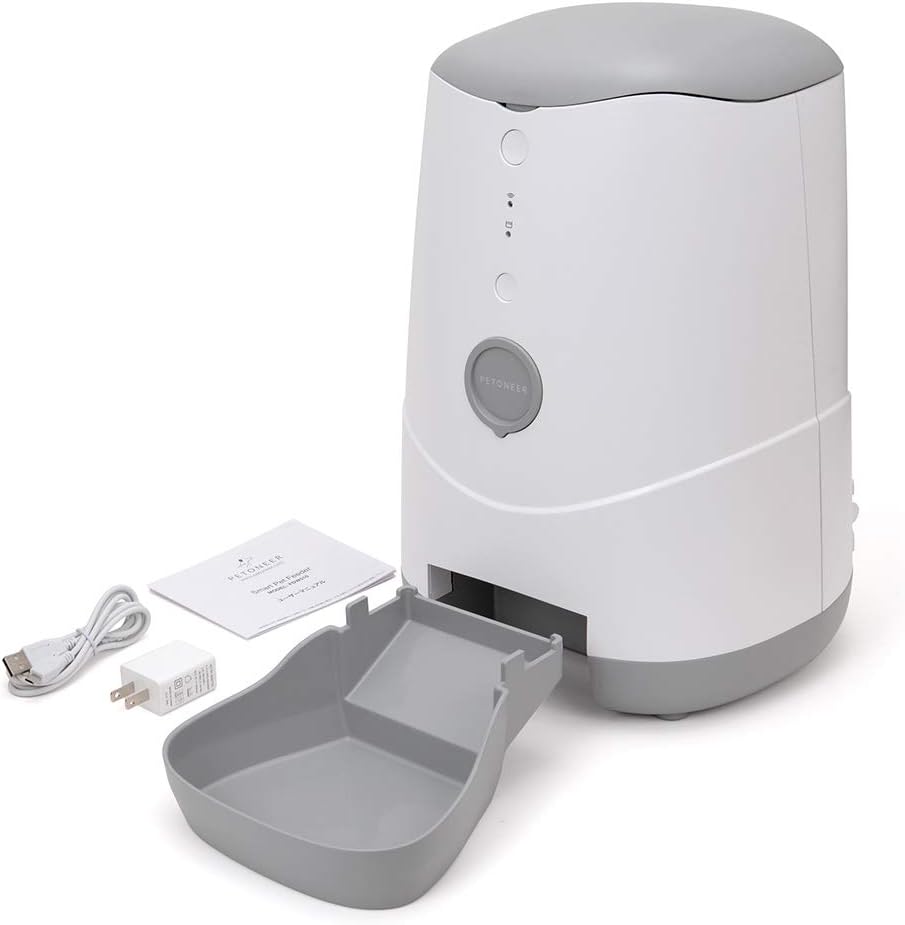
Image: Petoneer Nutri Smart Pet Feeder with its food bowl, power adapter, and user manual laid out.
4. Product Overview
Familiarize yourself with the components of your Petoneer Nutri Smart Pet Feeder.

Image: Front view of the Petoneer Nutri Smart Pet Feeder, showing the main unit, food hopper, and dispensing bowl filled with pet food.

Image: Rear view of the Petoneer Nutri Smart Pet Feeder, displaying the power input and product label.
Key Components:
- Food Hopper: Stores dry pet food (3.7L capacity).
- Lid: Secures the food hopper.
- Control Panel: Includes manual feed button and indicator lights.
- Food Dispenser: Mechanism for releasing food into the bowl.
- Food Bowl: Detachable tray for pet food.
- Power Port: For connecting the power adapter.
5. Setup Instructions
- Unpack: Carefully remove all components from the packaging.
- Assemble Bowl: Attach the food bowl to the main unit. Ensure it clicks securely into place.

Image: Front view of the Petoneer Nutri Smart Pet Feeder with an empty food bowl, ready for assembly or filling.
- Fill Hopper: Open the lid and pour dry pet food into the hopper. Close the lid securely.
- Connect Power: Plug the power adapter into the feeder's power port and then into a wall outlet.
- App Installation (Optional but Recommended): Download the "Petoneer" app from your smartphone's app store. Follow the in-app instructions to connect the feeder to your home Wi-Fi network (supports 2.4GHz Wi-Fi only). This enables remote control and scheduling.
6. Operating Instructions
6.1 Manual Feeding
Press the manual feed button on the control panel to dispense a single portion of food. Repeat as needed.
6.2 Scheduled Feeding (via App)
- Open the Petoneer app on your smartphone.
- Select your Nutri Smart Pet Feeder.
- Navigate to the "Schedule" or "Feeding Plan" section.
- Set desired feeding times and portion sizes.
- Save your settings. The feeder will automatically dispense food according to your schedule.
6.3 Voice Control (Alexa Compatible)
If connected to Amazon Alexa, you can use voice commands to dispense food. Ensure your Petoneer account is linked to your Alexa app. Example commands:
- "Alexa, feed my pet with [Feeder Name]."
- "Alexa, dispense one portion from [Feeder Name]."
7. Maintenance
7.1 Cleaning
- Food Bowl: The food bowl is detachable and can be washed with mild soap and water. Rinse thoroughly and dry completely before reattaching.
- Food Hopper: Wipe the inside of the food hopper with a dry or slightly damp cloth. Ensure no moisture remains before refilling with food.
- Main Unit: Wipe the exterior of the main unit with a soft, dry cloth. Do not use abrasive cleaners or immerse in water.
7.2 Food Storage
For optimal pet health, regularly check the food level and refill with fresh dry food. Do not leave old food in the hopper for extended periods.
8. Troubleshooting
| Problem | Possible Cause | Solution |
|---|---|---|
| Feeder not dispensing food. | Food hopper is empty; food jammed; power issue. | Refill hopper; clear any food blockages; check power connection. |
| App cannot connect to feeder. | Incorrect Wi-Fi password; feeder out of Wi-Fi range; 5GHz Wi-Fi network. | Verify Wi-Fi password; move feeder closer to router; ensure 2.4GHz Wi-Fi is used. |
| Indicator lights not working. | No power. | Check power adapter and wall outlet. |
9. Specifications
- Model: FDW010
- Dimensions (W x D x H): 24.6 x 23 x 35.2 cm
- Weight: 2 kg
- Capacity: 3.7 Liters
- Power: 2W
- Connectivity: Wi-Fi (2.4GHz only)
- Compatibility: Cats, Small Dogs, Amazon Alexa
- Origin: China
10. Warranty and Support
For warranty information and technical support, please refer to the official Petoneer website or contact your local distributor. Keep your purchase receipt as proof of purchase.
Note: This product is a Japanese genuine product with PSE and technical certification.


