
Introduction
Thank you for purchasing the DEVAISE Compact TV Stand, Model ADSG607HF. This manual provides essential information for the safe and efficient assembly, operation, and maintenance of your new TV stand. Please read these instructions carefully before assembly and retain them for future reference.
Safety Information
- Ensure all parts are present and undamaged before assembly. Do not use if any parts are missing or broken.
- Assemble the unit on a soft, clean surface to prevent scratches.
- Do not overtighten screws during assembly to avoid damaging the material.
- Place the TV stand on a level and stable surface to prevent tipping.
- Do not exceed the maximum weight capacity of 25 kg for the top panel.
- Keep small parts away from children during assembly.
Package Contents
Verify that all components listed below are included in your package. If any parts are missing or damaged, please contact customer support.
- Top Panel
- Side Panels (x2)
- Bottom Panel
- Adjustable Shelf
- Casters (x5, 2 with lock)
- Assembly Hardware (screws, dowels, etc.)
- Assembly Tool (screwdriver)
Setup and Assembly Instructions
Assembly is required for this TV stand. It is recommended to have two people for easier and safer assembly. An impact driver can speed up the process, but be careful not to overtighten.
Step 1: Prepare the Components
Unpack all components and lay them out on a soft, clean surface. Identify each part according to the included diagram (if any).
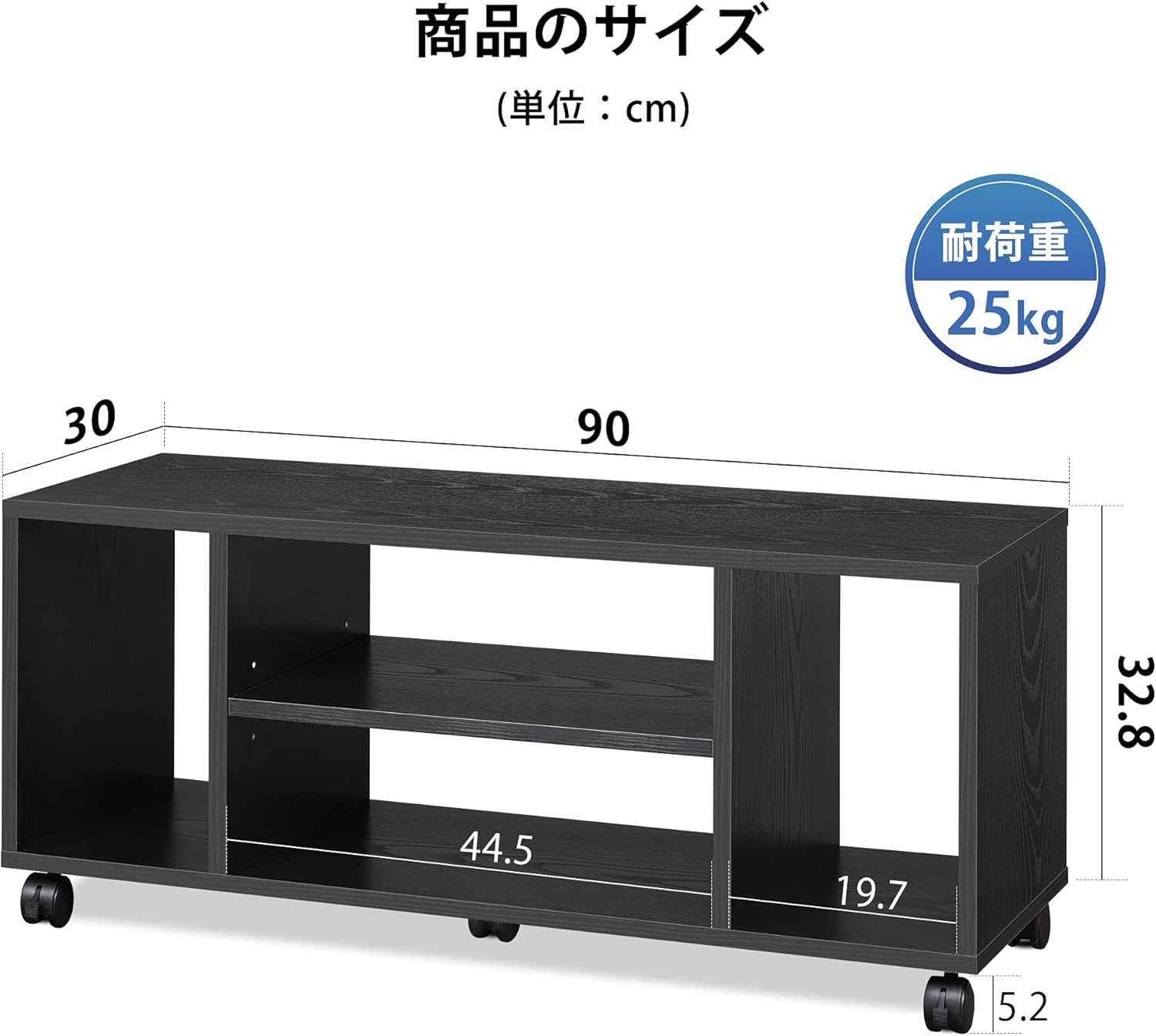
Image: Overview of the TV stand components and their dimensions (90cm width, 30cm depth, 38cm height).
Step 2: Attach Casters (Optional)
If you wish to use the casters for mobility, attach the five casters to the bottom panel. Ensure the two lockable casters are installed on the front side. If you prefer a stationary unit, you may omit this step.

Image: The TV stand equipped with five casters, demonstrating easy movement for cleaning. Two front casters have a lock function.
Step 3: Assemble the Frame
Connect the side panels to the bottom panel using the provided hardware. Then, attach the top panel to complete the main frame. Follow the numerical sequence in the assembly diagram for best results.
Step 4: Install Adjustable Shelf
Insert the adjustable shelf into the central compartment. The shelf can be set at three different height levels to accommodate various media devices.

Image: The TV stand's open storage design, highlighting the side compartments and the central adjustable shelf with three height options.
Operating Instructions
Placing Your Television
Carefully place your television on the top panel of the stand. Ensure the TV's base is fully supported and centered. The stand is designed to stably hold TVs up to 40 inches with a maximum weight of 25 kg.
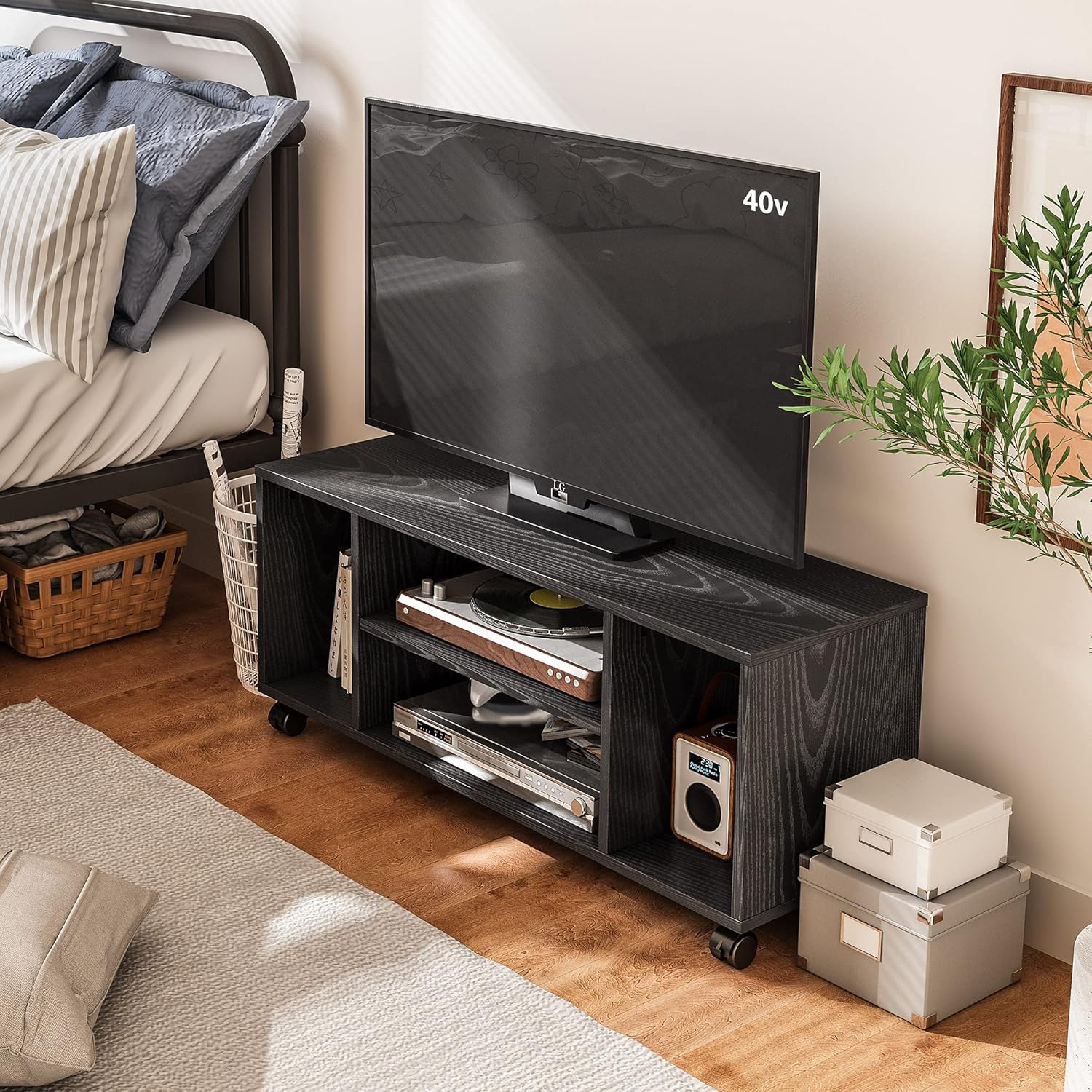
Image: The DEVAISE TV stand with a 40-inch television, demonstrating its use in a room setting.
Utilizing Storage
The four open compartments provide ample space for media devices, game consoles (e.g., PS5), magazines, or decorative items. The central shelf's adjustable height allows for flexible storage configurations.
Cable Management and Ventilation
The open-back design of the stand facilitates easy cable routing and promotes air circulation, preventing electronic devices from overheating.

Image: Detail of the open-back design, illustrating how cables can be easily passed through and how heat can dissipate.
Moving the Stand
If casters are installed, unlock the front two casters before moving the stand. When the stand is in its desired position, lock the front casters to secure it in place.
Maintenance
- Cleaning: Wipe the surface with a soft, damp cloth. Avoid using harsh chemicals or abrasive cleaners that may damage the finish.
- Inspection: Periodically check all screws and connections to ensure they remain tight. Retighten if necessary.
- Environment: Keep the TV stand away from direct sunlight and excessive moisture to prevent warping or discoloration.
Troubleshooting
- Stand is wobbly: Ensure all screws are securely tightened. Check that the stand is placed on a flat, even surface.
- Casters not moving smoothly: Check for any debris obstructing the wheels. Ensure the locking mechanism is disengaged.
- Difficulty with assembly: Refer to the assembly diagrams and ensure all parts are oriented correctly. Do not force parts together.
Specifications
| Brand | DEVAISE |
| Model Number | ADSG607HF |
| Color | Black |
| Material | Wood |
| Dimensions (W x D x H) | 90 cm x 30 cm x 38 cm |
| Product Weight | 11 kg |
| Max TV Size Supported | 40 inches |
| Top Panel Load Capacity | 25 kg |
| Assembly Required | Yes |
| Casters | 5 (2 with lock, removable) |
| UPC | 745103610816 |
Warranty and Support
This DEVAISE product comes with a 1-year manufacturer's warranty from the date of purchase. This warranty covers defects in materials and workmanship under normal use.
For warranty claims, missing parts, or technical assistance, please contact DEVAISE customer support through the retailer where you purchased the product or visit the official DEVAISE website.
Please retain your proof of purchase for warranty validation.