
Introduction
This manual provides comprehensive instructions for the One For All URC4812 TV Replacement Remote. Designed for seamless compatibility with Sony LCD, LED, OLED, and Plasma TVs, this remote offers the same core functionalities as your original Sony remote control. Please read this manual thoroughly to ensure proper setup and operation.
Product Overview
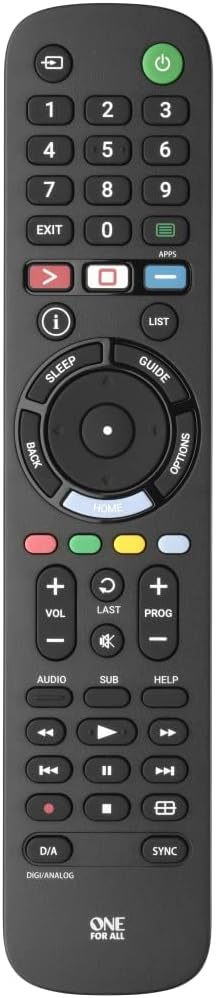
Figure 1: Front view of the One For All URC4812 remote control, showing all buttons and layout.

Figure 2: Angled view of the One For All URC4812 remote control, highlighting its ergonomic design.

Figure 3: Side view of the One For All URC4812 remote control, showing its slim profile.

Figure 4: Back view of the One For All URC4812 remote control, showing the battery compartment.
Key Features:
- Works just like your original television remote. Compatible with Sony TVs.
- No setup required. Insert batteries and it is ready to use.
- Learning feature allows customization of the remote to your specific needs.
- Quick Setup Guide Included for codeless setup.
- App Shortcut keys provide direct access to your favorite streaming services.
- Number of keys: 53.
- Remote Control Technology: IR (Infrared).
Setup
1. Battery Installation
The One For All URC4812 remote requires 2 AA batteries (not included). Follow these steps to install them:
- Locate the battery compartment on the back of the remote control (refer to Figure 4).
- Slide the battery cover downwards to open it.
- Insert two AA batteries, ensuring the positive (+) and negative (-) terminals align with the indicators inside the compartment.
- Slide the battery cover back into place until it clicks securely.
2. Initial Use (No Setup Required)
This remote is pre-programmed for Sony TVs. In most cases, no additional setup is required. Simply insert the batteries, point the remote at your Sony TV, and begin using it.
3. Learning Feature (Optional)
If you wish to customize certain functions or if some functions do not work as expected, the remote has a learning feature. This allows you to copy functions directly from your original remote control.
Detailed instructions for using the learning feature are typically provided in the Quick Setup Guide included with your remote. Please refer to that guide for specific steps.
Operating Instructions
The One For All URC4812 remote is designed to replicate the functionality of your original Sony TV remote. Below are common operations:
- Power On/Off: Press the Power button (usually red, top right) to turn your TV on or off.
- Channel Navigation: Use the CH +/- buttons to change channels. Use the number pad (0-9) for direct channel input.
- Volume Control: Use the VOL +/- buttons to adjust the volume. Press the Mute button to silence the audio.
- Input Selection: Press the Input or Source button to cycle through available input sources (HDMI, AV, etc.).
- Navigation Pad: The central circular pad with Up, Down, Left, Right arrows and an OK/Enter button is used to navigate menus and confirm selections.
- Smart TV/App Access: The APPS button provides direct access to your TV's smart features and installed applications.
- Menu Access: Press the MENU button to open your TV's main settings menu.
- Playback Controls: Buttons such as Play, Pause, Stop, Fast Forward, Rewind are available for media playback.
Video 1: Demonstration of the One For All remote turning on a Sony TV. This video illustrates the immediate functionality of the remote upon battery insertion, showing the power button being pressed and the TV screen displaying the Sony logo as it powers on.
Maintenance
To ensure the longevity and optimal performance of your One For All URC4812 remote control, please follow these maintenance guidelines:
- Cleaning: Use a soft, dry cloth to clean the remote's surface. Do not use abrasive cleaners, solvents, or harsh chemicals, as these can damage the finish or internal components.
- Battery Replacement: Replace batteries when the remote's response becomes sluggish or stops working. Always replace both batteries at the same time with new AA alkaline batteries. Do not mix old and new batteries, or different types of batteries.
- Storage: Store the remote in a cool, dry place away from direct sunlight, extreme temperatures, and high humidity.
- Avoid Drops: Protect the remote from physical impact. Dropping the remote can damage internal circuitry or buttons.
- Liquid Exposure: Keep the remote away from liquids. Spills can cause short circuits and permanent damage.
Troubleshooting
If you experience issues with your One For All URC4812 remote, consult the following troubleshooting tips:
| Problem | Possible Cause | Solution |
|---|---|---|
| Remote not working at all. | Dead or incorrectly inserted batteries. | Check battery polarity (+/-). Replace with fresh AA batteries. |
| Remote only works intermittently. | Low battery power; Obstruction between remote and TV; Remote too far from TV. | Replace batteries. Ensure clear line of sight to TV's IR receiver. Move closer to the TV. |
| Certain buttons do not work. | Button stuck or damaged; TV model specific function not supported by universal remote; Learning feature not correctly programmed. | Clean around the button. Verify if the function is supported for your TV model. Re-program the learning feature for that specific button if applicable. |
| TV does not respond to remote commands. | TV is off or unplugged; Remote is not correctly paired (rare for pre-programmed); IR receiver on TV is blocked. | Ensure TV is powered on. Check if anything is blocking the TV's IR sensor. Try re-inserting batteries to reset the remote. |
If the problem persists after trying these solutions, please refer to the "Warranty and Support" section for further assistance.
Specifications
| Feature | Detail |
|---|---|
| Brand Name | One For All |
| Model Number | URC4812 |
| Compatible Devices | Sony Televisions (LCD, LED, OLED, Plasma) |
| Remote Control Technology | Infrared (IR) |
| Number of Keys | 53 |
| Batteries Required | 2 AA batteries (not included) |
| Item Weight | 4.8 ounces |
| Product Dimensions | 8.07 x 1.81 x 0.79 inches |
| Special Features | Pre-Programmed, Learning Feature, App Shortcut Keys |
Warranty and Support
One For All products are designed for reliability and performance. For specific warranty details, please refer to the warranty card included with your product packaging or visit the official One For All website.
For technical support, troubleshooting assistance beyond this manual, or inquiries about product registration, please contact One For All customer service through their official channels. Contact information can typically be found on the product packaging or their website.
Online Resources:
- Official One For All Website: www.oneforall.com
- Product Support Page (if available): Search for Model URC4812 on the One For All support section.

