
Jensen JAS-725
Contents
Jensen Under Cabinet Bluetooth Music System with Alexa Far-Field and Tap to Talk
User Manual
Product Overview
The Jensen JAS-725 is an under-cabinet Bluetooth music system designed for hands-free convenience and voice control. It integrates with the Alexa Voice Service, allowing users to play music, access information, news, sports scores, weather updates, and more, simply by voice command. The system connects to Wi-Fi or a mobile hotspot for internet-based functions and features Bluetooth connectivity for streaming audio from compatible devices.
- Integrates with the Alexa Voice Service for voice-controlled functions.
- Works with Wi-Fi smart home devices for controlling lamps, timers, or other compatible devices.
- Bluetooth-enabled for streaming music from phones or tablets.
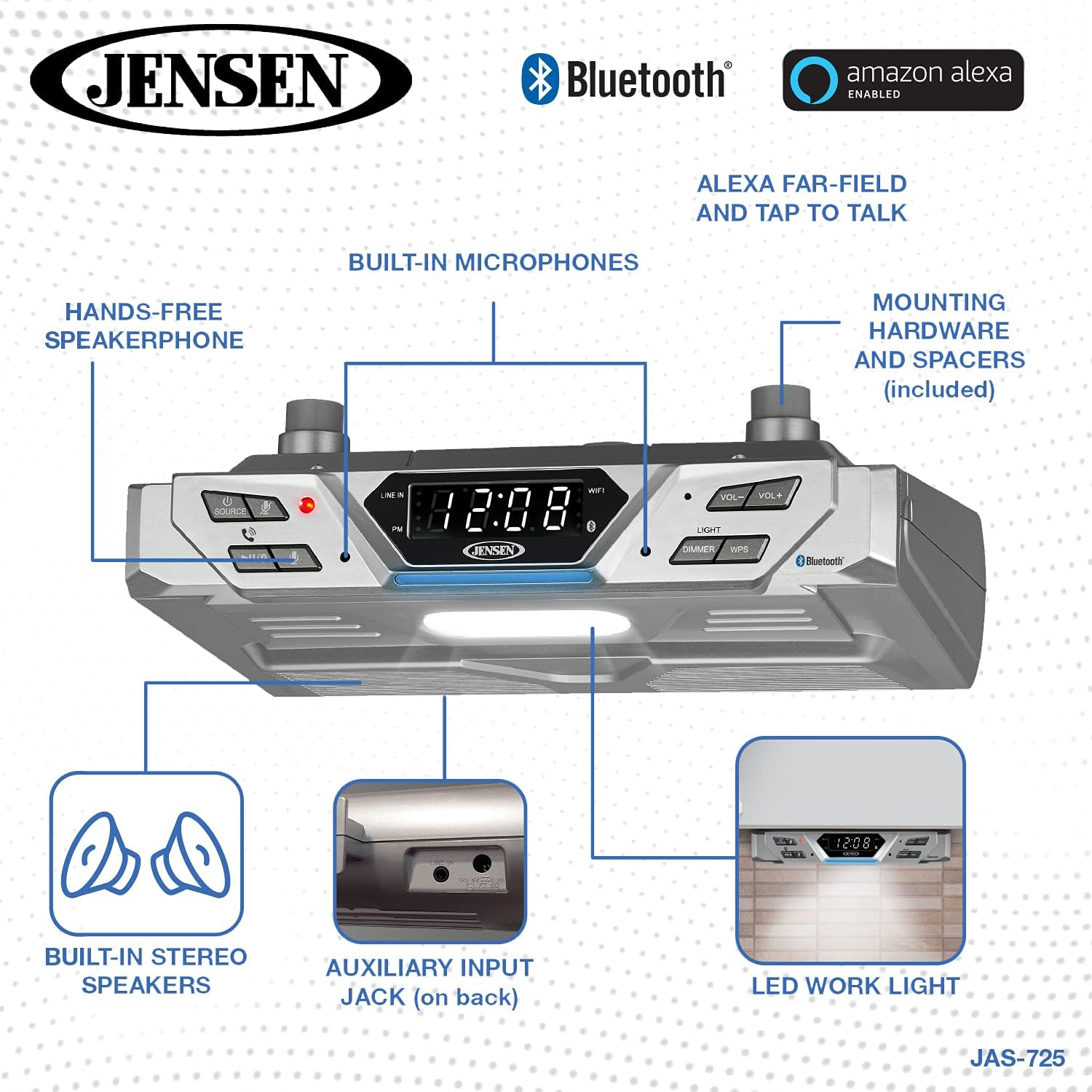
- Hands-free speakerphone with built-in microphone.
- Built-in 4 x LED work area light.
- Auxiliary input jack for connecting external audio players.
- Includes mounting hardware and a 120V AC adaptor.
Product Components and Controls



Setup and Installation
Mounting the Unit
The Jensen JAS-725 is designed for under-cabinet installation to save space. Mounting hardware is included with the unit. A template is provided to assist with aligning screws for secure attachment to the underside of a cabinet.
- Select a suitable location under a cabinet, ensuring adequate clearance and access to a power outlet.
- Use the provided mounting template to mark the screw positions on the underside of the cabinet.
- Drill pilot holes if necessary, then secure the mounting brackets or screws according to the template.
- Attach the JAS-725 unit to the installed mounting hardware, ensuring it is firmly in place.
Power Connection
Connect the included 120V AC adaptor to the power input jack on the unit and then plug it into a standard wall outlet.
Initial Setup and Wi-Fi Connection
To utilize Alexa voice services and Wi-Fi features, the unit must be connected to your home Wi-Fi network. Refer to the quick start guide for detailed instructions on connecting to Wi-Fi and setting up Alexa.
- Download the required companion app (if specified in the quick start guide) to your smartphone or tablet.
- Follow the in-app instructions to connect the JAS-725 to your Wi-Fi network.
- Once connected, proceed with linking your Amazon Alexa account to enable voice commands and smart home integration.
Bluetooth Pairing
To stream audio via Bluetooth:
- Ensure the JAS-725 is powered on.
- Activate Bluetooth on your smartphone or tablet.
- Select the JAS-725 from the list of available Bluetooth devices on your device.
- Once paired, you can stream audio wirelessly to the unit.
Auxiliary Input
For connecting external audio players without Bluetooth capability, use the auxiliary input jack on the back of the unit. A 3.5mm audio cable (not included) is required.
Operating Instructions
Power and Source Selection
- Press the POWER/SOURCE button to turn the unit on or off.
- Press the SOURCE button repeatedly to cycle through available input modes: Wi-Fi (Alexa), Bluetooth, and Line-In.
Volume Control
Use the VOL+ and VOL- buttons to adjust the playback volume.
Alexa Voice Commands
Once connected to Wi-Fi and linked to your Amazon Alexa account, you can use voice commands. The far-field microphones allow for hands-free interaction.
- To activate Alexa, simply say "Alexa" followed by your command.
- Examples: "Alexa, play music," "Alexa, what's the weather?" "Alexa, set a timer for 10 minutes."
- The unit also supports 'Tap to Talk' functionality for direct interaction.
Bluetooth Streaming
After pairing your device, select the Bluetooth source on the JAS-725. Play audio from your paired device, and it will stream through the unit's speakers.
Hands-Free Speakerphone
When a call comes in on a paired Bluetooth phone, the unit can function as a speakerphone. Use the dedicated call buttons (if present) or voice commands to answer or end calls.
LED Work Light
The built-in LED work light provides illumination for your counter space. Use the LIGHT button to turn the light on/off and the DIMMER button to adjust its brightness.
Maintenance
Cleaning the Unit
To maintain the appearance and functionality of your Jensen JAS-725:
- Disconnect the power adaptor before cleaning.
- Wipe the exterior surfaces with a soft, slightly damp cloth.
- Do not use abrasive cleaners, waxes, or solvents as they may damage the finish.
- Ensure no liquid enters the unit's openings.
General Care
- Avoid exposing the unit to extreme temperatures, direct sunlight, or high humidity.
- Do not block ventilation openings.
- Handle the unit with care to prevent physical damage.
Troubleshooting
| Problem | Possible Cause | Solution |
|---|---|---|
| Unit does not power on. | Power adaptor not connected or outlet is not active. | Ensure the AC adaptor is securely plugged into the unit and a working power outlet. |
| Cannot connect to Wi-Fi or Alexa. | Incorrect Wi-Fi password, weak signal, or app setup issue. | Verify Wi-Fi password. Ensure the unit is within range of your router. Re-attempt setup through the companion app. Check for app updates. |
| Bluetooth device will not pair. | Bluetooth not enabled on device, unit not in pairing mode, or device too far. | Ensure Bluetooth is active on your device. Put the JAS-725 into Bluetooth pairing mode. Move devices closer. |
| No sound from speakers. | Volume too low, incorrect source selected, or external device issue. | Increase volume. Select the correct input source (Wi-Fi, Bluetooth, Line-In). Check connections for external devices. |
| Alexa does not respond. | No internet connection, microphone muted, or Alexa account not linked. | Check Wi-Fi connection. Ensure the microphone is not muted. Verify your Amazon Alexa account is properly linked. |
| Display numbers disappear sometimes. | Possible minor display anomaly. | If this occurs intermittently and does not affect functionality, it may not require action. If persistent, contact support. |
Specifications
| Feature | Detail |
|---|---|
| Model Number | JAS-725 |
| Product Dimensions (L x W x H) | 2.28 x 9.06 x 2.28 inches |
| Item Weight | 1.9 pounds |
| Connectivity Technology | Bluetooth, Wi-Fi |
| Color | Silver |
| Speaker Type | Stereo |
| Power Source | 120V AC Adaptor (included) |
| Batteries Required | 1 Lithium Ion battery (for internal clock/memory, if applicable) |
| Manufacturer | JENSEN(R) |
Warranty and Support
Warranty Information
This product is covered by a manufacturer's warranty. Please refer to the warranty card included in the product packaging for specific terms, conditions, and duration of coverage. Retain your proof of purchase for warranty claims.
Customer Support
For technical assistance, troubleshooting beyond this manual, or warranty service, please contact Jensen customer support. Visit the official Jensen website for the most up-to-date contact information, FAQs, and additional resources.
You can also visit the Jensen Store on Amazon for more product information and support options.
Ask a question about this manual
Ask about setup, troubleshooting, compatibility, parts, safety, or missing instructions. Manuals+ will review the question and use this page’s manual context to help answer it.