
1. Introduction
This manual provides detailed instructions for the installation, operation, and maintenance of your ANRAN Wireless Home Security Camera System. Please read this manual thoroughly before using the product to ensure proper setup and functionality.

Figure 1.1: ANRAN Wireless Home Security Camera System Overview
2. Package Contents
Verify that all items listed below are included in your package. If any items are missing or damaged, please contact ANRAN customer support.
- 1 x 8-Channel 1080P NVR (Network Video Recorder) with 1TB HDD
- 4 x 1080P WiFi IP Cameras
- 1 x USB Mouse
- 1 x Network Cable
- 5 x Power Adapters (1 for NVR, 4 for cameras)
- 1 x User Manual
- Mounting Screws
- 1 x Security Sticker

Figure 2.1: Included Package Contents
3. Setup
3.1 System Connection
- Connect the NVR to a power source using the provided power adapter.
- Connect the NVR to your Wi-Fi router using the included network cable.
- Connect each camera to a power source using its respective power adapter. The cameras will automatically pair with the NVR.
- Connect a monitor or TV to the NVR via the HDMI or VGA port for local viewing and configuration.
- Connect the USB mouse to the NVR for navigation.

Figure 3.1: System Connection Diagram
3.2 Remote View Setup
To access your camera system remotely via a mobile device or computer:
- Download the free mobile application "IP Pro" from your device's app store. You can find the Android client link here and the iOS client link here.
- Run the application and register an account.
- Add your device by inputting the Device ID, typically found on the NVR or in the NVR's system information.
- Once added, you can view your cameras remotely anytime, anywhere.

Figure 3.2: Easy Remote View Setup Steps
3.3 Camera Installation and Adjustment
The cameras are designed for simple screw installation. Before mounting, ensure the desired viewing angle can be achieved.
- Mounting: Use the provided screws to securely mount the camera to a wall or ceiling.
- Adjustment: To adjust the camera's position, loosen the related screws on the mounting bracket. The camera can rotate 180 degrees vertically and 360 degrees horizontally. Once the desired position is set, tighten the screws to secure the camera.
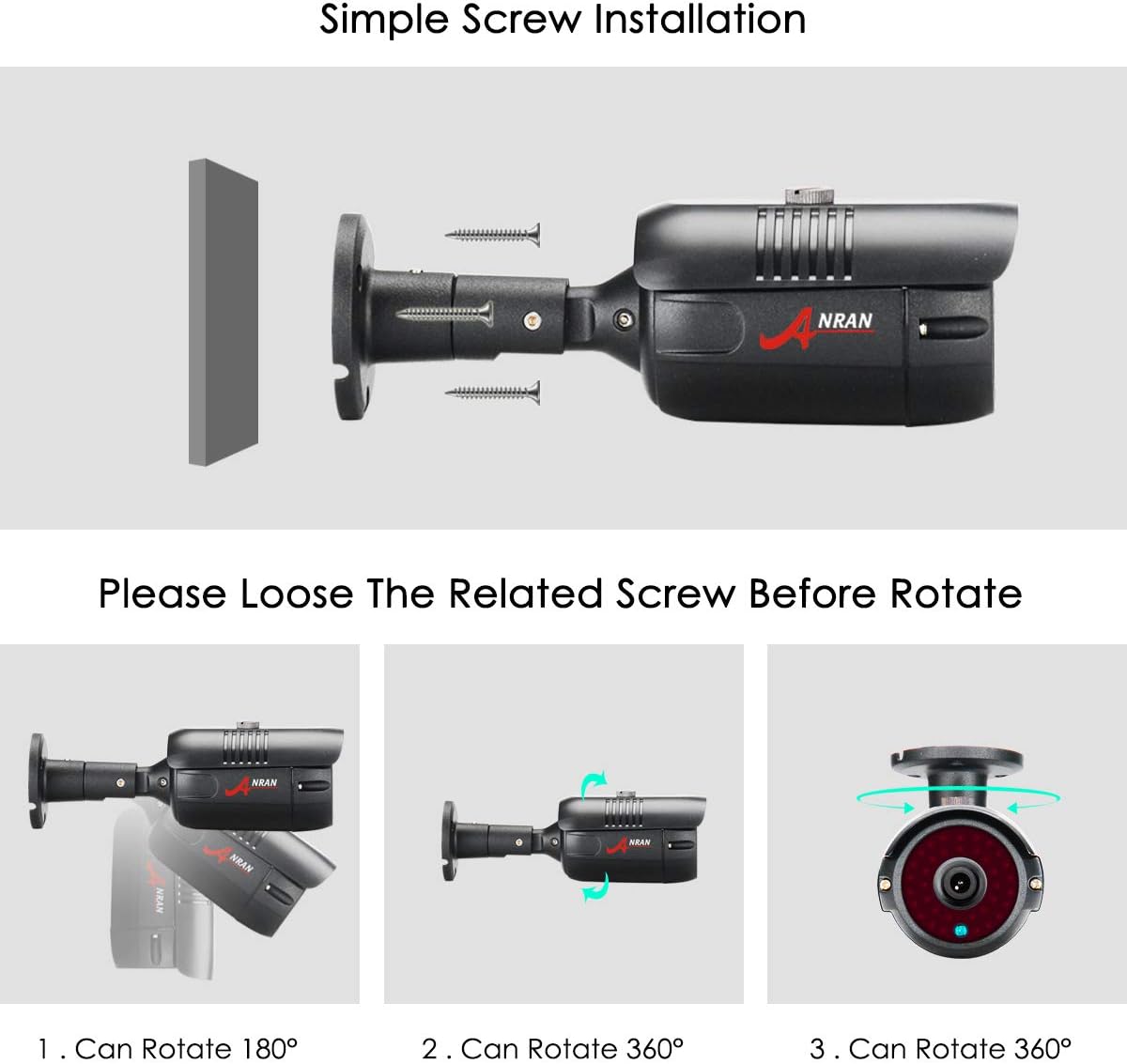
Figure 3.3: Camera Adjustment Mechanism
4. Operation
4.1 Day and Night Monitoring
The cameras are equipped with infrared (IR) LEDs and an IR-CUT filter for clear monitoring in various lighting conditions. The system automatically switches between day (color) and night (black and white infrared) modes based on ambient light levels.
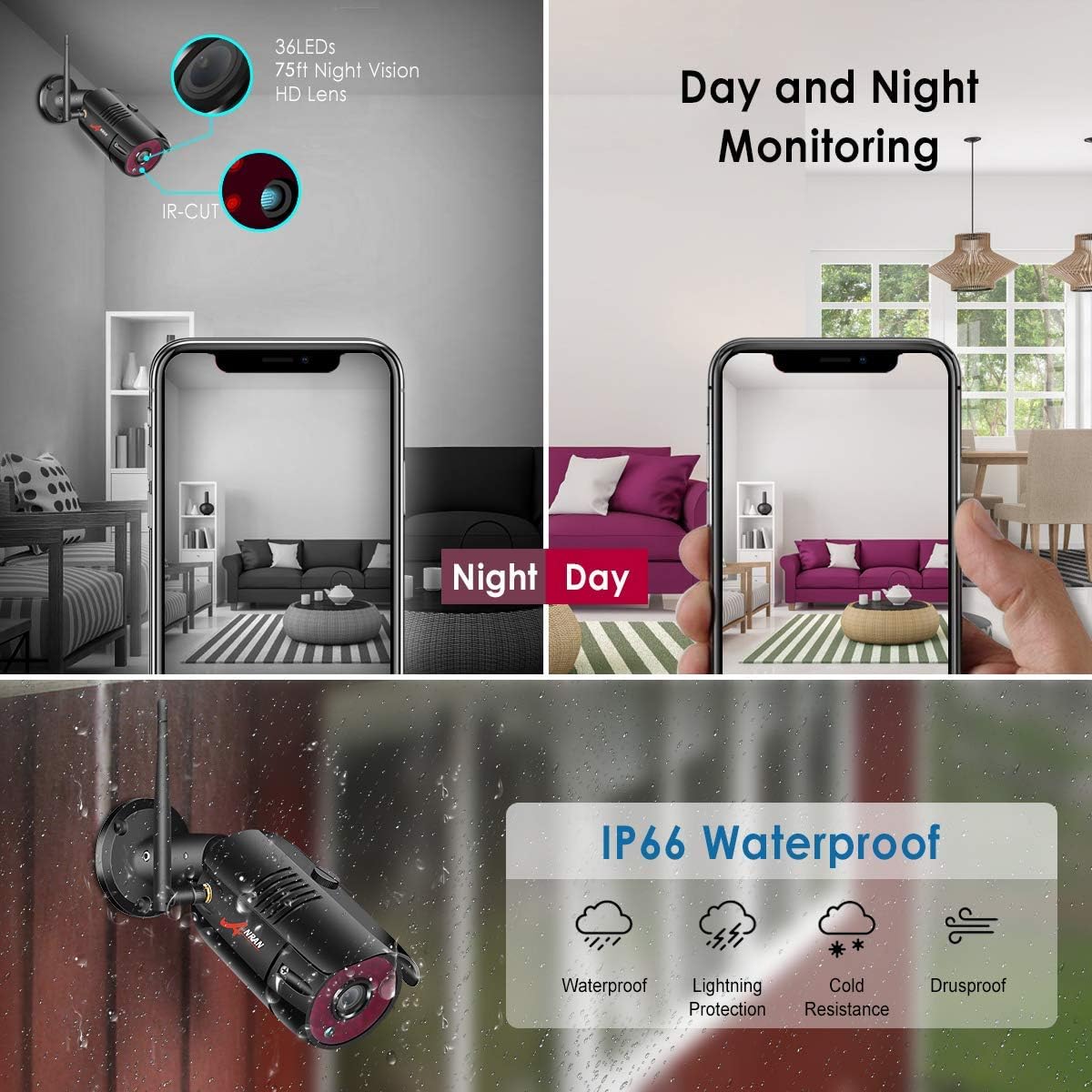
Figure 4.1: Day and Night Monitoring Capability
4.2 Motion Detection and Alerts
The system supports continuous recording and motion detection recording. When motion is detected, the system can trigger alerts and begin recording, saving storage space and making event review more efficient. Configure motion detection zones and sensitivity via the NVR interface or the mobile application.
4.3 Expandability
The 8-channel NVR system is expandable, allowing you to add up to 8 cameras in total. This provides flexibility to expand your surveillance coverage as needed.

Figure 4.2: System Expandability and Wireless Signal Repeater
5. Maintenance
- Camera Cleaning: Regularly clean the camera lenses with a soft, dry cloth to ensure clear image quality. Avoid using harsh chemicals.
- Cable Management: Ensure all cables are securely connected and protected from environmental damage.
- Firmware Updates: Periodically check the ANRAN website or app for firmware updates to ensure optimal performance and security.
- Environmental Protection: The cameras are IP66 waterproof, providing protection against dust and strong jets of water. However, avoid submerging them in water.
6. Troubleshooting
6.1 No Image Display
- Check if the NVR and cameras are properly powered on.
- Verify that the NVR is correctly connected to the monitor/TV via HDMI or VGA.
- Ensure cameras are within the NVR's wireless range.
- If a camera is not displaying, try resetting it using the reset button (refer to camera component diagram).
6.2 Remote Access Issues
- Ensure the NVR is connected to the internet via the router.
- Verify your mobile device has a stable internet connection.
- Double-check the Device ID entered in the app.
- Ensure the app is updated to the latest version.
6.3 Poor Image Quality
- Clean the camera lens.
- Check for obstructions in the camera's field of view.
- Ensure sufficient lighting for optimal image capture, especially at night.
7. Specifications
| Feature | Specification |
|---|---|
| Brand | ANRAN |
| Connectivity Technology | Wireless |
| Video Capture Resolution | 1024p, 1080p, 960p |
| Number of Channels | 8 |
| Memory Storage Capacity | 1 TB |
| Color | Black |
| Power Source | Battery Powered (for cameras, though typically adapter powered) |
| Item dimensions L x W x H | 12 x 10 x 7 inches |
| Compatible Devices | Cameras, Personal Computers, TV, Tablets |
| Signal Format | Digital |
| Low light technology | Night Vision |
| Frame Rate | 30 fps |
| Recording Mode | continuous motion detection |
| Optical Sensor Technology | CMOS |
| Total USB Ports | 1 |
| Hardware Interface | 802.11 ac/b/g/n |
| Lens Type | Zoom (Note: Fixed lens for these cameras, 'Zoom' might refer to digital zoom capability) |
| Video Input | RJ45 |
| Item Weight | 8.91 pounds |
| Date First Available | March 31, 2019 |
8. Warranty & Support
ANRAN provides customer support for its products. For technical assistance or warranty inquiries, please refer to the contact information below:
- Email Support: support@anran-cctv.com
- US Service Phone: +18189005656
Please have your product model and purchase information ready when contacting support.

Figure 8.1: ANRAN Customer Service Information


