1. Introduction
Thank you for purchasing the Pioneer VSX-534 5.1 Channel Surround AM/FM AV Receiver. This receiver is designed to deliver an immersive audio-visual experience with its 5.1 channel surround sound, 3D compatibility, and various connectivity options. This manual will guide you through the setup, operation, and maintenance of your new AV receiver to ensure optimal performance and longevity.
2. Safety Information
Please read all safety instructions carefully before operating the unit. Keep this manual for future reference.
- Power Source: Connect the unit only to an AC 220-240V, 50/60Hz power supply.
- Ventilation: Ensure adequate ventilation. Do not block ventilation openings. Maintain a minimum distance of 10 cm (4 inches) around the unit for proper airflow.
- Water and Moisture: Do not expose the unit to rain, moisture, dripping, or splashing. Do not place objects filled with liquids, such as vases, on the unit.
- Heat: Do not place the unit near heat sources such as radiators, heat registers, stoves, or other apparatus (including amplifiers) that produce heat.
- Cleaning: Unplug the unit from the wall outlet before cleaning. Use a dry cloth for cleaning.
- Servicing: Do not attempt to service this product yourself. Refer all servicing to qualified service personnel.
- Speaker Impedance: Ensure connected speakers have an impedance between 6 and 16 ohms.
3. Package Contents
Verify that all items are present in the package:
- Pioneer VSX-534 AV Receiver
- Remote Control
- Power Cord
- Setup Microphone for Auto Calibration
- AM Loop Antenna
- FM Wire Antenna
- Quick Start Guide
- Safety Brochure
4. Setup
4.1. Unpacking and Placement
Carefully remove the receiver from its packaging. Place the receiver on a stable, flat surface with adequate ventilation. Avoid placing it in direct sunlight or near heat sources.
4.2. Front Panel Overview
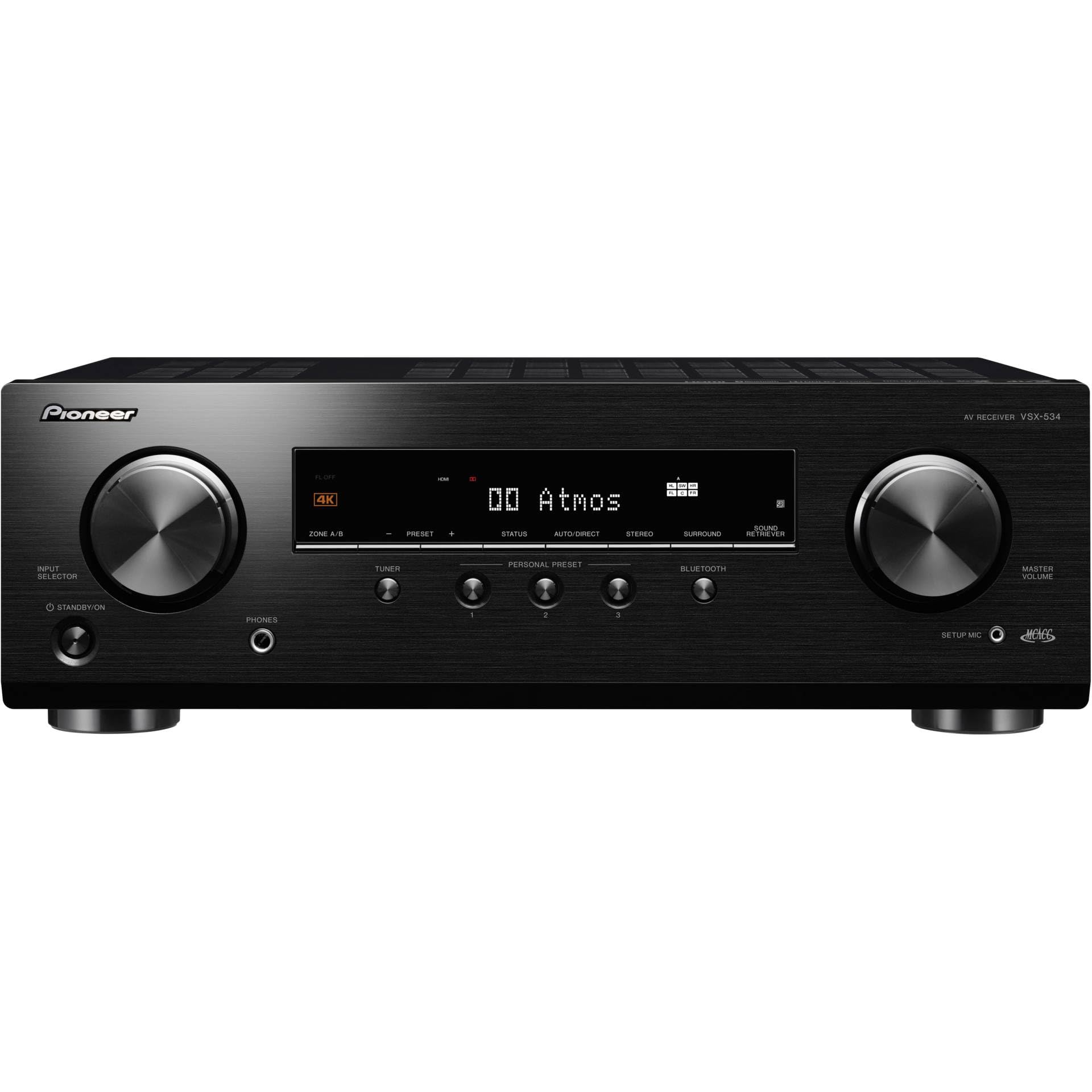
Image: Front view of the Pioneer VSX-534 AV Receiver, showing the input selector, standby/on button, phones jack, setup mic jack, master volume knob, and display.
4.3. Rear Panel Connections
Connect your audio and video devices to the appropriate inputs on the rear panel. Ensure all connections are secure.

Image: Rear view of the Pioneer VSX-534 AV Receiver, highlighting various input and output ports including HDMI, optical, coaxial, analog audio, speaker terminals, and antenna connections.
- HDMI Connections: Connect your video sources (Blu-ray player, game console, TV box) to the HDMI IN ports (1-4). Connect your TV to the HDMI OUT (ARC) port.
- Audio Connections: Use optical or coaxial digital audio inputs for devices without HDMI. Analog audio inputs (CD, SAT/CBL) are also available.
- Speaker Connections: Connect your 5.1 channel speakers to the corresponding terminals (FRONT L/R, CENTER, SURROUND L/R, SUBWOOFER PRE OUT). Ensure correct polarity (+ to + and - to -).
- Antenna Connections: Connect the supplied AM loop antenna and FM wire antenna for radio reception.
- Network: Connect an Ethernet cable to the NETWORK port for wired network connectivity (if applicable to your model variant).
- Power: After all connections are made, connect the power cord to the AC IN socket and then to a wall outlet.
4.4. Speaker Setup and Calibration
The VSX-534 features automatic calibration to optimize sound settings for your listening environment.
- Place the supplied setup microphone at your primary listening position.
- Connect the setup microphone to the SETUP MIC jack on the front panel.
- Follow the on-screen instructions (if connected to a TV) or the display panel instructions to initiate the auto-calibration process. The system will emit test tones to measure speaker distances, levels, and frequency response.
- Once calibration is complete, disconnect the setup microphone.
5. Operating Instructions
5.1. Basic Operation
- Power On/Off: Press the STANDBY/ON button on the front panel or the remote control to turn the receiver on or off.
- Input Selection: Use the INPUT SELECTOR knob on the front panel or the corresponding input buttons on the remote control (e.g., BD/DVD, CBL/SAT) to switch between connected devices.
- Volume Control: Adjust the MASTER VOLUME knob on the front panel or the VOLUME +/- buttons on the remote control.
- Sound Modes: Use the SURROUND button on the front panel or remote to cycle through various sound modes (e.g., Stereo, Direct, Surround).
5.2. Bluetooth Connectivity
The VSX-534 features built-in Bluetooth for wireless audio streaming from compatible devices.
- Select "Bluetooth" as the input source using the INPUT SELECTOR or remote.
- On your mobile device, enable Bluetooth and search for available devices.
- Select "Pioneer VSX-534" (or similar name) from the list of devices to pair.
- Once paired, you can stream audio from your device to the receiver.
5.3. AM/FM Radio Operation
To listen to AM or FM radio:
- Select "TUNER" as the input source.
- Use the TUNER buttons on the remote or front panel to select AM or FM band.
- Tune to your desired station using the tuning controls.
- You can save favorite stations as presets for quick access.
6. Maintenance
- Cleaning: Wipe the unit with a soft, dry cloth. Do not use abrasive cleaners, waxes, or solvents.
- Ventilation: Regularly check that the ventilation openings are not blocked by dust or debris.
- Power Cord: Periodically inspect the power cord for any damage.
7. Troubleshooting
If you experience issues with your receiver, refer to the following common solutions:
| Problem | Possible Cause / Solution |
|---|---|
| No power | Check if the power cord is securely connected. Ensure the wall outlet is functioning. |
| No sound | Verify speaker connections. Check volume level. Ensure correct input source is selected. Check mute function. |
| No picture | Check HDMI connections between source, receiver, and TV. Ensure correct input source is selected on both receiver and TV. |
| Bluetooth not connecting | Ensure Bluetooth is enabled on your device and the receiver is in pairing mode. Move devices closer. Clear previous pairings. |
| Remote control not working | Check batteries. Ensure no obstacles between remote and receiver. |
For more detailed troubleshooting, please refer to the full user manual available on the Pioneer support website.
8. Specifications
| Feature | Detail |
|---|---|
| Model Number | VSX534BMMP |
| Product Dimensions | 43.5 x 32.1 x 14.8 cm |
| Item Weight | 8 Kilograms |
| Color | Black |
| Compatible Devices | TV, Speaker, Blu-ray Player, Game Console |
| Connectivity Technology | Bluetooth, HDMI, USB |
| Connector Type | Bluetooth, USB Type A |
| Output Power (Watts) | 150 Watts |
| Voltage | 220 Volts |
| Audio Encoding | DTS |
| Audio Output Mode | Surround |
| Surround Sound Channel Configuration | 5.1 |
| Total HDMI Ports | 4 |
| Special Feature | Built-in Bluetooth, Auto Calibration |
9. Warranty and Support
Pioneer offers a limited warranty for this product. For specific warranty terms and conditions, please refer to the warranty card included in your package or visit the official Pioneer website.
For technical support, product registration, or to download the full user manual, please visit the official PIONEER support website or contact their customer service.


