
1. Overview
The ResMed AirFit N30i Cushion is a replacement nasal cradle cushion designed specifically for the ResMed AirFit N30i nasal CPAP mask system. This cushion is engineered to provide comfortable and effective sleep apnea therapy by resting gently under the nose, aiming to minimize pressure points and enhance overall sleep comfort. It is made from soft silicone and features quiet venting technology.

Image 1.1: The ResMed AirFit N30i nasal cushion, indicating a medium size.
2. Setup and Assembly
This section provides instructions for attaching the AirFit N30i cushion to your existing AirFit N30i mask frame system. Ensure all components are clean before assembly.
2.1 Attaching the Cushion
- Align the cushion with the mask frame. The cushion is designed to fit securely into the frame.
- Gently push the cushion into the frame until it clicks or feels firmly seated. Ensure the cushion is fully inserted and there are no gaps.
- Once attached, the cushion should sit comfortably under your nose when the mask is worn.

Image 2.1: An exploded view illustrating the various components of the AirFit N30i mask system, including the nasal cushion, frame, and headgear.
2.2 Fitting the Mask
After attaching the cushion, place the mask on your face and adjust the headgear for a secure yet comfortable fit. The cushion should rest gently below your nostrils, not inside them.

Image 2.2: A user demonstrating the proper adjustment of the AirFit N30i mask, ensuring the cushion is correctly positioned under the nose.
3. Operation and Comfort
The AirFit N30i cushion is designed for minimal facial contact and quiet operation, allowing for a more comfortable sleep experience.
3.1 QuietAir™ Vent Technology
The cushion incorporates QuietAir™ vent technology, which is designed to diffuse exhaled air quietly, reducing noise levels during therapy. This feature contributes to a more peaceful sleeping environment for both the user and their bed partner.

Image 3.1: Illustration highlighting the QuietAir™ vent technology, which reduces sound output to approximately 21 decibels, quieter than a soft whisper.
3.2 Nasal Cradle Design
The nasal cradle design of the N30i cushion means it sits comfortably under the nose rather than covering it entirely or inserting into the nostrils. This design aims to prevent red marks and irritation on the nasal bridge, offering greater freedom of movement during sleep.

Image 3.2: A user sleeping comfortably with the AirFit N30i mask, demonstrating its low-profile design and minimal facial contact.
4. Maintenance and Care
Regular cleaning and timely replacement of your AirFit N30i cushion are essential for maintaining hygiene, optimal performance, and the longevity of your CPAP therapy.
4.1 Daily Cleaning Instructions
To ensure proper hygiene and performance, clean your cushion daily.
- Disassemble the mask before cleaning.
- Soak components in warm water with a mild liquid detergent for approximately 10 minutes.
- Brush the elbow and around the vent holes to remove any residue.
- Rinse components thoroughly under running water.
- Leave components to air dry completely, away from direct sunlight.

Image 4.1: A visual guide outlining the recommended steps for daily care and cleaning of the AirFit N30i cushion.
4.2 Replacement Tips
It is recommended to replace your mask cushion monthly to ensure continued optimal performance and hygiene. Look for the following signs that indicate it's time for a replacement:
- You have to tighten the straps often to maintain a seal.
- The mask has lost its spring or elasticity.
- Your sleep therapy feels less effective than usual.
- The cushion is still slippery, even after being cleaned.
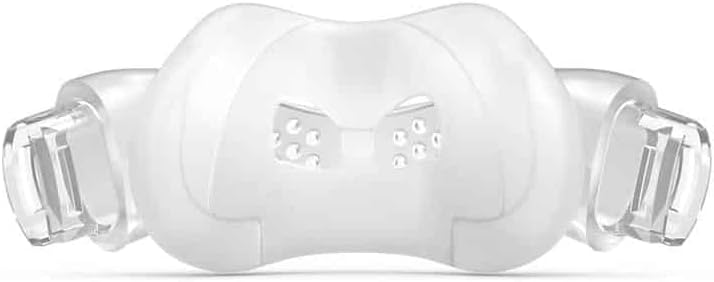
Image 4.2: A visual reminder to replace the mask cushion monthly, along with key indicators that signal the need for a new cushion.
5. Troubleshooting
This section addresses common issues you might encounter with your AirFit N30i cushion and provides potential solutions.
| Problem | Possible Cause | Solution |
|---|---|---|
| Air Leakage | Cushion not properly seated; cushion worn out; headgear too loose or too tight. | Ensure cushion is fully inserted into frame. Check cushion for tears or damage and replace if necessary. Adjust headgear for a snug but comfortable fit. |
| Discomfort or Red Marks | Mask too tight; incorrect cushion size; cushion not clean. | Loosen headgear straps. Verify you are using the correct cushion size. Clean cushion thoroughly. |
| Mask Noise | Vent holes blocked; cushion not properly seated. | Clean vent holes. Re-seat the cushion firmly into the mask frame. |
| Cushion feels slippery after cleaning | Residue from detergent; cushion material degrading. | Rinse thoroughly with plain water. If problem persists, cushion may need replacement. |
6. Product Specifications
Detailed specifications for the ResMed AirFit N30i Cushion (Medium).
| Feature | Detail |
|---|---|
| Product Name | AirFit N30i Cushion |
| Model Number | 63811 |
| Size | Medium |
| Material | Soft Silicone |
| Product Dimensions | 6 x 3.25 x 1.75 inches |
| Item Weight | 0.32 ounces |
| Special Feature | Quiet Venting (QuietAir™) |
| Compatibility | ResMed AirFit N30i Nasal CPAP Mask System |
7. Warranty and Support
For information regarding product warranty, please refer to the documentation provided with your complete ResMed AirFit N30i mask system or visit the official ResMed website. For further assistance, technical support, or to inquire about replacement parts, please contact ResMed customer service or your authorized ResMed dealer.
Important Note: Statements regarding dietary supplements have not been evaluated by the FDA and are not intended to diagnose, treat, cure, or prevent any disease or health condition.