
Sports Afield SA-PV2
Home & Office 0.81 cuft Security Vault SA-PV2 User Manual
Brand: Sports Afield | Model: SA-PV2
1. Introduction
The Sports Afield Home & Office 0.81 cuft Security Vault SA-PV2 is designed to provide secure storage for your valuables. It features a fully illuminated touchpad-activated electronic lock for quick and easy access, ensuring your items are protected from unauthorized access. This vault is ideal for use in homes, offices, or shared living spaces where secure storage is needed.

Image: Front view of the Sports Afield SA-PV2 Security Vault, showcasing its compact design and electronic keypad.
2. Safety Information
- Always keep the override keys in a secure location away from the vault and out of reach of children.
- Do not store the override keys inside the vault.
- Ensure the vault is placed on a stable, level surface to prevent tipping.
- For enhanced security, utilize the included bolt-down kit to secure the vault to a floor or wall.
- Keep hands and fingers clear of the door opening when closing to prevent pinching.
3. Package Contents
Please verify that all items listed below are included in your package:
- Sports Afield SA-PV2 Security Vault
- AA Batteries (for electronic lock)
- Bolt Down Kit
- 2 Spare Override Keys
4. Setup
4.1 Battery Installation
- Locate the battery compartment on the inside of the vault door.
- Insert the provided AA batteries, ensuring correct polarity (+/-).
- Close the battery compartment cover securely.
4.2 Initial Access and Code Setting
- Use one of the spare override keys to open the vault for the first time. Insert the key into the keyhole, turn it, and rotate the handle.
- With the door open, locate the red reset button on the inside of the door, near the hinge.
- Press the reset button. The keypad will beep, indicating it is ready to accept a new code.
- Enter your desired 3-8 digit code on the keypad, then press the '#' button to confirm.
- Test the new code with the door open to ensure it functions correctly before closing the vault.

Image: Interior view of the SA-PV2 vault, showing the removable shelves and door-mounted key hooks.
4.3 Securing the Vault (Optional)
The vault can be secured to a floor or wall using the included bolt-down kit for added security.
- Choose a suitable location for the vault, ensuring it is level and stable.
- Mark the drilling points through the pre-drilled holes in the bottom or back of the vault.
- Drill pilot holes in the chosen surface using an appropriate drill bit.
- Position the vault over the holes and secure it using the provided bolts and washers.

Image: Diagram illustrating the external dimensions of the SA-PV2 vault: 10" H x 14" W x 10" D.
5. Operating Instructions
5.1 Opening the Vault with Electronic Lock
- Enter your programmed 3-8 digit code on the 12-button illuminated keypad.
- Press the '#' button to confirm the code.
- If the code is correct, the lock will disengage, and you will hear a beep.
- Within 5 seconds, rotate the handle clockwise to open the vault door.
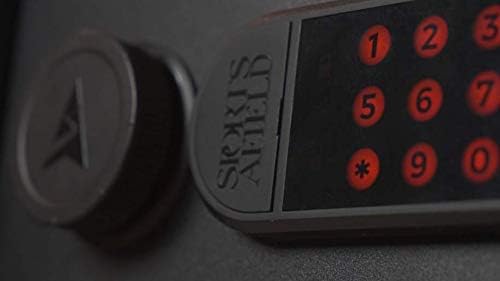
Image: Close-up view of the illuminated 12-button electronic keypad on the SA-PV2 vault.
5.2 Opening the Vault with Override Key
In case of battery failure or forgotten code, the vault can be opened using the override key.
- Locate the keyhole cover on the keypad panel.
- Gently remove the cover to expose the keyhole.
- Insert one of the spare override keys into the keyhole and turn it clockwise.
- While holding the key turned, rotate the handle clockwise to open the vault door.
- Once open, remove the key and replace the keyhole cover.
5.3 Closing and Locking the Vault
- Close the vault door firmly.
- Rotate the handle counter-clockwise until it is in the locked position. The vault will automatically lock.
6. Maintenance
- Cleaning: Wipe the exterior of the vault with a soft, damp cloth. Avoid abrasive cleaners or solvents that could damage the finish.
- Battery Replacement: Replace the AA batteries in the electronic lock annually, or immediately if the keypad lights dim or the lock becomes unresponsive. Always use new, high-quality alkaline batteries.
- Internal Organization: The vault features removable shelves and door-mounted key hooks for customized storage. Adjust these as needed to suit your items.
7. Troubleshooting
- Vault will not open with code:
- Ensure batteries are fresh and correctly installed.
- Re-enter the code carefully.
- If multiple incorrect attempts are made, the lock may temporarily disable. Wait a few minutes before trying again.
- Use the override key to open the vault and reset the code if necessary.
- Keypad is not lighting up:
- Check battery installation and replace batteries if they are old or depleted.
- Door does not close properly:
- Ensure no items are obstructing the door or the locking bolts.
- Check that the handle is fully rotated to the locked position.
8. Specifications
| Feature | Description |
|---|---|
| Brand | Sports Afield |
| Model Name | SA-PV2 |
| External Dimensions | 10" H x 14" W x 10" D |
| External Volume | 0.81 cu ft |
| Weight | 19 lbs |
| Lock Type | Electronic, Key |
| Color | Durable Matte Black |
| Material | Alloy Steel |
| Included Components | AA Batteries, Bolt Down Kit, 2 Spare Override Keys |
| Water Resistance Level | Not Water Resistant |
9. Warranty and Support
9.1 Warranty Information
A Three Year Hassle Free Warranty protects your Sports Afield Safe against product defects including locks, parts, and paint. Free freight is always provided on shipment of a warranty replacement in the continental US.
9.2 Customer Support
For further assistance, troubleshooting, or warranty claims, please visit the official Sports Afield Store or contact their customer service department.
Official Sports Afield Store: Sports Afield Store on Amazon
Ask a question about this manual
Ask about setup, troubleshooting, compatibility, parts, safety, or missing instructions. Manuals+ will review the question and use this page’s manual context to help answer it.