
Introduction
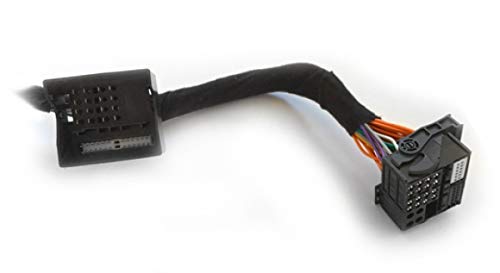
This manual provides instructions for the AXTON A480DSP-ISO43 Plug & Play connection cable. This 1.50 meter cable is designed for connecting AXTON A430DSP, A480DSP, A580DSP, and A500DSP digital sound processors. It is compatible with specific Audi (A3, A6, TT) and Mercedes (B-Class, C-Class) vehicles equipped with a Quadlock connection, facilitating a straightforward integration into your vehicle's audio system.
Setup
The A480DSP-ISO43 cable is designed for a Plug & Play installation, simplifying the connection process between your vehicle's head unit and a compatible AXTON DSP unit. Follow these steps for proper installation:
- Vehicle Preparation: Ensure your vehicle's ignition is off and the battery is disconnected before beginning any electrical work. This prevents short circuits and potential damage to the vehicle's electronics.
- Locate Quadlock Connector: Identify the existing Quadlock connector behind your vehicle's head unit. This is the main wiring harness for the audio system.
- Disconnect Original Harness: Carefully disconnect the vehicle's original Quadlock harness from the head unit.
- Connect A480DSP-ISO43 Cable: Connect one end of the A480DSP-ISO43 cable to the vehicle's head unit. Connect the other end of the A480DSP-ISO43 cable to the vehicle's original Quadlock harness.
- Connect to AXTON DSP: The remaining connector on the A480DSP-ISO43 cable is designed to plug directly into your compatible AXTON DSP unit (e.g., A430DSP, A480DSP, A580DSP, A500DSP). Refer to your DSP unit's manual for its specific input port.
- Secure Connections: Ensure all connections are firm and secure to prevent intermittent signal loss.
- Reconnect Battery: Once all connections are made, reconnect your vehicle's battery and test the audio system.
Operating
The A480DSP-ISO43 cable functions as a passive conduit for audio signals and power between your vehicle's head unit and the AXTON DSP. Once correctly installed, the cable requires no direct user operation. Its purpose is to ensure proper signal transmission, allowing your AXTON DSP to receive audio input from the head unit and send processed audio back to the vehicle's speakers. All operational adjustments and controls will be managed directly through your connected AXTON DSP unit and its associated software or controls.
Maintenance
To ensure the longevity and reliable performance of your A480DSP-ISO43 cable, consider the following maintenance guidelines:
- Regular Inspection: Periodically inspect the cable for any signs of physical damage, such as cuts, pinches, or frayed insulation. Ensure connectors are clean and free from corrosion.
- Avoid Stress: Do not bend the cable sharply or subject it to excessive pulling or tension. Route the cable in a way that avoids sharp edges or moving parts within the vehicle.
- Keep Dry: Protect the cable from moisture and liquids. Water ingress can lead to corrosion and electrical issues.
- Temperature Control: Avoid exposing the cable to extreme temperatures, which can degrade the PVC insulation over time.
- Cleaning: If necessary, gently wipe the cable with a dry, soft cloth to remove dust or dirt. Do not use harsh chemicals or abrasive cleaners.
Troubleshooting
If you experience issues after installing the A480DSP-ISO43 cable, consider the following troubleshooting steps:
- No Sound or Intermittent Audio:
- Verify all Quadlock connections are fully seated and secure at both the head unit and the vehicle's harness.
- Ensure the connection to the AXTON DSP unit is firm.
- Check for any visible damage to the cable itself (cuts, pinches).
- Power Issues with DSP:
- Confirm that the vehicle's battery was reconnected properly.
- Verify that the AXTON DSP unit is receiving power through the cable. Refer to the DSP's manual for power indicator lights.
- Incorrect Audio Channels:
- Double-check that the cable is correctly oriented and fully plugged into all connectors.
- Consult your AXTON DSP manual for channel configuration settings.
If problems persist after performing these checks, it is recommended to consult a professional car audio installer or contact AXTON customer support.
Specifications
| Brand | AXTON |
| Model Number | A480DSP-ISO43 |
| Material | Copper wire and Polyvinyl Chloride (PVC) |
| Connection Type | Quadlock |
| Cable Type | Flat band |
| Length | Approximately 1.50 meters |
| Compatibility | AXTON A430DSP, A480DSP, A580DSP, A500DSP; Audi A3, A6, TT; Mercedes B-Class, C-Class (with Quadlock) |
Warranty Information
Specific warranty terms for the AXTON A480DSP-ISO43 cable may vary by region and retailer. Please retain your proof of purchase. For detailed warranty information, it is recommended to consult the retailer from whom you purchased the product or visit the official AXTON website.
Support
For technical assistance, installation queries, or further support regarding your AXTON A480DSP-ISO43 cable, please refer to the following resources:
- AXTON Official Website: Visit the official AXTON website for product documentation, FAQs, and contact information.
- Authorized Retailer: Contact the authorized AXTON retailer where you purchased the product. They can often provide immediate assistance or guide you to the appropriate support channels.
- Professional Installer: If you are unsure about any aspect of the installation, it is always recommended to seek assistance from a qualified car audio professional.