
1. Introduction
Thank you for choosing the eSynic Professional 16-Channel Walkie-Talkie. This device is designed for reliable and clear long-distance communication, making it suitable for various applications such as security, construction, outdoor adventures, cycling, and hiking. With its robust features and user-friendly design, you can stay connected efficiently.

Image 1: eSynic Professional 16-Channel Walkie-Talkie, showcasing its compact and ergonomic design.
2. Product Overview
2.1 Components and Controls

Image 2: Detailed view of the walkie-talkie with key components labeled, including the antenna, PTT button, channel switch, power/volume control, signal indicator, and LED flashlight.
- Antenna: For transmitting and receiving signals.
- Power/Volume Control Knob: Rotate to turn the device on/off and adjust volume.
- Channel Switch Knob: Rotate to select one of the 16 available channels.
- PTT (Push-to-Talk) Button: Press and hold to transmit your voice.
- Monitor Button: Used for monitoring weak signals.
- Function Button (Bey): Programmable function button.
- LED Flashlight: Provides illumination in dark environments.
- SP/MIC Jacks: For connecting external headset/microphone.
- Microphone (MIC): For voice input.
- Belt Clip: For convenient carrying.
- Rubber Anti-slip Design: Enhances grip and durability.
2.2 What's in the Box
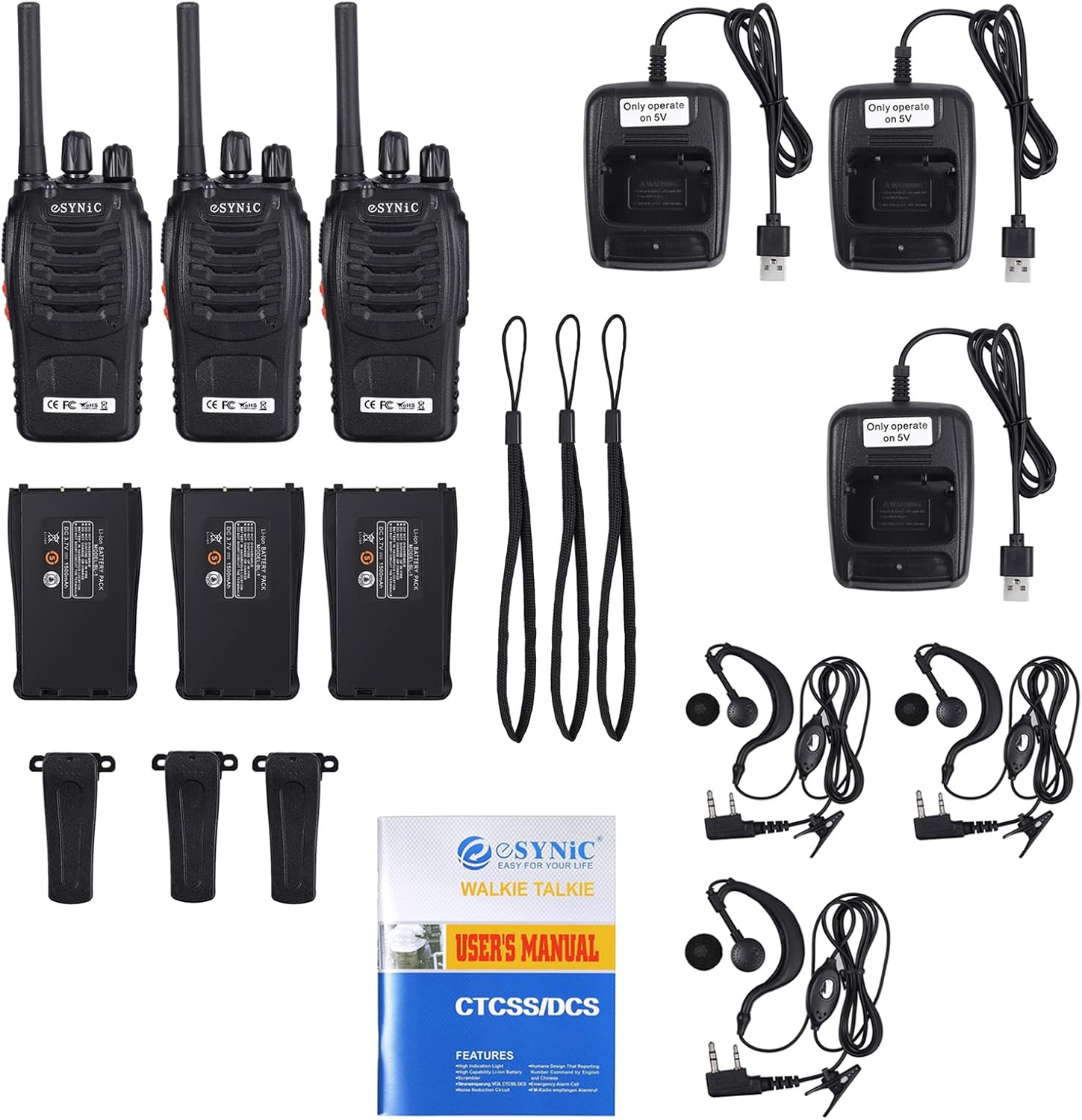
Image 3: The package includes walkie-talkies, headsets, USB chargers, belt clips, and lanyards.
- eSynic Walkie-Talkie Units (3 pieces)
- Headsets (3 pieces)
- USB Charging Bases (3 pieces)
- Belt Clips (3 pieces)
- Lanyards (3 pieces)
- User Manual
3. Setup
3.1 Battery Installation
- Ensure the walkie-talkie is powered off.
- Locate the battery compartment cover on the back of the device.
- Slide the cover downwards to open the compartment.
- Insert the 1500mAh Lithium-ion battery, ensuring the contacts align correctly.
- Slide the battery compartment cover back into place until it clicks securely.
3.2 Charging the Battery

Image 4: The walkie-talkie can be charged via a USB charging base or by directly connecting the battery to a USB charger.
The walkie-talkie features a 1500mAh rechargeable Lithium-ion battery. It can be charged using the provided USB charging base or by connecting the battery directly to a USB power source.
- Connect the USB charging cable to a power adapter (not included) or a power bank.
- Method 1 (Using Charging Base): Place the walkie-talkie into the charging base. The indicator light on the base will turn red during charging and green when fully charged.
- Method 2 (Direct Battery Charging): Remove the battery from the walkie-talkie and connect it to the dedicated USB battery charger. The indicator light will show charging status.
- A full charge typically takes 2-3 hours and provides 8-9 hours of continuous use.
4. Operating Instructions
4.1 Power On/Off and Volume Control
- To power on the device, rotate the Power/Volume Control knob clockwise until you hear a click and a voice prompt.
- To adjust the volume, continue rotating the Power/Volume Control knob.
- To power off, rotate the Power/Volume Control knob counter-clockwise until you hear a click.
4.2 Channel Selection
- Rotate the Channel Switch knob to select your desired channel (1-16).
- Ensure all walkie-talkies intended for communication are set to the same channel.
4.3 Transmitting and Receiving
- To transmit, press and hold the PTT (Push-to-Talk) button on the side of the walkie-talkie. Speak clearly into the microphone.
- Release the PTT button to stop transmitting and listen for a response.
- The signal indicator light will illuminate when transmitting or receiving.
4.4 VOX Function (Voice Operated Exchange)
- The VOX function allows for hands-free operation, enabling transmission when your voice is detected without pressing the PTT button.
- Refer to the full user manual for detailed instructions on activating and adjusting VOX sensitivity.
4.5 LED Flashlight

Image 5: The integrated LED flashlight provides convenient illumination in low-light conditions.
- To activate the LED flashlight, press the dedicated flashlight button (if available, or refer to the manual for specific button assignment).
- Press again to turn off the flashlight.
4.6 Emergency Alarm Function
- The walkie-talkie includes an emergency alarm function for critical situations.
- Consult the full user manual for instructions on how to activate and deactivate the emergency alarm.
4.7 Applications

Image 6: Examples of practical applications for the walkie-talkie, including construction sites, outdoor adventures, airports, and hotel operations.
5. Maintenance
5.1 Battery Care
- To prolong battery life, fully charge the battery before first use.
- Avoid overcharging or completely draining the battery.
- Store the battery in a cool, dry place when not in use for extended periods.
5.2 Cleaning
- Clean the walkie-talkie with a soft, damp cloth.
- Do not use harsh chemicals or abrasive cleaners.
- Ensure the device is dry before use or storage.
6. Troubleshooting
If you encounter issues with your eSynic walkie-talkie, please refer to the following common solutions:
- No Power: Ensure the battery is correctly installed and fully charged. Rotate the power knob clockwise to turn on.
- Cannot Communicate: Verify that all devices are on the same channel. Check if the volume is adjusted appropriately. Ensure you are within the effective communication range (up to 1.5 km in optimal conditions).
- Poor Sound Quality: Check for obstructions between devices. Ensure the antenna is securely attached. Adjust the volume.
- Battery Drains Quickly: Ensure the battery is fully charged. Reduce usage of high-power features like continuous transmission or flashlight.
For further assistance, please contact eSynic customer support.
7. Specifications

Image 7: The walkie-talkie measures approximately 171mm in height (including antenna), 58mm in width, and 34mm in depth.
| Feature | Description |
|---|---|
| Model Number | GGY-ESY159 |
| Brand | eSynic |
| Color | Black |
| Number of Channels | 16 |
| Frequency Range | UHF 446 MHz |
| Maximum Range | 1.5 Kilometers (up to 5 kilometers in optimal conditions) |
| Battery Type | 1500mAh Lithium-ion (Rechargeable) |
| Charging Method | USB (via charging base or direct battery charger) |
| Voltage | 3.7 Volts |
| Water Resistance Level | Waterproof |
| Special Features | Portable, VOX Function, CTCSS/DCS, Scan Function, Emergency Alarm, LED Flashlight |
| Item Weight | 139 Grams |
8. Warranty and Support
8.1 Manufacturer's Warranty
All eSynic products include a 12-month manufacturer's warranty from the date of purchase. This warranty covers defects in materials and workmanship under normal use.
8.2 Spare Parts Availability
Spare parts are guaranteed to be available for 18 months from the date of purchase.
8.3 Customer Support
For technical support, warranty claims, or any questions regarding your eSynic walkie-talkie, please contact eSynic customer service through the retailer where you purchased the product. Please have your model number (GGY-ESY159) and proof of purchase ready.
