
1. Introduction
Thank you for choosing the PKPOWER 19V AC/DC Adapter. This adapter is designed as a replacement power supply for various HP TouchSmart 520-1200 Desktop PC Series models. Please read this manual carefully before using the product to ensure proper operation and safety.
2. Safety Information
Always follow these safety guidelines to prevent damage to the adapter, your device, or personal injury:
- Do not expose the adapter to water, moisture, or high humidity.
- Avoid extreme temperatures. Do not operate the adapter in direct sunlight or near heat sources.
- Do not disassemble, modify, or attempt to repair the adapter. This will void the warranty and may cause electric shock or fire.
- Ensure the adapter is used with devices that match its voltage and current specifications. Using an incompatible adapter can damage your device.
- Keep the adapter away from children.
- Unplug the adapter from the power outlet when not in use for extended periods.
- If the adapter or cable is damaged, discontinue use immediately and contact customer support.
3. Package Contents
Please check the package for the following items:
- PKPOWER 19V AC/DC Adapter (1 unit)
If any items are missing or damaged, please contact your retailer or PKPOWER customer service.
4. Setup
Follow these steps to properly set up your PKPOWER AC/DC Adapter:
- Inspect the Adapter: Before connecting, visually inspect the adapter and its cables for any signs of damage. Do not use if damaged.
- Connect to Device: Plug the DC output connector of the adapter firmly into the power input port of your HP TouchSmart Desktop PC. Ensure a secure connection.
- Connect to Power Outlet: Plug the AC input cable into a standard wall power outlet (100-240V AC).
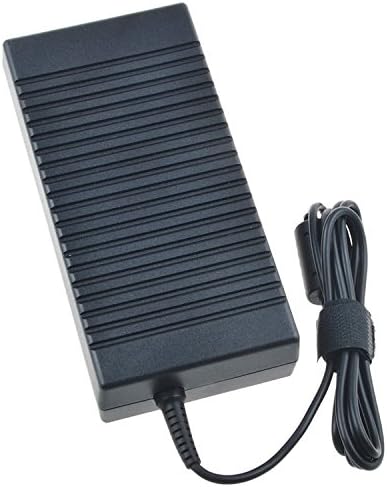
Image 1: PKPOWER 19V AC/DC Adapter with its output cable.
The adapter is now ready for use.
5. Operating Instructions
Once the adapter is properly connected as described in the Setup section:
- The adapter will automatically provide power to your HP TouchSmart Desktop PC.
- Turn on your desktop PC as you normally would.
- The adapter is designed for continuous operation within its specified limits.

Image 2: Top view of the PKPOWER 19V AC/DC Adapter.
6. Maintenance
To ensure the longevity and optimal performance of your adapter:
- Cleaning: Disconnect the adapter from both the power outlet and your device before cleaning. Use a soft, dry cloth to wipe the surface. Do not use liquid cleaners or solvents.
- Storage: When not in use, store the adapter in a cool, dry place, away from direct sunlight and extreme temperatures. Avoid tightly coiling the cables to prevent damage.
- Cable Care: Do not bend, twist, or pull the cables excessively. Avoid placing heavy objects on the cables.
7. Troubleshooting
If you encounter issues with your PKPOWER AC/DC Adapter, refer to the following common problems and solutions:
| Problem | Possible Cause | Solution |
|---|---|---|
| No power to device | Adapter not properly connected. Power outlet not working. Adapter or cable damaged. | Ensure all connections are secure. Test the power outlet with another device. Inspect adapter and cables for damage; if damaged, discontinue use. |
| Device not charging/powering on | Incorrect adapter specifications. Device issue. | Verify the adapter's output voltage (19V) matches your device's requirements. If the adapter is correct, the issue might be with the device itself. |
| Adapter gets excessively hot | Overload or poor ventilation. | Ensure the adapter is not covered and has adequate airflow. If overheating persists, discontinue use and contact support. |
If the problem persists after trying these solutions, please contact PKPOWER customer support.
8. Specifications
- Input Voltage: 100-240V AC, 50-60Hz
- Output Voltage: 19V DC
- Compatibility: Designed for HP TouchSmart 520-1200 Desktop PC Series (e.g., 520-1201ej, 520-1201el, 520-1201er, 520-1202el, 520-1202en, 520-1202er, 520-1202ex, 520-1203el, 520-1203er)
- Certifications: CE, FCC, RoHS
- Protection Features: Over Voltage Protection (OVP), Over Current Protection (OCP), Short Circuit Protection (SCP)
- Color: Black
9. Warranty & Support
PKPOWER products are manufactured to high-quality standards. This product comes with a manufacturer's warranty against defects in materials and workmanship under normal use.
For warranty claims, technical assistance, or any questions regarding your product, please contact PKPOWER customer service. Our friendly and reliable customer service team aims to respond to inquiries within 24 hours.
Contact Information: Please refer to the contact details provided with your purchase or visit the official PKPOWER website for support options.