
1. Introduction
This manual provides instructions for the Zerone Universal Remote Control, designed as a replacement for various Haier TV models. It is compatible with Haier HTR-A18M, 55D3550, 40D3500M, and 48D3500 series televisions. This remote control offers direct access to digital TV functions without complex programming.

Image 1.1: The Zerone Universal Remote Control in use, demonstrating its compatibility with Haier HTR-A18M, 55D3550, 40D3500M, and 48D3500 TV models.
2. Setup
2.1 Battery Installation
The remote control requires two (2) AAA batteries (not included) for operation. Follow these steps to install the batteries:
- Locate the battery compartment on the back of the remote control.
- Press down on the latch and slide the battery cover off.
- Insert two AAA batteries, ensuring the positive (+) and negative (-) terminals align correctly with the markings inside the compartment.
- Slide the battery cover back into place until it clicks securely.
The remote is ready for use immediately after battery installation; no additional programming is required for compatible Haier TV models.

Image 2.1: Detailed view of the remote control, highlighting the battery compartment for AAA battery installation.
3. Operating Instructions
3.1 Basic Functions
This remote control provides standard functions for your Haier TV. Point the remote directly at your television's infrared receiver for optimal performance.
- Power Button (U): Turns the TV on or off.
- Input: Selects video input sources (HDMI, AV, etc.).
- Number Buttons (0-9): Direct channel selection.
- VOL +/-: Adjusts volume up or down.
- CH +/-: Changes channels up or down.
- MUTE: Mutes or unmutes the TV audio.
- MENU: Accesses the TV's main menu.
- Navigation Buttons (Up, Down, Left, Right, OK): Navigates through menus and confirms selections.
- BACK / EXIT: Returns to the previous screen or exits the current menu.
- DISPLAY: Shows current channel information.
- SAP / AUDIO: Selects audio language or mode.
- SLEEP: Sets the sleep timer.
- PICTURE / WIDE: Adjusts picture mode or aspect ratio.
- CH.LIST / FAVORITE: Accesses channel list or favorite channels.
- Media Control Buttons (Play, Pause, Fast Forward, Rewind): Controls media playback.
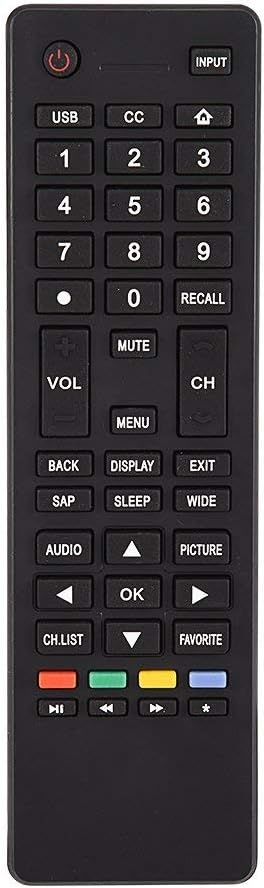
Image 3.1: Overview of the remote control's button layout for easy identification of functions.
3.2 Operating Range
The remote control has a stable signal transmission distance of up to 10 meters (33 feet). Actual remote distance may vary depending on environmental factors and the specific model of your TV.
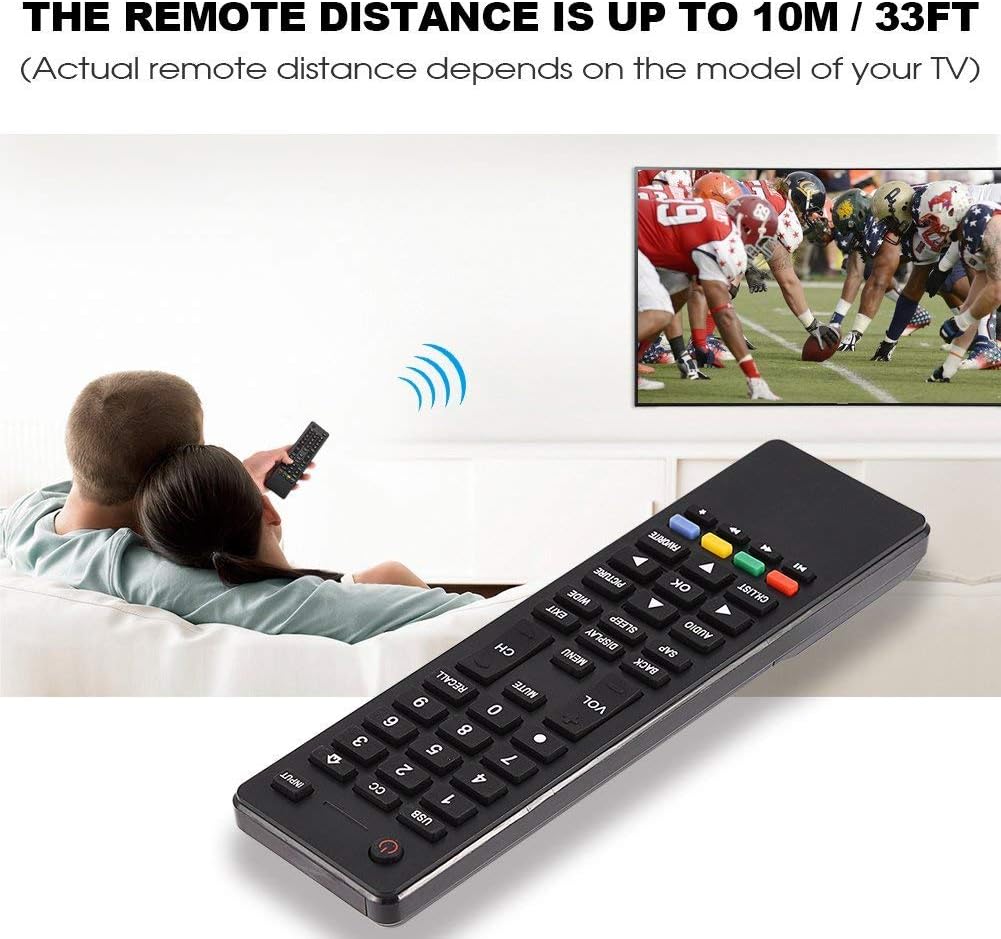
Image 3.2: Visual representation of the remote control's effective operating distance to the television.
4. Maintenance
4.1 Cleaning
To clean the remote control, use a soft, dry cloth. For stubborn dirt, lightly dampen the cloth with water or a mild cleaning solution. Avoid using harsh chemicals or abrasive cleaners, as these can damage the remote's surface or internal components.
4.2 Battery Care
- Replace batteries when the remote's response becomes sluggish or stops working.
- Do not mix old and new batteries, or different types of batteries.
- Remove batteries if the remote control will not be used for an extended period to prevent leakage.
- Dispose of used batteries responsibly according to local regulations.
5. Troubleshooting
5.1 Remote Not Responding
- Check Batteries: Ensure batteries are inserted correctly with the correct polarity (+/-) and are not depleted. Replace with fresh AAA batteries if necessary.
- Line of Sight: Make sure there are no obstructions between the remote control and the TV's infrared sensor.
- Distance: Confirm you are within the effective operating range (up to 10 meters / 33 feet).
- TV Compatibility: Verify that your TV model is listed as compatible (Haier HTR-A18M, 55D3550, 40D3500M, 48D3500).
5.2 Buttons Not Working Correctly
- Clean Remote: Dust or debris under buttons can cause malfunction. Refer to the Maintenance section for cleaning instructions.
- Battery Check: Weak batteries can lead to inconsistent button responses. Replace batteries.
6. Specifications
| Feature | Detail |
|---|---|
| Brand | Zerone |
| Compatible Devices | Haier HTR-A18M, 55D3550, 40D3500M, 48D3500 TVs |
| Connectivity Technology | Infrared |
| Maximum Range | 10 meters (33 feet) |
| Battery Type | 2 x AAA (not included) |
| Controller Type | Button Control |
| Material | ABS |
| Model Number | Zerone9rnag3b5y4-cr |
| UPC | 647213811490 |

Image 6.1: Physical dimensions of the Zerone Universal Remote Control.
7. Warranty Information
This product is offered as an Amazon Renewed item. Amazon Renewed products are professionally inspected and tested to work and look like new. If you are not satisfied with your purchase, renewed products are eligible for replacement or refund under the Amazon Renewed Guarantee.
Additionally, the manufacturer provides a 90-day limited warranty. For specific details regarding the terms and conditions of this warranty, please refer to the documentation provided at the time of purchase or contact customer support.
8. Customer Support
If you encounter any issues or have questions regarding your Zerone Universal Remote Control that are not addressed in this manual, please contact the seller or Amazon Renewed customer service for assistance.
For Amazon Renewed Guarantee claims, please visit the Amazon Renewed program page or contact Amazon customer support directly.