
Rollerhouse 304ca9be-9900-4831-9259-01d0258edb11
Contents
Rollerhouse 1.25" (32mm) Battery Powered Electric Shade Motor Instruction Manual
Model: 304ca9be-9900-4831-9259-01d0258edb11 | Brand: Rollerhouse
Product Overview
The Rollerhouse 1.25" (32mm) Battery Powered Electric Shade Motor provides a convenient and quiet motorized solution for various interior window coverings, including blinds, shades, Roman/woven shades, sheer shades, and horizontal blinds. This motor is designed for easy integration into existing roller blind systems, offering automated control.

Figure 1: Rollerhouse 1.25" (32mm) Battery Powered Electric Shade Motor.
Setup and Installation
Follow these simple steps to retrofit your roller blinds with the Rollerhouse motor.
Step 1: Measure Your Shade Tube
Accurate measurement of your existing shade tube's Inner Diameter (ID) and Outer Diameter (OD) is crucial for selecting the correct motor and drive parts. A digital ruler is recommended for precision.

Figure 2: Measuring the ID and OD of the shade tube.
The motor is compatible with Rollease 1.25" (32mm) Roller Shade Tubes. Ensure your tube matches these specifications. The ID helps choose the motor diameter, and the OD helps select the drive parts.
Step 2: Prepare Your Blind
Unclip your existing roller blind and carefully remove its chain drive mechanism. This motor replaces the manual chain drive.
Step 3: Insert the Motor
Insert the Rollerhouse motor into the shade tube. Ensure the motor is fully seated and any included rubber fittings or crown and drive adapters are properly installed for a secure fit.
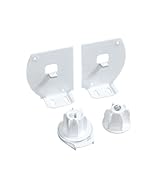
Figure 3: Motor with required crown and drive adapters.
Note: Mounting hardware and brackets are not included with the bare motor and must be selected and purchased separately to match your specific installation needs.
Step 4: Reinstall and Set Up Controls
Rehang your motorized roller blind. Once installed, proceed to set up your controls, including pairing the remote and configuring smart home integrations if desired.
Figure 4: Pairing the remote with the motor.
Operating Instructions
The Rollerhouse motor offers versatile control options for your motorized shades.
Remote Control Operation
If you have a compatible remote control (not included with this bare motor), you can use it to raise, lower, and stop your shades. Refer to your remote's specific instructions for pairing and limit setting procedures.
Figure 5: Example of a compatible remote control.
Smart Home Integration (Optional)
For advanced control, the motor can be integrated with smart home systems like Amazon Alexa and Google Home via an RF/Wi-Fi gateway (sold separately). This allows for voice commands and scheduled automation.

Figure 6: Smart home integration with voice assistants and a smart hub.
The RF/Wi-Fi gateway learns commands from your remote and converts them for smart home compatibility. You can set daily or weekly schedules or use voice commands to control your shades.

Figure 7: Multi-device and brand compatible smart hub.
The smart hub typically offers an IR range of up to 10m and an RF range of up to 40m, allowing for flexible placement within your home.

Figure 8: Smart hub range capabilities.
Compatibility extends to Amazon Alexa, Google Assistant, Siri, Smart Life, and Tuya platforms. Note that Zigbee devices, IFTTT, and HomeKit are not supported by the smart hub.
Maintenance
The Rollerhouse Electric Shade Motor requires minimal maintenance. For cleaning, spot clean the motor and surrounding components as needed. Avoid using harsh chemicals or abrasive materials that could damage the motor or its housing.
Ensure the motor's battery is charged regularly to maintain optimal performance. Charging frequency will depend on usage.
Troubleshooting
If you encounter issues with your Rollerhouse Electric Shade Motor, consider the following common problems and solutions:
| Problem | Possible Cause | Solution |
|---|---|---|
| Motor does not run | Low battery, motor not paired, power issue. | Charge the motor's battery. Re-pair the remote with the motor. Check power connection if applicable. |
| Motor runs but shades do not move | Incorrect installation of crown/drive adapters, motor not properly seated in tube. | Ensure crown and drive adapters are correctly fitted. Verify the motor is fully inserted and secured within the shade tube. |
| Cannot program limits or remote | Incorrect programming steps, remote battery low. | Refer to the detailed programming instructions (usually provided with the remote). Replace remote battery (e.g., CR2450 for some models). |
| Motor direction is reversed | Motor direction needs to be inverted. | Follow the remote's instructions to reverse motor direction (e.g., holding limit and stop buttons). |
| Motor does not fit the roller blinds | Incorrect tube diameter or type. | Verify your shade tube's ID and OD against the motor's specifications. Contact Rollerhouse support for assistance with alternative drive wheels or motor sizes. |
For persistent issues or specific technical assistance, please contact Rollerhouse customer support.
Specifications
| Feature | Detail |
|---|---|
| Model Number | 304ca9be-9900-4831-9259-01d0258edb11 |
| Material | Metal + Plastic |
| Product Dimensions | 4"L x 1"W (approximate for motor body) |
| Compatible Tube Diameter | 1.25" (32mm) |
| Operation Mode | Automatic |
| Special Feature | DC 8.4V, 1.25 inch Tube (Just the Roller Motor) |
| Included Components | 32mm rubber fittings, Install Instruction, Roller shade motor (remote and charger not included with bare motor) |
| Item Weight | 2.89 ounces (81.99 Grams) |
| Lifting Capacity | 6lb shades |
| Radio Frequency | 433.32MHz (for remote control) |
| Torque | 0.6Nm |
| Speed | 28rpm |

Figure 9: Technical specifications and included components.
Warranty and Support
Rollerhouse provides long-term technical assistance for its products. If you encounter any issues such as the motor not fitting your roller blinds, incorrect sizing, programming difficulties, or the motor not running, please contact us via Amazon message.
We recommend providing photos of your setup to help us recommend the correct size or provide spare drive wheel samples for assurance. Our goal is to ensure your satisfaction with our motorized solutions.
For further assistance, please visit the official Rollerhouse Store on Amazon: Rollerhouse Store.
Ask a question about this manual
Ask about setup, troubleshooting, compatibility, parts, safety, or missing instructions. Manuals+ will review the question and use this page’s manual context to help answer it.