
Introduction
This manual provides instructions for the installation and proper use of the Panasonic Strada genuine digital terrestrial film antenna and 3M super strong double-sided tape set. This product is designed for use when replacing or reinstalling car navigation systems, specifically compatible with Panasonic Strada models CN-RE03D and CN-RE03WD. The included components ensure optimal digital terrestrial broadcast reception.
Package Contents
Verify that all items listed below are present in your package:
- Genuine Film Antennas: 4 pieces (2 for left side, 2 for right side)
- 3M Super Strong Acrylic Foam Double-Sided Tapes: 4 pieces (for antenna attachment)
Note: Antenna cables and GPS antennas are not included and must be purchased separately if needed.
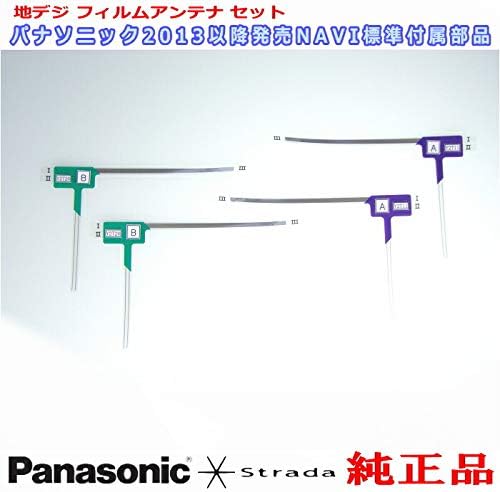
Image: Overview of the film antenna and double-sided tape set. The set includes four film antennas and four pieces of 3M double-sided tape for secure installation.

Image: Product label confirming the contents and noting that antenna cords and GPS antennas are sold separately. This label specifies the model YESFZ450.
Setup and Installation
Proper installation is crucial for optimal reception. Follow these general guidelines. Refer to your car navigation system's specific installation manual for detailed wiring and panel removal instructions.
- Preparation: Ensure the installation surface on the windshield is clean, dry, and free of grease or dust. Use an alcohol wipe if necessary and allow it to dry completely.
- Antenna Placement: Carefully plan the placement of each film antenna on the windshield. Typically, two antennas are placed on the left side and two on the right side, as indicated by the 'A' and 'B' markings on the antenna tabs. Ensure they do not obstruct your view or interfere with other vehicle components.
- Applying Double-Sided Tape: Peel off one side of the protective backing from a 3M double-sided tape. Align it precisely with the designated area on the film antenna. Press firmly to ensure good adhesion.
- Attaching Antennas to Windshield: Peel off the remaining protective backing from the double-sided tape on the antenna. Carefully position the antenna on the prepared windshield surface. Press firmly along the entire length of the antenna and tape to eliminate air bubbles and ensure strong adhesion.
- Connecting Antenna Cables: If you have purchased antenna cables separately, connect them to the film antennas. Route the cables neatly to your car navigation system, ensuring they do not interfere with vehicle operation or safety features. Secure cables with clips or ties as needed.
- System Integration: Connect the antenna cables to the corresponding input ports on your Panasonic Strada car navigation unit. Refer to your navigation system's manual for specific port locations.
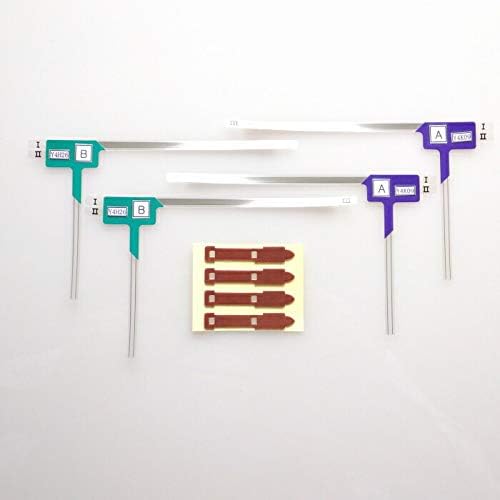
Image: A detailed view of the film antennas and the 3M double-sided tape, highlighting the adhesive surface for installation.
Operating
Once the film antennas are correctly installed and connected to your Panasonic Strada navigation system, the system will automatically utilize them for digital terrestrial broadcast reception. The genuine Panasonic antennas are designed to maximize reception sensitivity, providing a stable viewing experience.
- Channel Scan: After installation, perform a channel scan on your car navigation system to detect available digital terrestrial broadcasts in your area.
- Reception Quality: Reception quality may vary depending on your geographical location, vehicle speed, and environmental factors such as buildings or terrain.
Maintenance
The film antennas require minimal maintenance to ensure long-term performance.
- Cleaning: Gently wipe the windshield area around the antennas with a soft, damp cloth. Avoid using harsh chemicals or abrasive materials that could damage the antenna film or the adhesive.
- Inspection: Periodically check the antennas for any signs of damage or peeling. If an antenna begins to peel, re-secure it with new 3M double-sided tape if possible, or replace the antenna if damaged.
Troubleshooting
If you experience issues with digital terrestrial broadcast reception, consider the following troubleshooting steps:
- No Signal or Poor Reception:
- Verify all antenna cables are securely connected to both the film antennas and the navigation system.
- Ensure the film antennas are firmly adhered to the windshield. Reapply tape if necessary.
- Perform a channel rescan on your navigation system.
- Check if you are in an area with known digital terrestrial broadcast coverage.
- Obstructions like tall buildings, tunnels, or dense foliage can affect reception. Try moving to an open area.
- Antenna Peeling:
- If an antenna begins to peel, carefully remove it and clean the area thoroughly. Reapply with a new piece of 3M super strong double-sided tape, ensuring firm pressure during application.
Specifications
| Brand | Panasonic |
| Manufacturer | Panasonic |
| Model Compatibility | Panasonic Strada CN-RE03D, CN-RE03WD |
| Antenna Type | Digital Terrestrial Film Antenna (TV) |
| Adhesive Type | 3M Acrylic Foam Double-Sided Tape |
| Number of Film Antennas | 4 (2 left, 2 right) |
| Number of Double-Sided Tapes | 4 |
| ASIN | B07NTQ5L9M |
Support
For further assistance or inquiries regarding this product, please contact your authorized Panasonic dealer or the point of purchase. Ensure you have your product model number (CN-RE03D or CN-RE03WD) and ASIN (B07NTQ5L9M) available when seeking support.