
Logitech G 910-005670
Logitech G903 LIGHTSPEED Wireless Gaming Mouse with HERO 25K Sensor Instruction Manual
Model: 910-005670
1. Introduction
This manual provides detailed instructions for the Logitech G903 LIGHTSPEED Wireless Gaming Mouse. Designed for precision and performance, this mouse features the HERO 25K sensor, LIGHTSPEED wireless technology, and customizable options to enhance your gaming and computing experience.
2. Setup
2.1. What's in the Box
The Logitech G903 LIGHTSPEED Wireless Gaming Mouse package includes the following components:
- Logitech G903 LIGHTSPEED Wireless Gaming Mouse
- LIGHTSPEED USB Receiver
- Charging/Data Cable
- Receiver Extension Adapter
- Optional 10g Weight
- Optional Side Buttons (left and right)
- Button Covers
- Documentation

Figure 2.1: Package Contents. This image displays all items included in the Logitech G903 LIGHTSPEED Wireless Gaming Mouse package, laid out neatly. Visible are the mouse, its braided charging cable, the USB LIGHTSPEED receiver, a small case containing an optional 10-gram weight, and additional side buttons with covers for ambidextrous configuration.
2.2. Connecting the Mouse
The G903 mouse offers both wireless and wired connectivity options.
2.2.1. Wireless Connection
- Locate the LIGHTSPEED USB receiver.
- Plug the USB receiver directly into an available USB port on your computer. For optimal signal strength, especially if your computer is under a desk, use the included receiver extension adapter and charging/data cable to position the receiver closer to your mouse.
- Turn on the mouse using the ON/OFF switch located on the underside of the mouse.
- The mouse should automatically connect to your computer.
2.2.2. Wired Connection
To use the mouse in wired mode or to charge it, connect the charging/data cable directly to the micro-USB port on the front of the mouse and to an available USB port on your computer.
2.3. Installing Logitech G HUB Software
For full customization of buttons, DPI settings, and LIGHTSYNC RGB lighting, download and install the Logitech G HUB software from the official Logitech G website. This software is compatible with Windows 7 or later and Mac OS X 10.11 or later.
2.4. Adjusting Mouse Weight
The G903 mouse comes with an optional 10-gram weight to customize its feel. To install or remove the weight:
- Turn the mouse over.
- Locate the circular magnetic cover on the underside.
- Remove the cover.
- Place the 10g weight into the designated slot or remove it if already installed.
- Replace the magnetic cover.

Figure 2.2: Removable Weight Compartment. This diagram illustrates the underside of the G903 mouse, highlighting the magnetic compartment for the optional 10-gram weight. It also shows the ON/OFF switch, profile button, and advanced optical sensor.
3. Operating Instructions
3.1. Button Functions and Customization
The G903 features up to 11 programmable buttons, including the main left/right clicks, DPI adjustment buttons, and side buttons. All buttons can be customized using the Logitech G HUB software.
- Main Clicks: Left and right click buttons feature metal-spring button tensioning for consistent feel and response.
- DPI Adjustment: Dedicated buttons near the scroll wheel allow for on-the-fly DPI changes.
- Scroll Wheel: The hyper-fast dual-mode scroll wheel can be switched between click-to-click precision and hyper-fast scrolling using a button located behind it.
- Side Buttons: The mouse includes removable side buttons, allowing for ambidextrous configuration. You can choose to have buttons on the left, right, or both sides, or use button covers for a smooth grip.

Figure 3.1: Mouse Features Overview. This image provides a detailed view of the G903 mouse, pointing out key features such as up to 180 hours battery life, 110g lightweight design, 7-11 customizable buttons and layout, 10g optional weight, hyper-fast dual-mode scroll wheel, and approximately 16.8M LIGHTSYNC RGB colors.
3.2. LIGHTSYNC RGB Lighting
The G903 features LIGHTSYNC RGB lighting, offering full-spectrum customization with approximately 16.8 million colors. Lighting effects can respond to in-game action, audio, or screen color. Customize these settings via Logitech G HUB software.
- G Logo: The Logitech G logo on the palm rest illuminates with customizable RGB.
- DPI Indicator: Small LED lights near the DPI buttons indicate the current DPI profile.
- Battery Indicator: The DPI indicator lights also serve as a battery level indicator, changing color or pattern to show remaining charge.
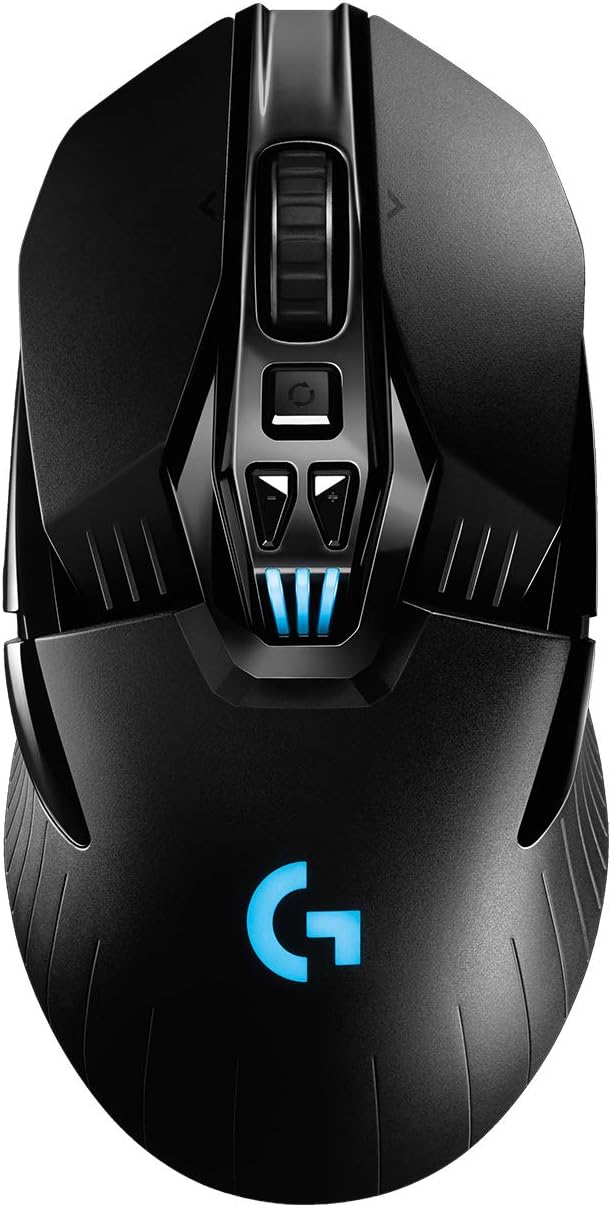
Figure 3.2: G903 RGB Lighting. A top-down view of the Logitech G903 mouse showcasing its customizable blue RGB lighting on the G logo and DPI indicator lights.
3.3. HERO 25K Sensor and DPI Settings
The G903 is equipped with the HERO 25K sensor, offering 1:1 tracking, 400+ IPS, and a DPI range of 100-25,600. This sensor provides zero smoothing, filtering, or acceleration for precise control.

Figure 3.3: HERO 25K Sensor. This image highlights the HERO 25K sensor technology within the G903 mouse, emphasizing its capabilities for precision, accuracy, and improved battery efficiency.

Figure 3.4: Upgraded Performance Comparison. A table comparing the original G903 LIGHTSPEED with the G903 LIGHTSPEED with HERO 25K Sensor, detailing improvements in DPI range (200-12000 vs. 100-16000, though the product description states 25,600 for HERO 25K) and significantly extended battery life (Up to 32h vs. Up to 180h).
3.4. Battery Life and Charging
The G903 features a super-efficient LiPo battery, providing up to 140 hours of gameplay with LIGHTSYNC RGB lighting enabled, and up to 180 hours without lighting. The mouse can be charged via the included charging/data cable. Additionally, it is compatible with the Logitech G POWERPLAY wireless charging system (sold separately), which allows continuous charging while at rest and at play.

Figure 3.5: POWERPLAY Wireless Charging Compatibility. This image shows the G903 mouse on a POWERPLAY mousepad, demonstrating its compatibility with the wireless charging system for continuous power. Note: POWERPLAY Wireless Charging System is sold separately.
4. Maintenance
To ensure optimal performance and longevity of your Logitech G903 mouse, follow these maintenance guidelines:
- Cleaning: Use a soft, lint-free cloth to gently wipe the surface of the mouse. For stubborn dirt, slightly dampen the cloth with water. Avoid harsh chemicals or abrasive materials.
- Sensor Care: Keep the optical sensor on the underside of the mouse clean and free from dust or debris. Use a can of compressed air to gently clear any obstructions.
- Cable Management: When using the wired connection or charging, ensure the cable is not excessively bent or strained to prevent damage.
- Storage: Store the mouse in a dry, cool environment away from direct sunlight and extreme temperatures.
5. Troubleshooting
If you encounter issues with your Logitech G903 mouse, refer to the following common troubleshooting steps:
- No Power/Not Responding:
- Ensure the mouse is turned ON via the switch on the underside.
- Connect the mouse via the charging/data cable to check if it powers on in wired mode.
- Verify the battery is charged. The DPI indicator lights will show battery status.
- Wireless Connectivity Issues:
- Ensure the LIGHTSPEED USB receiver is securely plugged into a working USB port.
- Try using the receiver extension adapter to position the receiver closer to the mouse.
- Avoid sources of wireless interference (e.g., Wi-Fi routers, other wireless devices).
- Try plugging the receiver into a different USB port.
- Tracking Problems:
- Clean the optical sensor on the underside of the mouse.
- Ensure you are using the mouse on a suitable surface (e.g., a mouse pad).
- Check DPI settings in Logitech G HUB; reset to default if necessary.
- Software Not Recognizing Mouse:
- Ensure Logitech G HUB is updated to the latest version.
- Restart your computer and the mouse.
- Reinstall Logitech G HUB software.
6. Specifications
| Feature | Detail |
|---|---|
| Brand | Logitech G |
| Model Number | 910-005670 |
| Series | G903 LIGHTSPEED Gaming Mouse with HERO 25K sensor |
| Connectivity Technology | LIGHTSPEED Wireless |
| Movement Detection Technology | Optical (HERO 25K Sensor) |
| DPI Range | 100-25,600 |
| Report Rate | 1 ms |
| Battery Life (with RGB) | Up to 140 hours |
| Battery Life (without RGB) | Up to 180 hours |
| Battery Type | 1 Lithium Polymer battery (included) |
| Wireless Charging Compatibility | POWERPLAY (System sold separately) |
| Weight | 3.88 ounces (approx. 110g) + 10g optional weight |
| Dimensions (LxWxH) | 5.13 x 2.62 x 1.59 inches (130 x 66.5 x 40.4 mm) |
| Color | Black |
| Hardware Platform | PC |
| Operating System Compatibility | PC, Mac OS, Linux |
| Special Feature | Rechargeable, Ambidextrous Design, LIGHTSYNC RGB |
7. Warranty and Support
Logitech G products typically come with a limited hardware warranty. For specific warranty details, please refer to the warranty information included in your product packaging or visit the official Logitech G support website. For technical assistance, driver downloads, and frequently asked questions, please visit support.logitech.com/gaming.
8. Official Product Videos
Logitech G903 LIGHTSPEED Wireless Gaming Mouse Overview
Video 8.1: G903 LIGHTSPEED Features. This video provides an overview of the Logitech G903 LIGHTSPEED Wireless Gaming Mouse, highlighting its key features and design elements. It showcases the mouse's ambidextrous design, customizable buttons, and LIGHTSPEED wireless technology.
Related documents910-005670

Ask a question about this manual
Ask about setup, troubleshooting, compatibility, parts, safety, or missing instructions. Manuals+ will review the question and use this page’s manual context to help answer it.