
Introduction
The Retevis RT55 Handheld Marine Radios are designed for reliable communication in marine environments. Featuring IP67 waterproofing and a floating design, these radios are built to withstand the elements. This manual provides essential information for setup, operation, and maintenance of your RT55 radios.
What's in the Box
- 2 x Retevis RT55 Marine two way radios
- 2 x Antenna & 2 x Belt Clip
- 2 x 1200mAh Li-ion Battery
- 2 x Power Adapter & 2 x Charger
- 2 x Sling & 2 x English User Manual
Product Overview
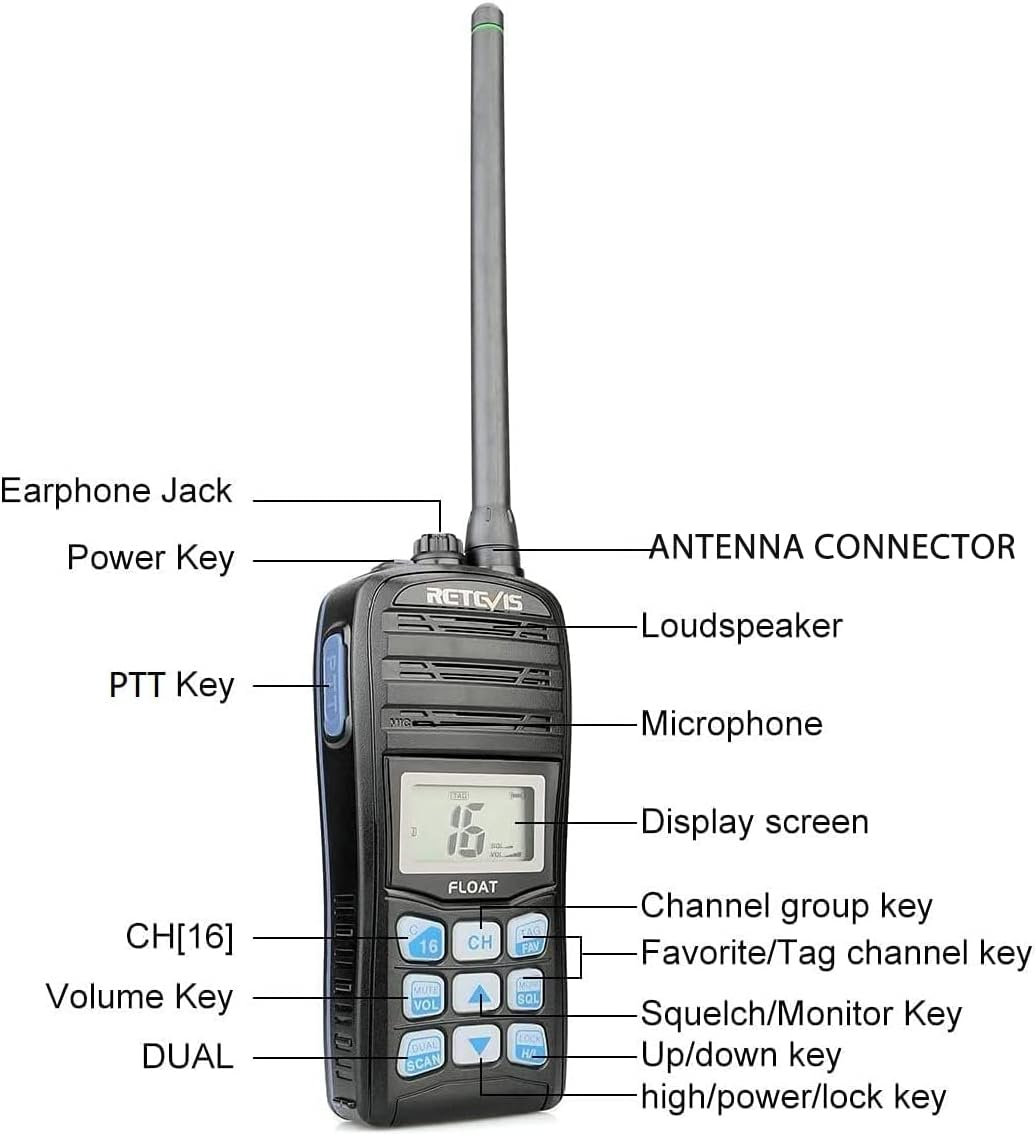
Figure 1: Front view of the Retevis RT55 Marine Radio with key components labeled, including the earphone jack, power key, PTT key, antenna connector, loudspeaker, microphone, display screen, channel group key, favorite/tag channel key, volume key, squelch/monitor key, up/down key, and high/power/lock key.

Figure 2: Side view of the Retevis RT55 Marine Radio illustrating its compact dimensions: 140mm (H) x 65mm (W) x 41mm (D), not including the antenna. The radio weighs 288g with battery, antenna, and belt clip.
Key Features and Operation
IP67 Waterproof and Floating Design
The Retevis RT55 is designed to be truly waterproof with an IP67 rating, meaning it can be submerged in 1 meter of water for 30 minutes without damage. Its lightweight design also allows it to float if accidentally dropped overboard, making retrieval easy.
Video: Demonstrates the IP67 waterproof capability and floating function of the Retevis RT55 radio, showing it submerged in water and floating to the surface.

Figure 3: The Retevis RT55 radio partially submerged in water, highlighting its IP67 waterproof rating and ability to float, ensuring it remains functional and retrievable.
Aqua Quake Water Drainage Function
If water enters the speaker grille and distorts audio, the Aqua Quake function can be activated to vibrate the speaker and force water out. This ensures clear sound quality even after exposure to water.
Video: Illustrates the Aqua Quake feature of the Retevis RT55, showing how the radio vibrates its speaker to expel water and restore clear audio.

Figure 4: The Retevis RT55 radio actively using its vibration drainage function, indicated by water droplets being expelled from the speaker area, ensuring optimal performance after water exposure.
NOAA Weather Alert
The radio features NOAA Weather alerts, providing instant updates on weather information by scanning 10 weather channels and alerting you to severe weather nearby.

Figure 5: The Retevis RT55 radio's display showing weather-related information, surrounded by icons representing different weather conditions, indicating its NOAA weather alert capability.
Dual/Tri-Watch Function
The Dual/Tri-Watch feature allows you to monitor multiple channels simultaneously. Dual Watch monitors your current operating channel and the emergency channel (Channel 16). Tri-Watch monitors your operating channel, the emergency channel, and a third desired calling channel.
Video: Explains the Dual/Tri-Watch function, demonstrating how the radio monitors multiple channels simultaneously for enhanced safety and communication.

Figure 6: A visual representation of the Dual-watch and Tri-watch features, showing how the radio can monitor two or three channels, including the emergency channel (CH16), concurrently.
Scan Modes
The RT55 offers two types of scan modes: Normal Scan and Priority Scan. Normal Scan searches through all tagged channels in sequence. Priority Scan sequentially searches through all tagged channels while continuously monitoring Channel 16 (emergency channel). NOAA weather channels and tagged channels will also be scanned when activated.
Video: Demonstrates the scan modes of the Retevis RT55, explaining the difference between normal and priority scanning, and how they help monitor various channels including emergency and weather alerts.
Keypad Functions
The radio features a fully backlit keypad with dedicated buttons for various functions, including channel selection, volume control, mute, squelch, and lock. The up/down arrows allow for easy navigation through channels.
Video: A detailed walkthrough of the Retevis RT55's keypad functions, explaining how to use each button for channel selection, volume adjustment, muting, squelch control, and locking the keypad.
Programming Mode
The radio features a programming mode with 11 different options to customize settings such as beep tone, weather alert, scan mode, scan resume timer, auto scan, dual/tri-watch, monitor key function, LCD contrast, and power save function. To access the programming menu, turn the radio on while pushing down the monitor and squelch buttons simultaneously.
Video: Guide to accessing and navigating the programming mode on the Retevis RT55, detailing how to adjust various settings like beep tone, weather alerts, and scan options.
Specifications
| Feature | Detail |
|---|---|
| Item Weight | 3.1 pounds |
| Product Dimensions | 2.95 x 9.69 x 9.72 inches |
| Country of Origin | China |
| Item model number | FA9153AX2 |
| Batteries | 2 Lithium Ion batteries required. (included) |
| Display Type | LCD |
| Manufacturer | Retevis |
| Color | Black |
| Number of Channels | 88 |
| Special Feature | Vibration Water Draining Function, floats on Water |
| Tuner Technology | RT55 |
| Voltage | 3.7 Volts |
| Water Resistance Level | Waterproof |
Warranty and Support
Retevis provides a 2-year warranty for the radio body and a 1-year warranty for accessories. Additionally, there is a 30-day no-reason return policy. Beyond the warranty period, maintenance services are offered, with buyers responsible for associated costs. For support, please contact Retevis on Amazon, and they will reply within 12 hours.
Setup
1. Charge the Battery: Before first use, fully charge the included Lithium Ion batteries using the provided power adapter and charger.
2. Attach Antenna: Screw the antenna firmly into the antenna connector at the top of the radio.
3. Attach Belt Clip (Optional): Use the supplied screws to attach the belt clip to the back of the radio if desired.
4. Power On: Press and hold the power button located on the top of the radio to turn it on.
Operating Instructions
1. Channel Selection: Use the CH button to switch between channel mode and weather channels. Use the up/down arrow keys to cycle through available channels.
2. Volume Adjustment: Press the MUTE/VOL button to adjust the volume using the up/down arrow keys. Hold the MUTE/VOL button to mute/unmute the radio.
3. Push-to-Talk (PTT): Press the PTT button on the left side of the radio to transmit your voice. Release to listen.
4. Keypad Lock: To prevent accidental changes, hold the LOCK/H/L button to lock the keypad. Hold it again to unlock.
5. High/Low Power: Press the LOCK/H/L button to toggle between high and low transmission power modes.
Maintenance
1. Cleaning: Wipe the radio with a soft, damp cloth. Do not use harsh chemicals or abrasive cleaners.
2. Battery Care: Store batteries in a cool, dry place when not in use. Avoid overcharging or completely draining the battery frequently to prolong its lifespan.
3. Water Drainage: Regularly use the Aqua Quake function after exposure to water to ensure the speaker remains clear and functional.
4. Inspection: Periodically inspect the antenna, battery compartment seal, and speaker/microphone areas for any signs of wear or damage that could compromise waterproofing.
Troubleshooting
| Problem | Possible Cause | Solution |
|---|---|---|
| No Power | Battery is low or not properly installed. | Charge the battery. Ensure battery is securely in place. |
| Poor Audio Quality | Water in speaker, low battery, or out of range. | Use Aqua Quake function. Recharge battery. Move closer to other radio. |
| Cannot Transmit | Keypad locked, wrong channel, or out of range. | Unlock keypad. Select correct channel. Move closer to other radio. |
| Radio Not Floating | Battery cover not properly sealed. | Ensure battery cover is securely closed and sealed. |
