
1. Introduction
Thank you for choosing the EverNary Wireless Dog Doorbell. This system is designed to assist in potty training your dog and facilitate communication, allowing your pet to signal when they need to go outside or come back in, reducing barking and scratching at the door. This manual provides detailed instructions for setup, operation, maintenance, and troubleshooting to ensure optimal performance and a positive experience for both you and your pet.
2. Product Components
The EverNary Wireless Dog Doorbell system typically includes the following components:
- Receiver: The indoor unit that plugs into a standard electrical outlet and produces the doorbell sound.
- Transmitter(s): The outdoor unit(s) that your pet interacts with to send a signal to the receiver.
- Mounting Accessories: Double-sided tape for installation.
- Batteries: 12V batteries for the transmitters (included).

Image: Overview of the EverNary Wireless Dog Doorbell system, including the receiver and a transmitter.
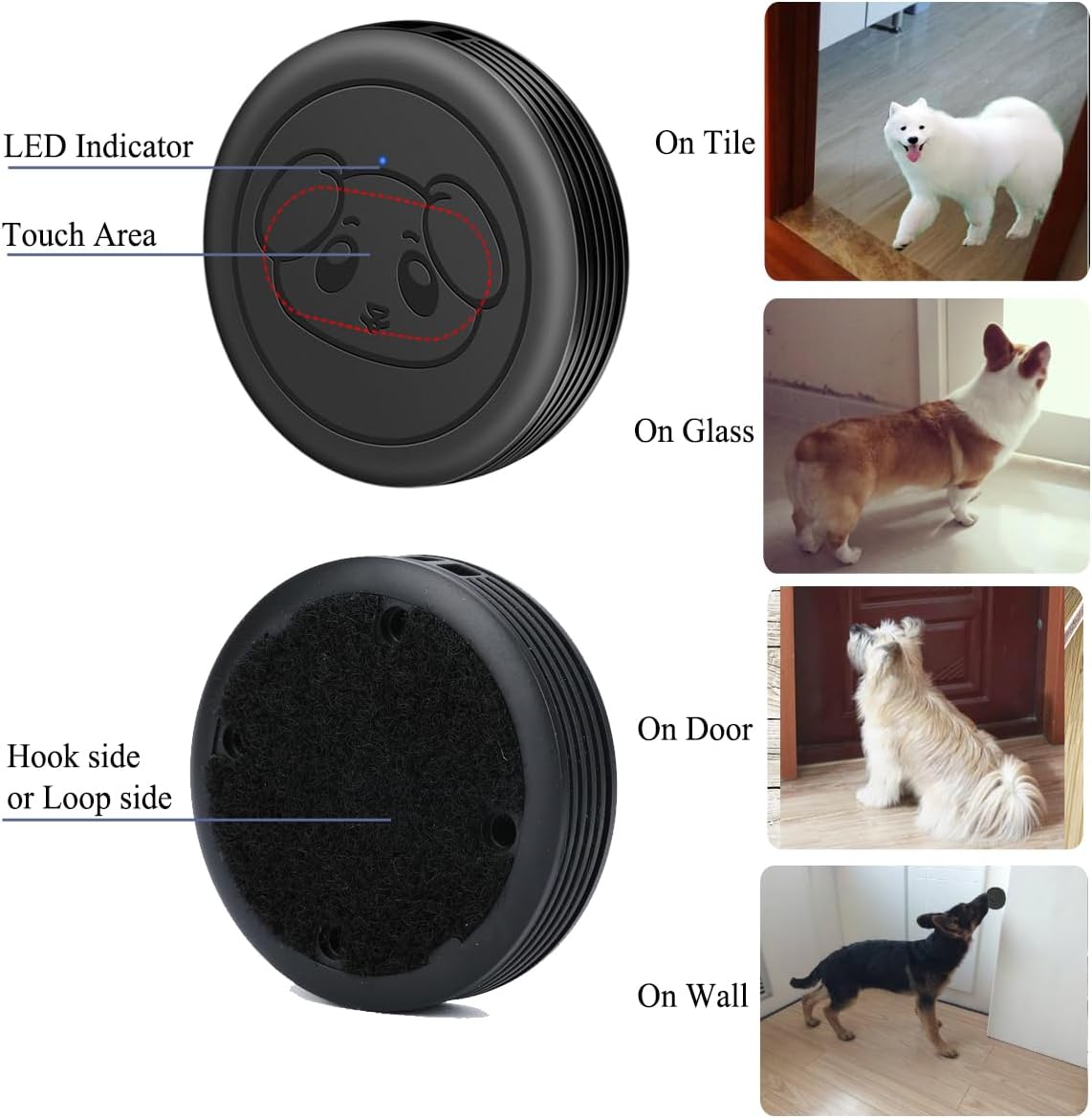
Image: Detailed view of the transmitter, highlighting the LED indicator and touch-sensitive area.
3. Setup Instructions
3.1. Transmitter Installation
- Choose a Location: Select a suitable location for the transmitter where your pet can easily reach it with their nose or paw. Common locations include near the door, on a wall, or even on the floor.
- Clean the Surface: Ensure the chosen surface is smooth and clean. Wipe away any dust or debris to ensure proper adhesion of the double-sided tape.
- Attach the Transmitter: Peel off the protective backing from the double-sided tape and firmly press the transmitter onto the desired surface. For outdoor installation, mount the transmitter under eaves or a sheltered area to protect it from direct sunlight and heavy rain, which can affect the tape's adhesion over time.

Image: Various installation examples for the transmitter, including on glass, doors, and walls.

Image: The transmitter is waterproof (IP55) and heat resistant. Note: For outdoor use, install under eaves to protect double-sided tape from direct weather exposure.
3.2. Receiver Placement
Plug the receiver into a standard electrical outlet in a central location within your home where you can easily hear the doorbell sound. The operating range is up to 500+ feet in open areas, but walls and other obstacles indoors may significantly shorten the working distance. Consider placing it strategically to ensure reliable signal reception from all transmitters.
4. Operating Instructions
4.1. Changing Ringtone and Pairing New Transmitters
- Select Ringtone: Press the UP or DOWN button on the receiver to cycle through the available 55 ringtones. Stop when you find your desired melody.
- Enter Pairing Mode: Press and hold the Volume button on the receiver for approximately 5 seconds until it makes a "Ding" sound. The receiver's LED indicator will flash, indicating it is in pairing mode.
- Activate Transmitter: Within 5 seconds of entering pairing mode, gently touch or tap the transmitter. The receiver will play the selected ringtone, confirming successful pairing.
- Pair Additional Transmitters: Repeat steps 1-3 for each additional transmitter you wish to pair with the receiver.
Video: Demonstrates how to change the ringtone and pair a new transmitter with the EverNary Wireless Dog Doorbell receiver.

Image: Close-up of the receiver showing the Forward/Backward buttons for ringtone selection and the Volume Control button for pairing and volume adjustment.
4.2. Volume Adjustment
The receiver offers 5 levels of volume adjustment, ranging from 0dB (mute mode) to 110dB. Short press the Volume button on the receiver to cycle through the volume levels. Select 0dB for mute mode when you do not wish to be disturbed.

Image: Visual representation of the 5 volume levels available on the receiver, from mute to 110dB.
4.3. Resetting All Settings
To reset all settings and clear all paired transmitters, press and hold either the UP or DOWN button on the receiver for more than 5 seconds. The receiver will revert to its default ringtone ("dingdong") and enter pairing mode, disconnecting all previously paired transmitters. You will then need to re-pair any desired transmitters.
5. Training Your Pet
The EverNary Wireless Dog Doorbell is an effective tool for potty training and teaching your dog to communicate their needs. Consistency and positive reinforcement are key to successful training.
- Introduce the Bell: Start by gently guiding your dog's paw or nose to touch the transmitter. When they activate it, immediately praise them and give them a treat.
- Associate with Going Outside: Every time you take your dog outside for a potty break, have them touch the doorbell first. As soon as they touch it, open the door and take them out.
- Positive Reinforcement: When your dog successfully uses the doorbell and goes potty outside, offer enthusiastic praise and a high-value treat.
- Consistency: Repeat this process consistently. Your dog will quickly learn that touching the doorbell leads to going outside.
- Patience: Some dogs learn faster than others. Be patient and continue with positive reinforcement. Avoid scolding if they don't get it right away.
Video: Short demonstration on training and using the EverNary dog doorbell for pet communication.

Image: A dog demonstrating how to use its nose to activate the doorbell transmitter.
6. Maintenance
- Cleaning: Wipe the receiver and transmitters with a soft, dry cloth. Avoid using harsh chemicals or abrasive cleaners.
- Battery Replacement: The transmitters use 12V batteries (included). If a transmitter stops working or its LED indicator no longer lights up, it may be time to replace the battery. Refer to the product packaging or manufacturer's instructions for specific battery type and replacement procedure.
- Adhesion Check: Periodically check the double-sided tape holding the transmitters, especially if installed outdoors. Reapply or reinforce if necessary to prevent the transmitter from falling.
7. Troubleshooting
| Problem | Possible Cause | Solution |
|---|---|---|
| Receiver does not ring when transmitter is touched. |
|
|
| Doorbell rings continuously or unexpectedly. |
|
|
| Shortened operating range. |
|
|
8. Specifications
- Model: GM03
- Brand: EverNary
- Operating Range: 500+ feet (open area)
- Ringtones: 55 selectable chimes
- Volume Levels: 5 levels (0dB to 110dB)
- Transmitter Power: 2 x 12V batteries (included)
- Receiver Power: AC 110-240V (plugs into standard outlet)
- Waterproof Rating (Transmitter): IP55
- Item Weight: 10.5 ounces (total package)
- Item Model Number: GM03
- First Available: April 5, 2019

Image: Dimensions of the EverNary Wireless Dog Doorbell receiver and transmitter.

Image: Detailed dimensions of the receiver's plug for installation reference.
9. Warranty and Support
For warranty information, technical support, or any questions regarding your EverNary Wireless Dog Doorbell, please refer to the product packaging or contact the manufacturer directly through their official website or the retailer where the product was purchased. Keep your purchase receipt as proof of purchase for warranty claims.