1. Introduction
This manual provides essential information for the setup, operation, maintenance, and troubleshooting of your Artillery Sidewinder X1 3D Printer. Please read this manual thoroughly before operating the device to ensure proper use and to prevent damage.

Figure 1.1: The Artillery Sidewinder X1 3D Printer, showcasing its design and a sample print.
2. Key Features
- Ultra-Quiet Stepper Driver: Designed for reduced heat dissipation and higher torque, contributing to quieter operation.
- Synchronized Dual Z System: Ensures consistent and parallel movement of the X-carriage relative to the build plate, even if one Z-stepper encounters an issue.
- Direct Drive Extruder: Enhances reliability, particularly when printing with flexible filaments.
- AC Heating Platform: Provides rapid heating of the build plate. The lattice glass surface offers excellent adhesion when heated and allows for easy removal of prints once cooled.
- Power Failure Protection: Enables the printer to resume printing from the last recorded position after a power interruption.
- Filament Runout Sensor: Automatically pauses printing and prompts for filament feeding when the material runs out.
- Full Touch Screen: Provides clear instructions and intuitive control.

Figure 2.1: Visual representation of the Artillery Sidewinder X1's key features, including quiet operation, heated bed, and various sensors.
3. What's in the Box
Upon unboxing, verify that all components listed below are present and undamaged:
- 1 x Artillery Sidewinder X1 3D Printer
- 1 x Assembly Tool Kit
- 1 x Assembly Instruction Manual
- 1 x Assembly Guide (likely a quick start guide or visual aid)

Figure 3.1: Detailed view of the included assembly tool kit, showing various tools and spare parts.
4. Setup and Assembly
The Artillery Sidewinder X1 comes 95% pre-assembled. Follow the included Assembly Instruction Manual for detailed steps. Key assembly points include:
- Unpacking: Carefully remove all components from the packaging.
- Gantry Installation: Secure the gantry to the base unit. Ensure all connections are firm.
- Filament Holder: Attach the filament spool holder to the top of the gantry.
- Cable Connections: Connect all necessary cables, paying attention to proper routing to avoid interference with moving parts.
- Power Connection: Connect the power supply unit. Ensure the correct voltage (110V) is selected if applicable.
4.1 Initial Leveling
Accurate bed leveling is crucial for successful prints. The Sidewinder X1 features large leveling knobs for easier adjustment.
- Heat the build plate to your typical printing temperature (e.g., 60°C for PLA) before leveling.
- Use the touch screen to move the nozzle to each corner and the center of the build plate.
- Adjust the leveling knobs until a piece of paper can slide with slight friction between the nozzle and the build plate.

Figure 4.1: Components facilitating setup and operation, including the direct drive extruder, large leveling knob, synchronized dual Z system, and inductive endstop sensors.
5. Operating Instructions
5.1 Loading Filament
To load filament, gently press the extruder arm and insert the filament into the direct drive extruder until it catches. Use the touch screen controls to extrude a small amount of filament to ensure it is flowing correctly through the nozzle.
5.2 Printing from SD Card/USB Stick
The Sidewinder X1 supports printing directly from a TF Card or USB Stick.
- Prepare your 3D model using a slicing software (e.g., Cura, PrusaSlicer, Simplify3D) and save the G-code file to your TF Card or USB Stick.
- Insert the storage device into the designated slot on the printer.
- Navigate the full touch screen interface to select your desired G-code file and initiate the print.
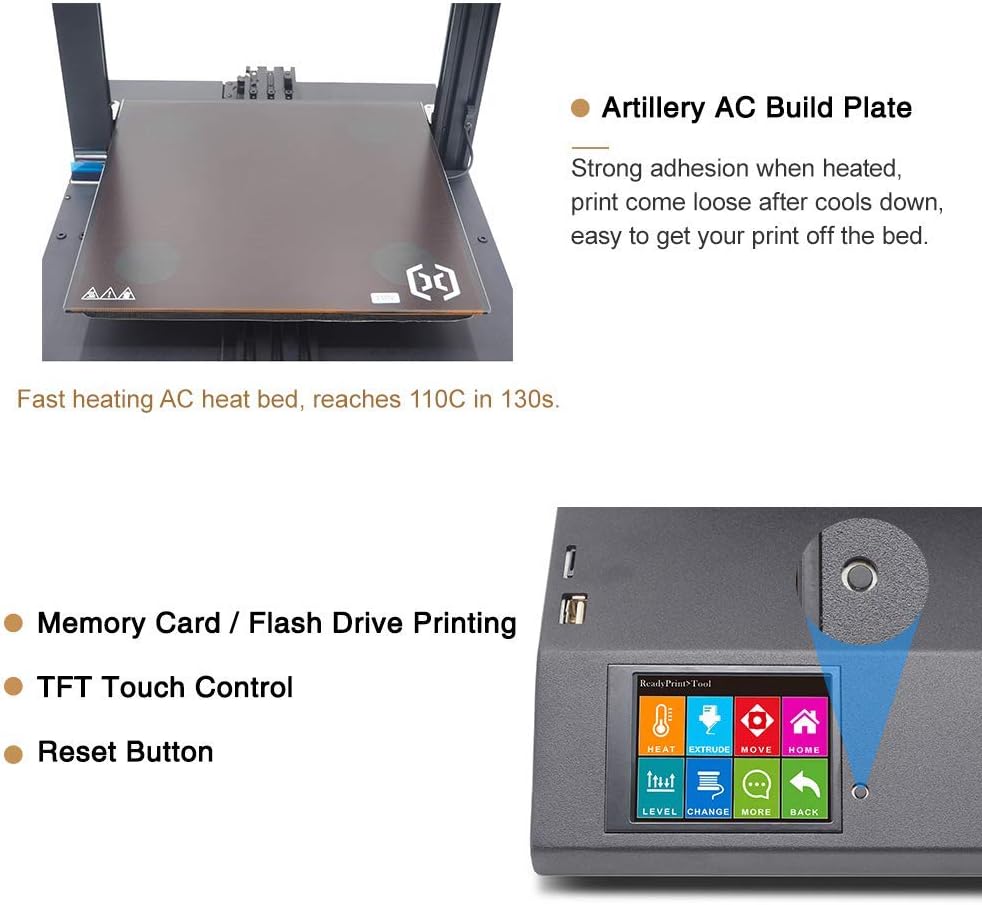
Figure 5.1: The Artillery AC Build Plate, known for its strong adhesion when heated, and the intuitive TFT Touch Control screen with a reset button for easy operation.
6. Maintenance
Regular maintenance ensures optimal performance and longevity of your 3D printer.
- Clean the Build Plate: After each print, allow the build plate to cool completely before removing the print. Clean the surface with isopropyl alcohol to remove any residue.
- Nozzle Cleaning: Periodically check the nozzle for clogs. Use the included needle or a brass brush to clean any filament buildup.
- Lubrication: Apply a small amount of lubricant to the Z-axis lead screws and smooth rods every few months or as needed.
- Belt Tension: Ensure the X and Y axis belts are properly tensioned. They should be taut but not overly tight.
- Firmware Updates: Check the official Artillery website for any available firmware updates to improve performance or add new features.
7. Troubleshooting
This section addresses common issues you might encounter.
7.1 Common Printing Issues
- Poor First Layer Adhesion:
- Ensure the build plate is properly leveled.
- Verify the correct bed temperature for your filament type.
- Clean the build plate surface thoroughly.
- Filament Not Extruding:
- Check for a clogged nozzle.
- Ensure the filament is loaded correctly and the extruder gear is gripping it.
- Verify the hotend temperature is appropriate for the filament.
- Layer Shifting:
- Check belt tension on X and Y axes.
- Ensure the printer is on a stable surface.
- Reduce print speed if necessary.
7.2 Power Failure Recovery
The Sidewinder X1 features power failure recovery. If power is interrupted during a print, the printer will attempt to resume from the last position once power is restored.

Figure 7.1: The printer's power failure detection system, which allows it to resume printing after a power outage, preventing print job ruin.
8. Technical Specifications
| Parameter | Value |
|---|---|
| Layer Resolution | 0.1mm |
| Frame | Aluminum Extrusion |
| XYZ Positioning Accuracy | 0.05mm, 0.05mm, 0.1mm |
| Printing Filament | PLA, ABS, TPU, Flexible Materials |
| Filament Diameter | 1.75mm |
| Nozzle Diameter | 0.4mm |
| Maximum Print Speed | 150 mm/s |
| Maximum Travel Speed | 250mm/s |
| Build Volume | 300x300x400 mm |
| Extruder Type | Direct Drive Extruder |
| Maximum Build Plate Temperature | 130°C |
| Power Requirement | 110V |
| Connectivity | USB, TF Card, USB Stick |
| Control Board | MKS Gen L |
| Nozzle Type | Volcano |
| Machine Dimensions | 550x405x640 mm (550x405x870 mm with spool holder) |
| Item Weight | 17.3 Kilograms (38.1 pounds) |
| Supported File Format | slicer, prusaslicer, cura, kisslicer, ideamaker, slic3r, simplify3d |

Figure 8.1: A visual summary of the Artillery Sidewinder X1's technical specifications and dimensions.
9. Support and Warranty
For any assistance, questions, or warranty inquiries, please contact Artillery customer support. You can typically find contact information on the official Artillery website or through the retailer where the product was purchased.
As per the product description, for help or questions, contact "Rxlife" (the seller) by clicking "Ask a question" behind "sold by".