Introduction
This manual provides instructions for the Monoprice USB Keyboard, Model 135106. This keyboard features a standard US layout, a low profile design with easy-to-press keys for reduced fatigue, and quiet, comfortable key action. It offers reliable plug-and-play wired USB connectivity, full-sized function keys, a 10-key number pad, and indicator lights.
Product Features
- Comfortable, spill-resistant membrane keyboard.
- Standard US layout with rectangular Enter key.
- Dimensions: 17.0" x 5.0" x 1.0".
- Weight: Approximately 15 ounces.
- Simple, wired USB interface with a 53" cable.
- Folding keyboard feet to raise the back by 0.5" for improved typing comfort.
- Clearly labeled keys and indicator lights.
Setup
The Monoprice USB Keyboard is designed for plug-and-play operation. No special drivers are typically required for most modern operating systems.
Connecting the Keyboard
- Locate an available USB port on your computer.
- Insert the USB connector of the Monoprice USB Keyboard firmly into the USB port.
- Your operating system should automatically detect the new hardware and install the necessary generic drivers.
- The keyboard is ready for use once detected by the system.
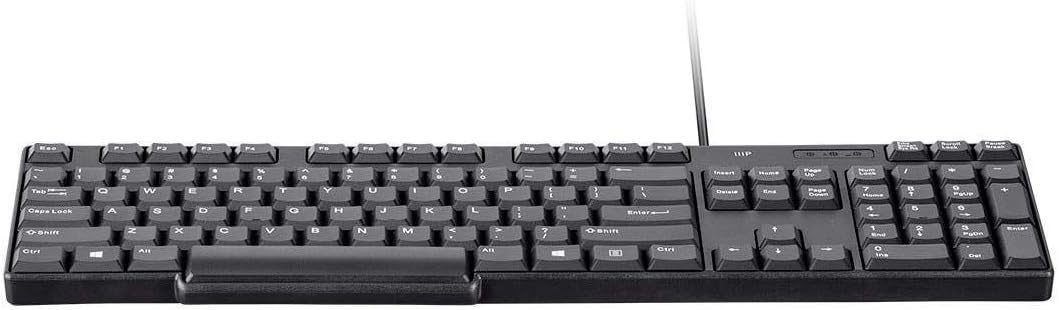
Image: Top-down view of the Monoprice USB Keyboard, showing the full key layout and USB cable connection point.
Operating the Keyboard
Basic Typing
The keyboard features a standard 104-key US layout, including a full alphanumeric section, a numeric keypad, and a row of function keys (F1-F12).
Function Keys
The function keys (F1-F12) perform various tasks depending on the active application or operating system. Consult your software's documentation for specific functions.
Indicator Lights
Three LED indicator lights are located above the numeric keypad:
- Num Lock: Illuminates when the numeric keypad is active for number input.
- Caps Lock: Illuminates when Caps Lock is engaged, causing all letter keys to type in uppercase.
- Scroll Lock: Illuminates when Scroll Lock is active. Its functionality varies significantly by application.
Adjusting Keyboard Angle
For improved typing comfort, the keyboard is equipped with foldable feet on its underside. Gently pull out these feet to elevate the rear of the keyboard by approximately 0.5 inches, creating an ergonomic tilt.
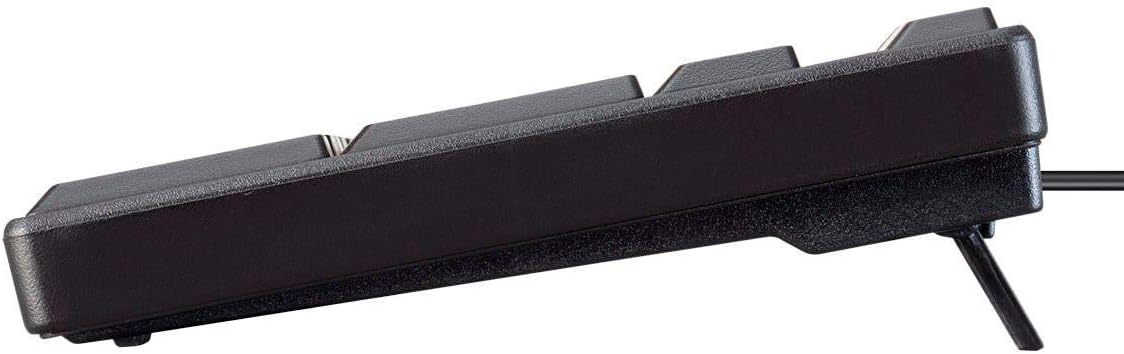
Image: Side view of the Monoprice USB Keyboard, illustrating the foldable feet extended to adjust the typing angle.
Maintenance
Cleaning
To clean your keyboard, first disconnect it from your computer. Use a soft, slightly damp cloth with a mild cleaning solution. Avoid using abrasive cleaners or excessive moisture. Do not immerse the keyboard in any liquid.
Spill Resistance
This keyboard features a spill-resistant design. In the event of a liquid spill, immediately disconnect the keyboard from your computer. Invert the keyboard to allow any liquid to drain out, then let it dry completely in a well-ventilated area before reconnecting. While designed to resist spills, it is not waterproof and should not be submerged.
Troubleshooting
Keyboard Not Responding
- Ensure the USB cable is securely connected to both the keyboard and a functioning USB port on your computer.
- Try connecting the keyboard to a different USB port on your computer.
- Restart your computer.
- Test the keyboard on another computer to determine if the issue is with the keyboard itself or your computer's USB port/drivers.
Keys Not Functioning Correctly
- Check for any visible debris or obstructions under the affected keys.
- Ensure that Caps Lock, Num Lock, or Scroll Lock are not inadvertently engaged if specific keys are not behaving as expected.
- If the issue persists after these steps, the keyboard may require replacement.
Specifications
| Feature | Detail |
|---|---|
| Brand | Monoprice |
| Model Number | 135106 |
| Connectivity Technology | USB (Wired) |
| Keyboard Type | Membrane |
| Layout | Standard US Layout |
| Product Dimensions (L x W x H) | 17.0" x 5.0" x 1.0" |
| Item Weight | Approximately 15 ounces |
| Cable Length | 53 inches |
| Operating System Compatibility | Windows 10 (and generally compatible with other OS supporting standard USB keyboards) |
| Color | Black |
What's in the Box
- Monoprice USB Keyboard (Model 135106)
Warranty and Support
Monoprice products are manufactured to high standards. For detailed warranty information, technical assistance, or customer support, please visit the official Monoprice website. Please retain your purchase receipt for warranty claims.
You can also find more information and support by visiting the Monoprice Store: Monoprice Store


