
Product Overview
The Huepar FL360G Floor Laser Level is a self-leveling green line laser designed for precise tile installation, floor alignment, and various other leveling tasks. Its unique ultra-low laser line projection and 360-degree horizontal coverage make it an efficient tool for professionals and DIY enthusiasts.

Figure 1: Huepar FL360G Floor Laser Level and included accessories.
Key Features
- Ultra-Low Laser Line: Projects a laser line just 1/3 inch (8mm) from the ground, ideal for tile alignment, floor layout, and precise positioning of studs, windows, and doors. Designed for indoor use.
- Patented 360° Design: Provides a full 360-degree horizontal green laser line, offering continuous leveling across an entire room (up to 65.6 ft diameter coverage, brightness dependent) without the need for repositioning.
- Efficiency and Durability: Enables multiple workers to tile simultaneously, significantly boosting job site productivity. Features IP54 water and dust resistance for long-term indoor reliability.
- Versatile Laser Modes & Self-Leveling: Offers horizontal, vertical, or cross-line modes. Self-levels within ±3° and alerts with flashing lines when out of range. Delivers ±0.2mm accuracy at 1m.
- Power & Mounting: Operates for up to 6 hours on 3 AA batteries. Includes a magnetic bracket and a 1/4” tripod thread for flexible mounting options.

Figure 2: The Huepar FL360G provides a precise laser line for flooring, contrasting with traditional methods.

Figure 3: Illustration of the three available laser projection modes: horizontal, vertical, and cross-line.
Setup and Installation
1. Battery Installation
The FL360G requires 3 AA batteries for operation. To install:
- Locate the battery compartment on the side of the device.
- Open the battery cover.
- Insert 3 AA batteries, ensuring correct polarity (+/-).
- Close the battery cover securely.
2. Mounting Options
The laser level can be used freestanding or mounted:
- Freestanding: Place the unit directly on the floor or a stable, level surface.
- Magnetic Bracket: Use the included magnetic pivoting base to attach the laser level to metal surfaces.
- Tripod Mounting: The unit features a 1/4-inch threaded mount on its base, allowing it to be attached to standard tripods for elevated or precise positioning.

Figure 4: Detailed view of the laser level's dimensions and battery compartment.
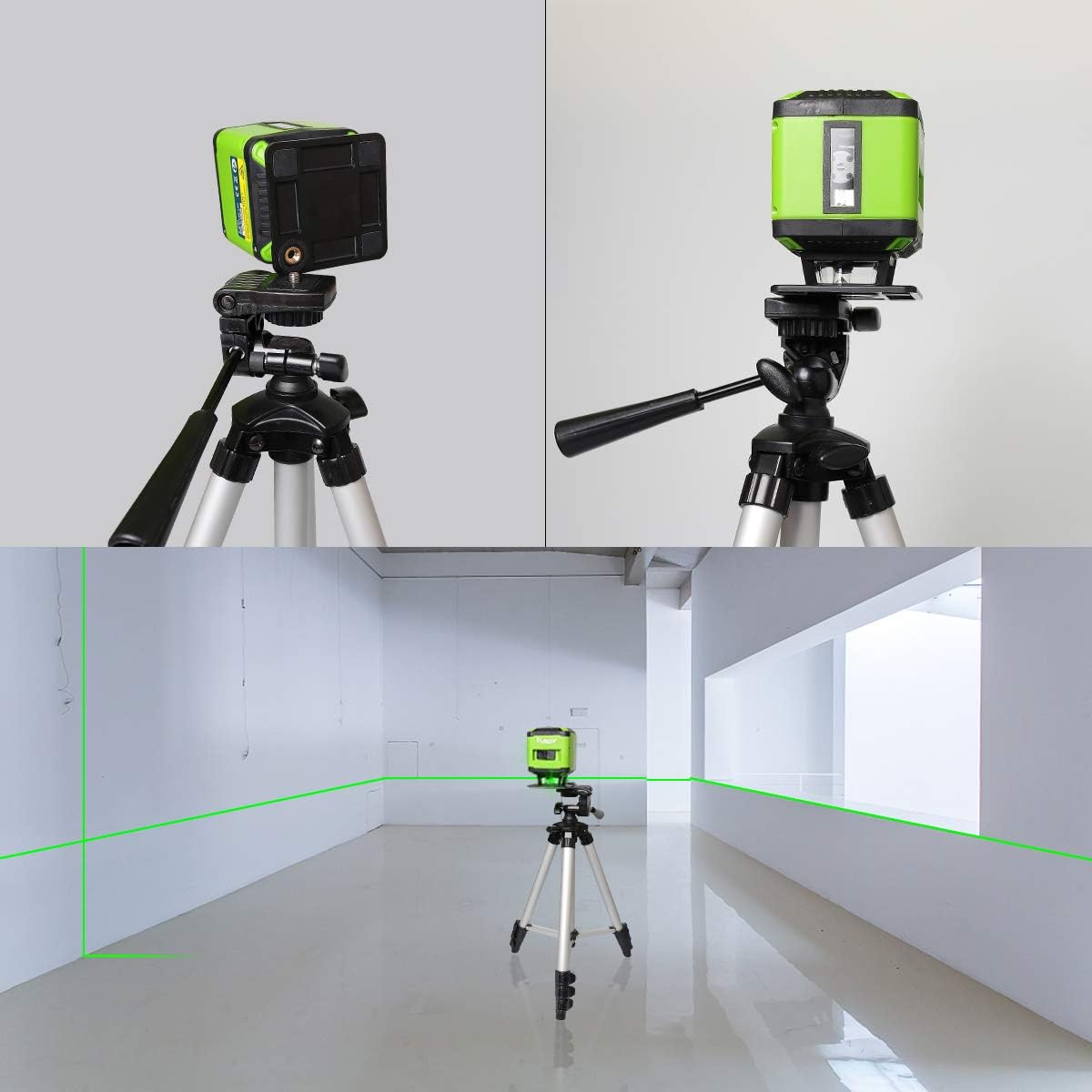
Figure 5: The laser level mounted on a tripod, demonstrating its ability to project lines across a large area.
Operating Instructions
1. Powering On/Off
To power on the device, slide the main switch to the "ON" position. To power off, slide the switch to "OFF".
2. Self-Leveling Mode
When powered on, the FL360G automatically enters self-leveling mode. The laser lines will quickly stabilize. If the device is placed on an uneven surface beyond its ±3° self-leveling range, the laser lines will flash rapidly to indicate it is out of level. Adjust the device's position until the lines stop flashing and become stable.
3. Switching Laser Modes
Press the "Switch Mode" button on top of the unit to cycle through the available laser projection modes:
- Horizontal Line only
- Vertical Line only
- Cross-Line (Horizontal and Vertical lines combined)
Note: This model does not feature plumb or lock modes.
4. Practical Applications
- Tile Installation: Position the laser level to project the ultra-low horizontal line for precise tile alignment on floors.
- Floor Alignment: Use the 360-degree horizontal line to check for levelness across large floor areas.
- Wall Decor & Framing: Utilize the vertical or cross-line modes for hanging pictures, installing shelves, or framing walls.

Figure 6: The FL360G projecting its ultra-low laser line for accurate tile placement.

Figure 7: Precise tile setting facilitated by the Huepar FL360G laser level.
Maintenance and Care
- Cleaning: Use a soft, damp cloth to clean the device. Do not use abrasive cleaners or solvents.
- Storage: Store the laser level in its included carry-on bag in a dry, cool place when not in use. Remove batteries if storing for extended periods to prevent leakage.
- Protection: The FL360G has an IP54 rating, providing protection against dust and splashing water. However, avoid submerging the device in water or exposing it to heavy rain.

Figure 8: The FL360G is designed to be both waterproof and dustproof for enhanced durability.
Troubleshooting
| Problem | Possible Cause | Solution |
|---|---|---|
| Laser lines are flashing rapidly. | Device is out of its self-leveling range (±3°). | Place the device on a more level surface until the lines stabilize. |
| No laser lines projected. | Batteries are low or incorrectly installed. / Device is off. | Check battery installation and replace if necessary. Ensure the power switch is in the "ON" position. |
| Laser line is dim or not visible. | Excessive ambient light. / Operating distance too far. | Reduce ambient light if possible. Use the device within its specified working distance (up to 65.6 ft diameter). |
Specifications
| Specification | Detail |
|---|---|
| Brand | Huepar |
| Model Number | FL360G |
| Laser Color | Green Line |
| Laser Class | Class 2 (IEC/EN60825-1/2014), output power <1mW |
| Laser Wavelength | 505~520 nm |
| Working Distance (Diameter) | Up to 65.6 ft (room brightness dependent) / 98 ft (from A+ content) |
| Leveling Accuracy | ±1/13 in. at 33 ft (±0.2mm at 1m) |
| Self-Leveling Range | ±3° |
| Leveling Duration | ≤4s |
| Operating Temperature | -10°C~60°C (14°F~140°F) |
| Power Source | 3 x 1.5V LR6 (AA batteries) |
| Operating Time | Up to 6 hours (approx. 4 hours from A+ content) |
| Mount Size | 1/4" |
| IP Rating | IP54 (Water and Dust Resistant) |
| Product Dimensions | 3.66"L x 2.76"W |
| Item Weight | 220 Grams (7.8 ounces) |
| Material | Thermoplastic Elastomers, Plastic, Acrylonitrile Butadiene Styrene |
Warranty and Support
The Huepar FL360G Floor Laser Level comes with a 24-month warranty. Huepar also provides lifetime technical support for this product. For any issues or inquiries, please contact the Huepar support team.
Video 1: An overview of Huepar's commitment to quality and customer service, highlighting their dedication to technological innovation and support.