1. Introduction
Thank you for purchasing the Mersoco Portable Bluetooth Turntable. This manual provides essential information for the safe and efficient operation of your new device. Please read it thoroughly before use and retain it for future reference.
This turntable allows you to enjoy your vinyl record collection with its 3-speed playback capability (33 1/3, 45, and 78 RPM). It also features built-in stereo speakers, Bluetooth connectivity for streaming music from external devices, and AUX-IN/RCA OUT ports for versatile audio connections.
2. Safety Information
- Power Source: Use only the specified power adapter. Ensure the voltage matches your local power supply.
- Water and Moisture: Do not expose the unit to rain, moisture, or liquids. Do not place objects filled with liquids, such as vases, on the unit.
- Heat Sources: Keep the unit away from heat sources such as radiators, heat registers, stoves, or other apparatus (including amplifiers) that produce heat.
- Ventilation: Ensure proper ventilation. Do not block any ventilation openings.
- Cleaning: Unplug the unit from the wall outlet before cleaning. Use a soft, dry cloth. Do not use liquid cleaners or aerosol cleaners.
- Servicing: Do not attempt to service this product yourself. Refer all servicing to qualified service personnel.
- Stylus Care: The stylus is delicate. Handle with care to avoid damage. Keep the stylus guard on when not in use.
3. Package Contents
Please check that all items listed below are included in your package:
- Mersoco Portable Bluetooth Turntable
- Power Adapter
- 45 RPM Adapter
- User Manual
- AUX Input Cable (3.5mm)
- RCA Output Cable
4. Product Overview
Familiarize yourself with the components of your turntable:

Figure 4.1: Turntable Components
This diagram illustrates the main parts of the turntable, including the platter, tone arm, stylus, speed selector, and control knobs.
- Platter: Where the vinyl record rests.
- Spindle: Holds the record in place on the platter.
- 45 RPM Adapter: Used for playing 7-inch records with a large center hole.
- Tone Arm: Holds the cartridge and stylus.
- Tone Arm Lifter: Raises and lowers the tone arm gently.
- Cartridge/Stylus: Reads the grooves of the record.
- Speed Selector: Allows selection of 33 1/3, 45, or 78 RPM.
- Auto Stop Switch: Enables or disables the auto-stop function.
- Power/Volume Knob: Turns the unit on/off and adjusts the volume.
- Headphone Jack: For private listening.
- AUX-IN Port: For connecting external audio devices.
- RCA OUT Ports (L/R): For connecting to external amplifiers or powered speakers.
- DC IN Jack: For connecting the power adapter.
5. Setup
5.1 Unpacking
- Carefully remove the turntable from its packaging.
- Place the unit on a stable, level surface.
- Remove any protective materials, including the stylus guard.
5.2 Power Connection
- Connect the power adapter to the DC IN jack on the back of the turntable.
- Plug the power adapter into a wall outlet.
5.3 Dust Cover
The turntable includes a removable dust cover to protect the platter and tone arm when not in use. Simply place it over the unit.
6. Operating Instructions
6.1 Playing a Vinyl Record

Figure 6.1: Turntable in Operation
The turntable is shown playing a vinyl record with the dust cover open.
- Turn the Power/Volume knob clockwise to power on the unit.
- Place a vinyl record on the turntable platter.
- Select the appropriate speed (33 1/3, 45, or 78 RPM) using the speed selector switch. For 7-inch records with a large center hole, place the 45 RPM adapter on the spindle before placing the record.
- Lift the tone arm using the tone arm lifter.
- Move the tone arm over the desired track on the record.
- Gently lower the tone arm onto the record using the tone arm lifter. The music will begin to play.
- Adjust the volume using the Power/Volume knob.
- When the record finishes, the tone arm will automatically return to its rest position if the auto-stop function is enabled. If disabled, manually lift the tone arm and return it to its rest.


Figure 6.2: Speed Selector and 45 RPM Adapter
Ensure the correct playback speed is selected for your record, and use the adapter for 7-inch singles.

Figure 6.3: Tone Arm Lifter
Use the lifter to gently raise and lower the tone arm.

Figure 6.4: Auto Stop Switch
The auto stop switch controls whether the platter stops automatically at the end of a record.
6.2 Bluetooth Playback
This turntable can receive audio wirelessly from Bluetooth-enabled devices.
- Turn the Power/Volume knob clockwise to power on the unit. The Bluetooth indicator light will flash, indicating it's in pairing mode.
- Enable Bluetooth on your external device (e.g., smartphone, tablet, computer).
- Search for "Mersoco" or a similar device name in your device's Bluetooth settings and select it to pair.
- Once paired, the Bluetooth indicator light will stop flashing and remain solid. You can now play music from your device through the turntable's speakers.
- Adjust the volume using the Power/Volume knob on the turntable and/or your external device.

Figure 6.5: Bluetooth Pairing
The image shows a smartphone successfully paired with the turntable via Bluetooth for wireless audio streaming.
6.3 AUX-IN Connection
Connect external audio sources to the turntable using the 3.5mm AUX-IN port.
- Connect one end of the 3.5mm AUX cable (included) to the AUX-IN port on the back of the turntable.
- Connect the other end of the AUX cable to the headphone jack or audio output of your external device (e.g., CD player, MP3 player).
- The turntable will automatically switch to AUX-IN mode.
- Play music from your external device.
- Adjust the volume using the Power/Volume knob on the turntable and/or your external device.
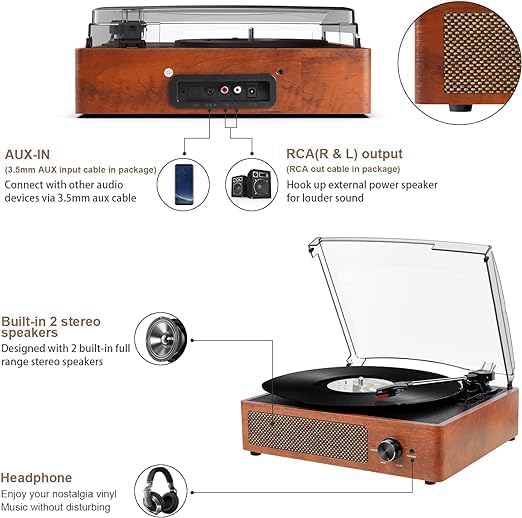
Figure 6.6: AUX-IN and RCA OUT Ports
The rear panel illustrates the connectivity options for AUX-IN and RCA OUT.
6.4 RCA Output Connection
For enhanced sound or to connect to a larger audio system, use the RCA output ports.
- Connect the RCA output cable (included) to the RCA OUT ports (red for right, white for left) on the back of the turntable.
- Connect the other end of the RCA cable to the audio input (e.g., AUX IN, LINE IN) of your external amplifier or powered speakers.
- Ensure your external audio system is powered on and set to the correct input source.
- Play a record or stream via Bluetooth. The audio will be routed through your external system.
- Adjust the volume primarily on your external amplifier or powered speakers.
6.5 Headphone Use
For private listening, connect headphones to the 3.5mm headphone jack on the front of the unit.
- Plug your headphones into the HEADPHONE jack.
- Adjust the volume using the Power/Volume knob.
- The built-in speakers will automatically mute when headphones are connected.
7. Maintenance
7.1 Cleaning the Unit
- Always unplug the unit from the power outlet before cleaning.
- Use a soft, dry cloth to wipe the exterior surfaces.
- Do not use abrasive cleaners, waxes, or solvents as they may damage the finish.
7.2 Stylus Care
The stylus is a delicate component and requires careful handling to ensure optimal sound quality and longevity.

Figure 7.1: Stylus
The stylus is the delicate needle that reads the record grooves.
- Avoid touching the stylus with your fingers.
- Clean the stylus periodically using a soft brush, brushing gently from back to front.
- Replace the stylus if you notice a decrease in sound quality or visible damage.
- Always place the stylus guard back on when the turntable is not in use or being moved.
7.3 Dust Cover Care
The dust cover helps protect your turntable from dust and debris.
- Wipe the dust cover with a soft, damp cloth.
- Do not use harsh chemicals or abrasive materials, as they can scratch the surface.
8. Troubleshooting
If you experience issues with your turntable, please consult the following table before contacting support.
| Problem | Possible Cause | Solution |
|---|---|---|
| No power | Power adapter not connected; Power outlet not working; Unit not turned on. | Ensure power adapter is securely connected. Try a different outlet. Turn the Power/Volume knob clockwise. |
| No sound from speakers | Volume too low; Headphones connected; External speakers not connected/powered on (if using RCA OUT); Stylus damaged. | Increase volume. Disconnect headphones. Check external speaker connections and power. Inspect stylus for damage. |
| Record skipping | Record is dirty or scratched; Turntable not level; Stylus is dirty or worn. | Clean the record. Ensure the turntable is on a level surface. Clean or replace the stylus. |
| Bluetooth not pairing | Turntable not in pairing mode; Device too far; Bluetooth disabled on external device. | Ensure turntable is powered on and indicator is flashing. Move device closer. Enable Bluetooth on your device and search again. |
| Incorrect playback speed | Wrong speed selected. | Adjust the speed selector to match the record's RPM (33 1/3, 45, or 78). |
9. Specifications
| Feature | Detail |
|---|---|
| Brand | Mersoco |
| Model Name | M49Orange-DE_SML |
| Color | Orange |
| Connectivity | Bluetooth |
| Special Feature | Portable |
| Compatible Devices | Speaker, Personal Computer, Smartphone, Tablet |
| Max Rotation Speed | 78 RPM (supports 33 1/3, 45, 78 RPM) |
| Included Components | Built-in Speakers |
| Material | Vinyl (referring to vinyl records, unit material is wood/plastic) |
| Item Weight | 4.76 Pounds (approx. 2.16 kg) |
| Style | Retro, Vintage |
10. Warranty and Support
Mersoco products are designed for reliability and performance. For specific warranty details, please refer to the warranty card included with your purchase or contact Mersoco customer support.
If you encounter any issues not covered in the troubleshooting section, or require further assistance, please contact our customer support team through the retailer where you purchased the product or visit the official Mersoco website for contact information.