Introduction
This manual provides essential instructions for the proper use and care of your Vivitar 420-800mm f/8.3 Manual Focus Telephoto Zoom Lens. This lens is designed for use with DSLR and mirrorless cameras via a camera-specific T-Mount adapter (sold separately), offering significant magnification for distant subjects. Please read this manual thoroughly before using the lens to ensure optimal performance and longevity.
Package Contents
Verify that all items listed below are included in your package:
- Vivitar 420-800mm f/8.3 Manual Focus Telephoto Zoom Lens
- Front Lens Cap
- Rear Lens Cap
- Screw-in Lens Hood
- Soft Carrying Bag

Image: Vivitar 420-800mm Telephoto Zoom Lens with included accessories: front cap, rear cap, and soft carrying bag.
Key Features
- Designed for DSLR / Mirrorless cameras (requires camera-specific T-Mount adapter, sold separately).
- Provides magnification up to 16 times that of a standard 50mm lens.
- Constructed with multi-coated all-glass elements for optical clarity.
- Includes a screw-in lens hood to reduce flare.
- Features a built-in tripod collar for stable mounting.
- Lightweight aluminum alloy body for portability.
- Macro focusing capability down to 5.25 feet even at 800mm.
- Suitable for wildlife, sports, nature, and surveillance photography.
Setup: Attaching the Lens
The Vivitar 420-800mm lens requires a camera-specific T-Mount adapter (not included) to connect to your camera body. Follow these steps for proper attachment:
- Prepare the Lens: Remove the rear lens cap from the Vivitar 420-800mm lens.
- Attach T-Mount Adapter: Connect your camera-specific T-Mount adapter to the lens's rear thread. Screw it on by rotating clockwise until it is snug and securely fastened.
- Mount to Camera: Attach the lens with the T-Mount adapter to your camera body. Ensure the connection is locked properly, similar to attaching any standard camera lens.

Image: Rear view of the Vivitar 420-800mm lens, showing the T-mount thread where the camera-specific adapter attaches.
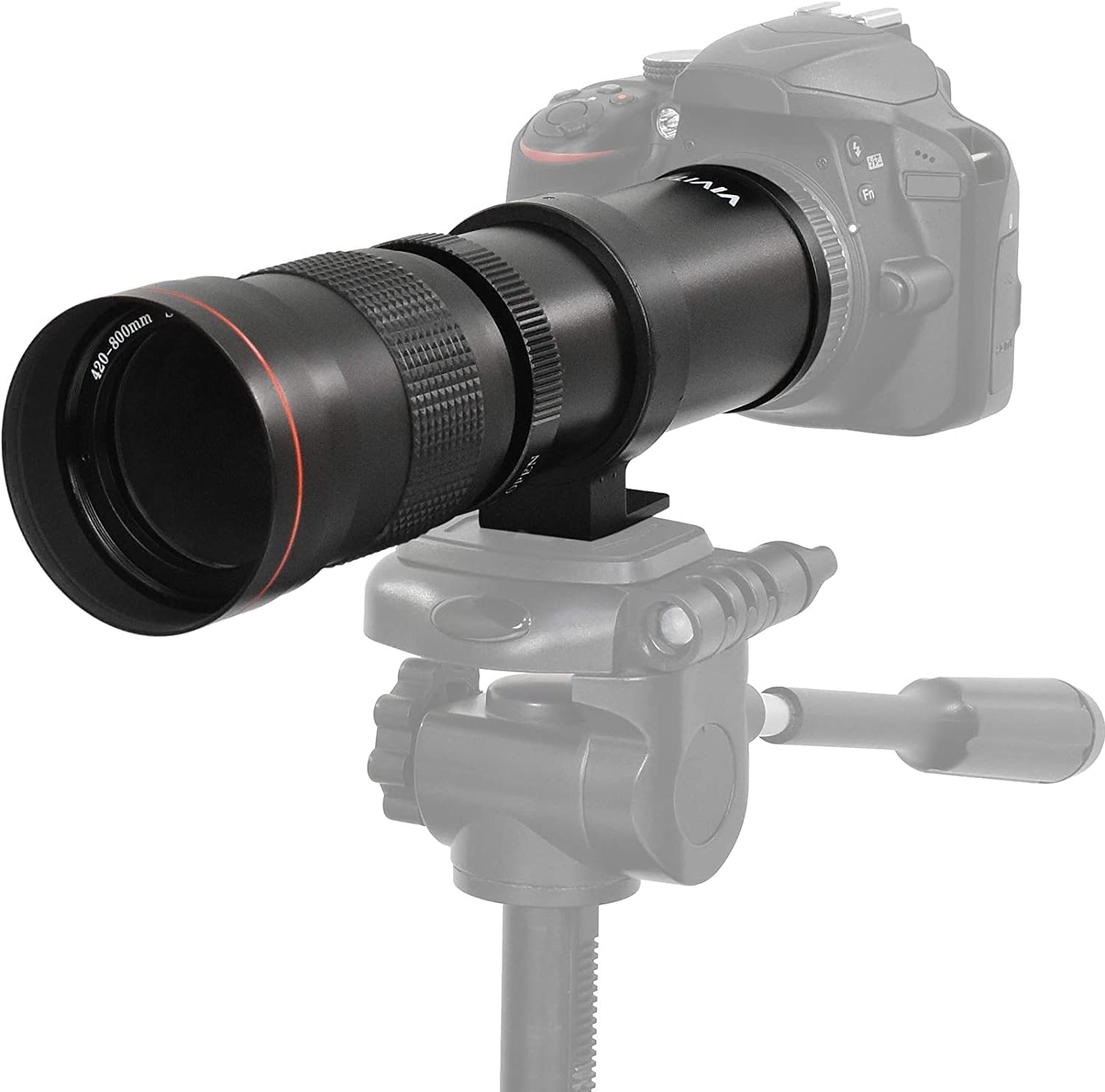
Image: The Vivitar 420-800mm lens mounted on a DSLR camera, demonstrating a typical setup with a tripod for stability.
Operating Instructions
This is a manual focus lens. Follow these guidelines for operation:
- Camera Mode: Turn your camera on and switch it to Manual Mode (M). This lens does not have electronic contacts for autofocus or automatic aperture control.
- Remove Lens Cap: Remove the front lens cap before use.
- Adjust Focal Length: The lens features a push/pull zoom mechanism. Extend or retract the lens barrel to adjust the focal length between 420mm and 800mm.
- Focus Manually: Rotate the focus ring on the lens barrel until your subject appears sharp in the viewfinder or on your camera's LCD screen. Utilize your camera's focus peaking or magnification assist features if available.
- Exposure Settings: Since the lens does not communicate aperture information to the camera, you will need to set exposure manually. Adjust your camera's shutter speed and ISO to achieve the desired exposure. The lens operates at a fixed aperture of f/8.3 at 420mm, which changes as you zoom towards 800mm (e.g., f/16 at 800mm).

Image: Close-up view of the lens barrel, illustrating the focal length markings (420mm to 800mm) and corresponding aperture values.
Important Note on Metering: Depending on your camera model, automatic light metering may not function with this lens. You may need to use an external light meter or rely on trial-and-error with your camera's display to achieve correct exposure.
Maintenance
- Cleaning the Lens: Use a soft, lint-free microfiber cloth specifically designed for optics to clean the lens elements. For stubborn smudges, use a small amount of lens cleaning fluid applied to the cloth, not directly to the lens. Avoid touching the glass surfaces with your fingers.
- Cleaning the Body: Wipe the lens body with a soft, dry cloth. Do not use harsh chemicals or solvents.
- Storage: When not in use, always attach both the front and rear lens caps. Store the lens in its provided soft carrying bag in a cool, dry place, away from direct sunlight and extreme temperatures. Avoid areas with high humidity to prevent mold growth.
- Handling: Always handle the lens carefully. Avoid dropping or subjecting it to strong impacts, which can damage the optical elements or mechanical components.
Troubleshooting
| Problem | Possible Cause | Solution |
|---|---|---|
| Images are blurry or out of focus. | Incorrect manual focus; camera shake; subject movement. | Ensure precise manual focusing. Use a tripod for stability. Increase shutter speed to freeze motion. |
| Images are too dark or too bright (incorrect exposure). | Camera not in Manual Mode; incorrect shutter speed or ISO settings; camera not metering correctly. | Set camera to Manual Mode (M). Adjust shutter speed and ISO. If camera metering is not working, use an external light meter or adjust settings based on test shots. |
| Lens cannot be attached to the camera. | Missing or incorrect T-Mount adapter. | Ensure you have the correct camera-specific T-Mount adapter (sold separately) and that it is properly attached to the lens before mounting to the camera. |
| Lens feels loose or wobbly on the camera. | T-Mount adapter not securely tightened; lens not properly locked onto camera. | Re-tighten the T-Mount adapter to the lens. Ensure the lens is fully rotated and locked into the camera mount. |
Specifications
| Model Number | V-420800-NOC |
| Focal Length | 420-800mm |
| Maximum Aperture | f/8.3 (at 420mm) to f/16 (at 800mm) |
| Minimum Focus Distance | 5.25 feet (1.6 meters) |
| Lens Type | Manual Focus Telephoto Zoom |
| Mount Type | T-Mount (requires camera-specific adapter) |
| Optical Construction | Multi-coated all-glass elements |
| Dimensions (L x D) | Approximately 10.6 x 3.4 inches (26.9 x 8.6 cm) |
| Weight | Approximately 1.7 pounds (0.77 kg) |
| Included Accessories | Front lens cap, rear lens cap, screw-in lens hood, soft carrying bag |
Warranty and Support
For warranty information and technical support, please refer to the documentation provided at the time of purchase or contact Vivitar customer service directly. Details regarding warranty periods and service procedures are typically available on the manufacturer's official website or through your retailer.
Keep your purchase receipt as proof of purchase for any warranty claims.


