
Panasonic EH-SC67
Panasonic Dense Foam Este Facial Cleanser
Model: EH-SC67-P
1. Introduction
Thank you for purchasing the Panasonic Dense Foam Este Facial Cleanser, Model EH-SC67-P. This instrument is designed to provide a comprehensive facial cleansing experience using dense foam, various brush attachments, and a warming makeup removal function. Please read this instruction manual thoroughly before use to ensure safe and correct operation, and keep it for future reference.
2. Safety Information
To prevent injury to yourself and others, and to avoid damage to the product, observe the following safety precautions:
- Do not use this product if you have skin conditions, allergies, or are undergoing medical treatment that affects your skin. Consult a dermatologist before use.
- Do not use on broken, irritated, or sunburned skin.
- Keep out of reach of children.
- Ensure the charging port is dry before charging.
- Do not disassemble, repair, or modify the product.
- Use only the specified charging adapter.
- Avoid using abrasive cleansers or exfoliants with this device, especially with the brush attachments, unless specifically designed for use with facial cleansing devices.
- This appliance is waterproof and can be used in the bath, but do not immerse it completely in water for extended periods.
3. Package Contents
Verify that all the following items are included in your package:
- Main Unit (Panasonic Dense Foam Este Facial Cleanser)
- Foaming Wash Attachment (Drainage Type)
- Soft Facial Brush Attachment
- Sebum Care Brush Attachment (Silicone Brush)
- Measuring Cup for water/cleanser
- Charging Cable/Adapter
- Instruction Manual (this document)
4. Setup and Charging
4.1 Initial Charging
Before first use, fully charge the device. Connect the charging cable to the device and plug it into a power outlet. The charging indicator will illuminate. A full charge takes approximately 2 hours (at room temperature 15-35°C).
4.2 Attaching a Head
Align the desired attachment (Foaming Wash, Soft Facial Brush, or Sebum Care Brush) with the main unit and gently push until it clicks into place.
4.3 Preparing for Foam Wash
For foam washing, you will need to add facial cleanser and water to the device.
- Open the cleanser inlet on the back of the unit.
- Dispense an appropriate amount of liquid or cream facial cleanser into the inlet.
- Using the provided measuring cup, add water into the inlet.
- Close the inlet securely.

Figure 1: Adding cleanser and water to the device. The image illustrates the back inlet for cleanser and the use of the measuring cup to add water, leading to foam generation for both drainage and brush types.
5. Operating Instructions
The Panasonic Dense Foam Este Facial Cleanser offers multiple modes for different skin care needs.
5.1 Dense Foam Brush Wash
This mode uses the soft facial brush attachment to create dense foam for deep cleansing.
- Attach the Soft Facial Brush.
- Prepare the unit with cleanser and water as described in Section 4.3.
- Press the power button to start. The device will generate dense foam.
- Gently move the brush over your face in circular motions. The device will pause every 20 seconds to indicate moving to a different facial area.
- After 60 seconds, the device will automatically turn off.
- Rinse your face thoroughly with water.

Figure 2: Using the dense foam brush for facial cleansing.
5.2 Drainage Foam Wash
This mode uses the foaming wash attachment with three rollers to gently massage and cleanse your face.
- Attach the Foaming Wash Attachment (Drainage Type).
- Prepare the unit with cleanser and water as described in Section 4.3.
- Press the power button to start. The device will generate dense foam.
- Gently glide the attachment along your face, following the contours.
- The device will pause every 20 seconds to indicate moving to a different facial area.
- After 60 seconds, the device will automatically turn off.
- Rinse your face thoroughly with water.

Figure 3: Performing a drainage foam wash.
5.3 Sebum Care Brush (Silicone Brush)
Use this attachment for targeted care on areas prone to sebum and blackheads, such as the nose and chin.
- Attach the Sebum Care Brush.
- Apply a small amount of facial cleanser directly to the brush or your wet face.
- Press the power button.
- Gently move the silicone brush over areas requiring sebum care.
- The device will automatically turn off after 60 seconds.
- Rinse your face thoroughly with water.
5.4 Warm Makeup Removal
This function uses a warming plate to gently loosen makeup, reducing the burden on your skin.
- Ensure no brush attachment is installed. The warming plate is located at the base of the unit.
- Apply your regular cleansing oil or makeup remover to your face.
- Press the power button and select the warm makeup removal mode (if applicable, refer to device buttons).
- Gently glide the warming plate over your face in circular motions to help dissolve makeup.
- After use, rinse your face and proceed with your regular cleansing routine.

Figure 4: Gentle warm makeup removal.
5.5 Attachment Usage Recommendations
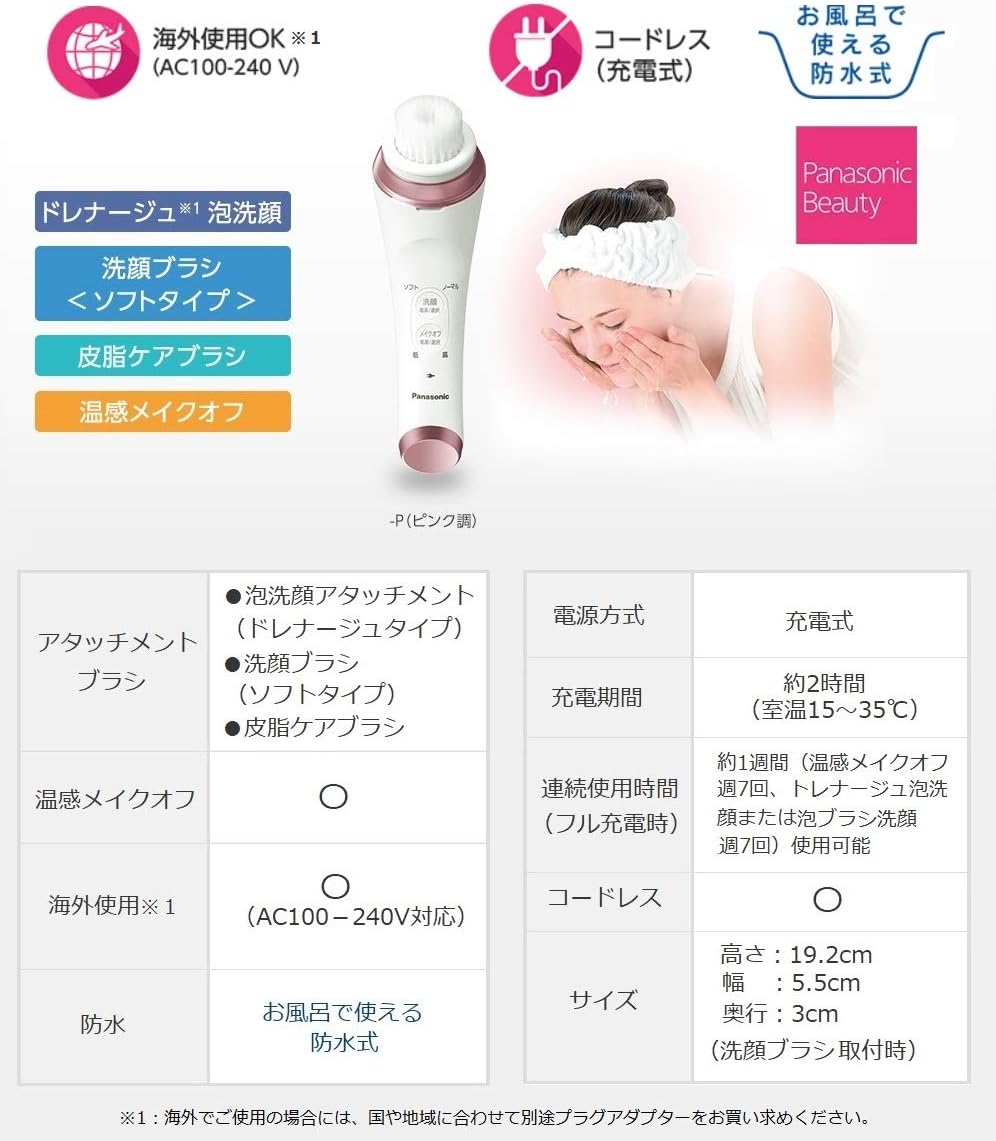
Figure 5: Attachment usage recommendations based on skin type and desired effect.
The image above provides a summary of attachment recommendations:
- Foaming Wash Attachment (Drainage Type): Recommended for improving face line. Suitable for normal, dry, and oily skin. Use daily.
- Soft Facial Brush: Recommended for thorough cleansing. Suitable for normal, dry, and oily skin. Use 1-2 times per week.
- Sebum Care Brush: Recommended for areas with concerns like pores and blackheads (nose, chin). Suitable for normal and oily skin. Use twice a week.
Note: "Drainage" is a term used in esthetics. For brush usage, adjust frequency based on your skin condition.
5.6 Cleaning Effectiveness Comparison

Figure 6: Comparison of cleansing effectiveness: Hand washing vs. Dense Foam Brush + Brush. The image illustrates significantly less foundation residue when using the device.
The device is designed to remove makeup and impurities more effectively than manual washing. Using a facial cleanser that can also remove makeup with the brush results in significantly less residue compared to hand washing.
6. Maintenance and Cleaning
Regular cleaning ensures optimal performance and hygiene of your device.
- After each use, remove the attachment and rinse both the attachment and the main unit under running water.
- Ensure no cleanser residue remains in the foam generation mechanism.
- Wipe the main unit with a soft, dry cloth.
- Allow all parts to air dry completely before reassembling or storing.
- Do not use alcohol, thinner, or abrasive cleaners, as these may damage the product.
- Store the device in a cool, dry place away from direct sunlight.
7. Troubleshooting
If you encounter any issues with your Panasonic Dense Foam Este Facial Cleanser, refer to the following common problems and solutions:
- Device does not turn on:
- Ensure the device is fully charged.
- Check if the power button is pressed correctly.
- Insufficient foam generation:
- Verify that the correct amount of cleanser and water has been added.
- Ensure the cleanser inlet is securely closed.
- Check if the attachment is properly installed.
- Device stops unexpectedly:
- The device has an automatic shut-off feature after 60 seconds of operation. This is normal.
- If it stops before 60 seconds, ensure it is fully charged.
- Skin irritation:
- Reduce the frequency of use or switch to a gentler attachment.
- Ensure you are using a mild facial cleanser suitable for your skin type.
- Consult a dermatologist if irritation persists.
If the problem persists after trying these solutions, please contact customer support.
8. Specifications
| Model Number | EH-SC67-P |
| Brand | Panasonic |
| Power Source | Rechargeable (Cordless) |
| Charging Time | Approx. 2 hours (at 15-35°C) |
| Continuous Use Time (Full Charge) | Approx. 1 week (Warm makeup off: 7 times, Drainage foam wash: 7 times, Brush wash: 7 times) |
| Dimensions (with brush attachment) | Height: 19.2 cm, Width: 5.5 cm, Depth: 3 cm |
| Item Weight | 0.22 Kilograms (7.76 ounces) |
| Batteries | 1 Lithium Ion battery (included) |
| Waterproof | Yes, for use in bath |
| International Use | AC100-240V compatible (may require separate plug adapter) |
| Skin Type Compatibility | All |
| Material Type | Foam (referring to foam generation) |
9. Warranty and Support
Panasonic products are manufactured to the highest quality standards. For warranty information, please refer to the warranty card included with your purchase or visit the official Panasonic website for your region. For technical support, replacement parts, or service inquiries, please contact Panasonic customer service.
You can find contact information on the official Panasonic website: www.panasonic.com