
PowerA 1508493-01
PowerA Wired Controller for Xbox One - Blue User Manual
Model: 1508493-01
Introduction
This manual provides essential information for the setup, operation, and maintenance of your PowerA Wired Controller for Xbox One. Designed for comfort and precision, this officially licensed controller enhances your gaming experience on Xbox One, Xbox One S, Xbox One X, and Windows 10. It features a soft-touch rubberized finish, dual rumble motors, and a 3.5mm stereo headset jack.
Setup
Follow these steps to connect your PowerA Wired Controller to your console or PC.
- Unpack the Controller: Carefully remove the controller and its detachable 8ft micro-USB to standard USB cable from the packaging.
- Connect the Cable to Controller: Insert the micro-USB end of the cable into the port on the top of the controller.
- Connect to Console/PC: Insert the standard USB end of the cable into an available USB port on your Xbox One console or Windows 10 PC.
- Power Indicator: The LED power indicator on the controller will illuminate, indicating a successful connection and that the controller is ready for use.

Figure 1: Front view of the PowerA Wired Controller, showcasing its ergonomic design and button layout.
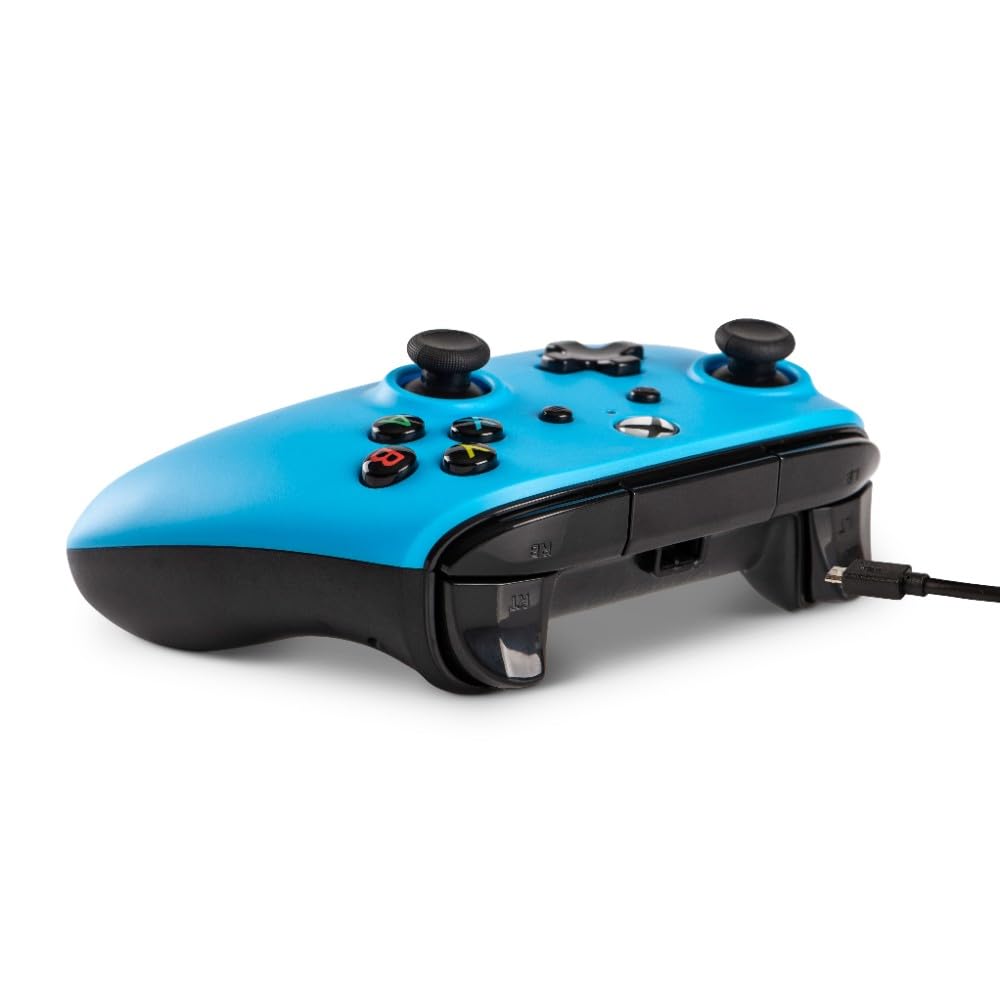
Figure 2: Side view illustrating the detachable micro-USB cable connection point on the controller.
Operating Instructions
The PowerA Wired Controller is designed for intuitive gameplay. Familiarize yourself with its key components:
- Analog Sticks: Two precision-tuned analog sticks for smooth, accurate movement and camera control.
- D-Pad: An 8-way plus-shaped directional pad for precise directional input.
- ABXY Buttons: Standard button placement for action commands.
- Bumpers and Triggers: Left/right bumpers and triggers for quick actions and nuanced control.
- Dual Rumble Motors: Provides immersive force feedback during gameplay.
- 3.5mm Stereo Headset Jack: Connect your compatible gaming headset for in-game audio and chat.
Simply launch your game after connecting the controller. The system will automatically recognize the controller, allowing you to navigate menus and play games.
Maintenance
To ensure the longevity and optimal performance of your controller, follow these maintenance guidelines:
- Cleaning: Use a soft, dry cloth to wipe down the controller. For stubborn dirt, slightly dampen the cloth with water. Avoid harsh chemicals or abrasive cleaners.
- Storage: When not in use, store the controller in a cool, dry place. The detachable cable allows for easy storage and reduces clutter, preventing cable damage.
- Handling: Avoid dropping the controller or exposing it to extreme temperatures or direct sunlight. Do not pull the cable forcefully from the controller or console.
Troubleshooting
If you encounter issues with your PowerA Wired Controller, try the following solutions:
- Controller Not Responding:
- Ensure the USB cable is securely connected to both the controller and the console/PC.
- Try connecting the controller to a different USB port on your console/PC.
- Restart your console or PC.
- Headset Audio Issues:
- Verify your headset is fully plugged into the 3.5mm jack on the controller.
- Check your console's audio settings to ensure the headset is recognized and volume levels are appropriate.
- Test the headset with another device to confirm it is functioning correctly.
- Buttons/Sticks Not Working Correctly:
- Ensure no debris is lodged around the buttons or sticks.
- Disconnect and reconnect the controller.
- If issues persist, contact PowerA customer support.
Specifications
| Feature | Detail |
|---|---|
| Model Number | 1508493-01 |
| Compatibility | Xbox One, Xbox One S, Xbox One X, Windows 10 |
| Connectivity | Wired (Detachable 8ft Micro-USB to Standard USB Cable) |
| Dimensions (L x W x H) | 3.9 x 4.02 x 7.91 inches |
| Weight | 10.9 ounces |
| Features | Dual rumble motors, 3.5mm stereo headset jack, precision-tuned analog sticks, 8-way D-pad, standard ABXY buttons, left/right bumpers and triggers |
| Manufacturer | PowerA |
| First Available | February 13, 2019 |
Warranty and Support
For information regarding product warranty, returns, or technical support, please refer to the documentation included with your product or visit the official PowerA website.
You can also visit the PowerA Store on Amazon for more product information and support resources.
Related documents1508493-01


Ask a question about this manual
Ask about setup, troubleshooting, compatibility, parts, safety, or missing instructions. Manuals+ will review the question and use this page’s manual context to help answer it.