
Vocal-Star VS-T200
Vocal-Star VS-T200 Portable PA Party Bluetooth Speaker Instruction Manual
Model: VS-T200
1. Introduction
This instruction manual provides comprehensive guidance for the safe and effective use of your Vocal-Star VS-T200 Portable PA Party Bluetooth Speaker. Please read this manual thoroughly before operating the device and retain it for future reference. The VS-T200 is a versatile audio system designed for various entertainment purposes, offering powerful sound, dynamic light effects, and karaoke capabilities.
2. Safety Information
- Do not expose the speaker to water or excessive moisture.
- Avoid placing the speaker near heat sources or in direct sunlight.
- Use only the provided power adapter for charging.
- Do not attempt to disassemble or repair the unit yourself. Refer all servicing to qualified personnel.
- Keep out of reach of children.
- Ensure proper ventilation around the speaker during operation.
- Dispose of batteries responsibly according to local regulations.
3. Package Contents
Please check the package for the following items:
- 1 x Vocal-Star VS-T200 Portable PA Speaker
- 2 x Wireless Microphones
- 1 x Power Adapter (AC/DC)
- 1 x User Manual (this document)
4. Product Overview
The Vocal-Star VS-T200 is a powerful 200W portable speaker system featuring dual woofers, integrated LED light effects, and a top-mounted disco ball. It supports multiple audio inputs including Bluetooth, AUX, and USB, and comes with two wireless microphones for karaoke. Its built-in battery and carry handle ensure maximum portability.

Figure 4.1: Vocal-Star VS-T200 Portable PA Speaker with included wireless microphones. The image shows the main speaker unit, two wireless microphones, and a display screen illustrating karaoke functionality.
4.1. Main Features
- 200W Peak Power Output with powerful bass and clear treble.
- Integrated LED light effects on front woofers and a top disco ball.
- Multiple connectivity options: Bluetooth, AUX, USB.
- Two wireless microphones included for karaoke.
- Built-in rechargeable battery for portable use.
- True Wireless Stereo (TWS) function for connecting two VS-T200 units.
- Integrated carry handle for easy transport.
4.2. Components and Controls
Familiarize yourself with the various parts and controls of your VS-T200 speaker.

Figure 4.2: Front view of the VS-T200 speaker with its LED lights active, showcasing the two illuminated woofers and the top disco ball light projection.

Figure 4.3: Detailed view of the light effects, including the patterns projected by the disco ball and the vibrant colors from the LED woofers.
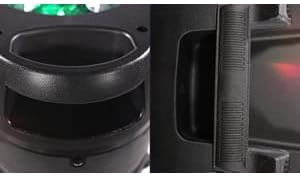
Figure 4.4: Close-up of the robust integrated carry handle, designed for easy and secure transportation of the speaker.
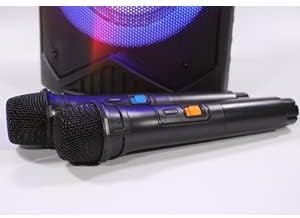
Figure 4.5: The two wireless microphones provided with the VS-T200 speaker, essential for karaoke functionality.
(Note: Specific control panel layout and button functions are typically detailed in a diagram in a physical manual. For this digital format, general functions are described.)
- Master Volume Knob: Adjusts the overall sound output level.
- Microphone Volume Knob: Controls the volume of the connected microphones.
- Echo Control Knob: Adjusts the echo effect for the microphones.
- Mode Button: Switches between Bluetooth, AUX, and USB input modes.
- Play/Pause Button: Controls media playback.
- Previous/Next Track Buttons: Navigates through tracks.
- Light Mode Button: Cycles through different LED light patterns or turns them off.
- USB Port: For playing audio from USB flash drives.
- AUX Input: 3.5mm jack for connecting external audio devices.
- Power Input: For connecting the AC/DC power adapter.
5. Setup
5.1. Charging the Speaker
- Connect the provided power adapter to the speaker's power input port.
- Plug the adapter into a suitable power outlet.
- The charging indicator light (if present) will illuminate. Allow the speaker to charge fully before first use (typically 4-6 hours).
- Once fully charged, disconnect the power adapter. The speaker can be used while charging.
5.2. Installing Microphone Batteries
Each wireless microphone requires 2 x AA batteries (included). Ensure correct polarity when inserting.
- Unscrew the bottom cap of each wireless microphone.
- Insert 2 AA batteries into each microphone, observing the correct positive (+) and negative (-) terminals.
- Replace the bottom cap securely.
6. Operating Instructions
6.1. Power On/Off
Locate the power switch on the speaker's control panel. Flip the switch to the "ON" position to power on the speaker. Flip it to "OFF" to power off.
6.2. Bluetooth Connection
- Power on the VS-T200 speaker. It will automatically enter Bluetooth pairing mode, indicated by a flashing Bluetooth indicator or voice prompt.
- On your Bluetooth-enabled device (smartphone, tablet, laptop), enable Bluetooth and search for available devices.
- Select "VS-T200" from the list of devices.
- Once connected, the speaker will confirm with an audible prompt, and the Bluetooth indicator will become solid.
- You can now play audio from your device through the VS-T200 speaker.
6.3. AUX Input
- Connect one end of a 3.5mm audio cable (not included) to the AUX input port on the VS-T200 speaker.
- Connect the other end of the cable to the audio output jack of your external device (e.g., MP3 player, TV).
- Press the "Mode" button on the speaker until "AUX" mode is selected.
- Play audio from your external device.
6.4. USB Playback
- Insert a USB flash drive containing MP3 audio files into the USB port on the speaker.
- The speaker will automatically switch to USB mode and begin playing the first compatible audio file. If not, press the "Mode" button to select USB.
- Use the Play/Pause and Previous/Next Track buttons to control playback.
6.5. Karaoke Function
- Ensure the wireless microphones have batteries installed and are powered on.
- Play your desired karaoke track via Bluetooth, AUX, or USB.
- Adjust the "Microphone Volume" knob on the speaker's control panel to your desired vocal level.
- Use the "Echo Control" knob to add echo effects to your voice.
6.6. TWS (True Wireless Stereo) Function
The TWS function allows you to connect two VS-T200 speakers wirelessly for a stereo sound experience.
- Ensure both VS-T200 speakers are powered on and are NOT connected to any Bluetooth device.
- On one of the speakers (this will be the primary speaker), press and hold the TWS button (or a designated pairing button, refer to speaker's physical controls if available).
- The primary speaker will search for the secondary speaker. Once connected, both speakers will confirm with an audible prompt.
- Now, connect your Bluetooth device to the primary VS-T200 speaker as described in section 6.2.
- Audio will now play in stereo through both speakers.
6.7. Light Effects Control
The VS-T200 features dynamic LED light effects and a disco ball. Use the "Light Mode" button on the control panel to cycle through different light patterns or to turn the lights off.
7. Maintenance
- Cleaning: Use a soft, dry cloth to clean the speaker's exterior. Do not use abrasive cleaners or solvents.
- Storage: When not in use for extended periods, store the speaker in a cool, dry place away from direct sunlight and extreme temperatures.
- Battery Care: To prolong battery life, fully charge the speaker before storing it for long periods. Recharge the battery at least once every 3 months if not in regular use.
8. Troubleshooting
| Problem | Possible Cause | Solution |
|---|---|---|
| Speaker does not power on. | Battery is depleted; Power adapter not connected or faulty. | Charge the speaker's battery; Ensure power adapter is securely connected and working. |
| No sound from speaker. | Volume too low; Incorrect input mode; Device not connected properly. | Increase master volume; Press "Mode" button to select correct input (Bluetooth, AUX, USB); Reconnect Bluetooth device or AUX cable. |
| Bluetooth connection fails. | Speaker not in pairing mode; Device too far; Interference. | Ensure speaker is in pairing mode; Move device closer to speaker; Turn off other Bluetooth devices. |
| Microphones not working. | Microphone batteries depleted or incorrectly inserted; Microphone volume too low. | Replace microphone batteries, ensuring correct polarity; Increase microphone volume on speaker. |
| Light effects not working. | Lights turned off; Malfunction. | Press the "Light Mode" button to activate lights; If issue persists, contact customer support. |
9. Specifications
| Feature | Detail |
|---|---|
| Model Number | VS-T200 |
| Brand | Vocal-Star |
| Power Output | 200W |
| Connectivity | Bluetooth, USB, AUX |
| Microphones | 2 x Wireless Microphones (requires 2x AA batteries each) |
| Speaker Battery | Built-in Lithium-ion (rechargeable) |
| Light Effects | LED Woofer Lights, Top Disco Ball |
| Color | Black |
| Portability | Integrated Carry Handle |
| Special Features | TWS (True Wireless Stereo) Function |
10. Warranty and Support
Vocal-Star products are designed for reliability and performance. While specific warranty details are not provided in this manual, Vocal-Star offers dedicated UK customer service to assist with any queries or issues you may encounter.
For support, please refer to the contact information provided on the product packaging or the official Vocal-Star website. When contacting support, please have your product model number (VS-T200) and purchase details ready.
Related documentsVS-T200


Ask a question about this manual
Ask about setup, troubleshooting, compatibility, parts, safety, or missing instructions. Manuals+ will review the question and use this page’s manual context to help answer it.