
1. Introduction
This manual provides detailed instructions for assembling your JEKCA Ankylosaurus 01S-M01 building block set. Please read all instructions carefully before beginning assembly to ensure a correct and enjoyable building experience. The JEKCA building system utilizes a unique interlocking brick-through mechanism for enhanced stability and durability.

Image 1.1: Fully assembled JEKCA Ankylosaurus 01S-M01 model.
2. Safety Information
Warning: Small parts are included. This product is recommended for individuals aged 14 years and above. Keep out of reach of young children to prevent choking hazards.
3. Package Contents
Before starting assembly, please verify that all components listed below are present in your package:
- Instruction Manual
- Building Bricks (over 1540 pieces)
- Connecting Pins
- Pin Driver (screwdriver tool)
- Quick Guide
If any parts are missing or damaged, please contact JEKCA customer support for assistance.
4. Assembly Instructions
The JEKCA building system uses a unique interlocking method to create sturdy models. Follow the steps below and refer to the included detailed building manual for specific part placement.
4.1 Understanding the Interlocking System
JEKCA blocks are connected using pins and a pin driver (screwdriver). This system ensures a strong and stable structure once assembled.
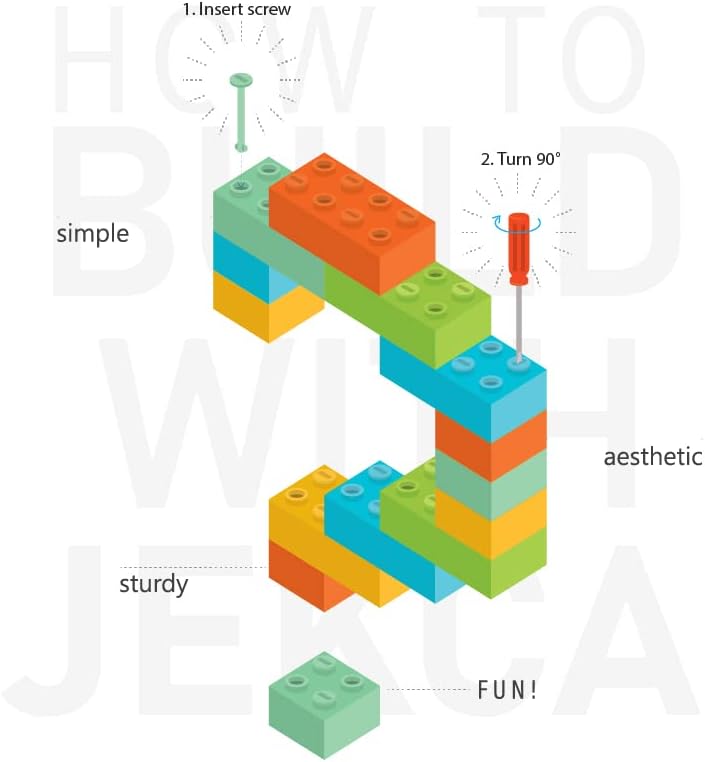
Image 4.1: Basic principle of JEKCA block connection. Insert the pin and turn 90 degrees with the pin driver.

Image 4.2: Detailed steps for connecting JEKCA blocks: 1. Align blocks, 2. Insert pins, 3. Turn pins 90 degrees using the pin driver.
4.2 General Assembly Steps
- Preparation: Unpack all components and organize the bricks by color or type as indicated in your detailed building manual.
- Follow the Manual: Refer to the included JEKCA building manual for step-by-step instructions specific to the Ankylosaurus 01S-M01 model. Each step will illustrate which blocks to use and where to place them.
- Connect Blocks: As shown in Image 4.1 and 4.2, align the blocks, insert the connecting pins through the designated holes, and then use the provided pin driver to turn the pins 90 degrees. This locks the blocks securely in place.
- Verify Connections: Ensure each connection is firm before proceeding to the next step. Properly connected blocks will result in a sturdy model.
- Completion: Continue following the manual until all sections are assembled and the Ankylosaurus model is complete.
5. Display and Stability
Once assembled, your JEKCA Ankylosaurus model is designed to be sturdy and resistant to accidental disassembly due to its unique interlocking system. It can be displayed on any flat, stable surface. The model's robust construction allows for handling without easily breaking apart.
6. Maintenance
To maintain the appearance of your JEKCA model, gently dust it with a soft, dry cloth. For more stubborn dirt, a slightly damp cloth can be used, but avoid excessive moisture or harsh cleaning agents, which may damage the plastic.
7. Troubleshooting
7.1 Missing or Damaged Parts
If you find any missing or damaged bricks or pins upon opening the package, please contact JEKCA customer support with your product model number and details of the missing/damaged parts. Do not attempt to force ill-fitting parts.
7.2 Difficulty Connecting Blocks
Ensure that the pins are fully inserted before attempting to turn them with the pin driver. If a pin is difficult to turn, check for proper alignment of the blocks and ensure no debris is obstructing the pinhole. Do not apply excessive force, as this may damage the blocks or pins.
8. Specifications
| Feature | Detail |
|---|---|
| Product Model Number | ST19DN04-M01 |
| Product Dimensions (L x W x H) | 17.72 x 7.6 x 5.55 inches (45.0 x 19.3 x 14.1 cm) |
| Item Weight | 2.86 pounds |
| Number of Pieces | Over 1540 |
| Recommended Age | 14 years and up |
| Manufacturer | JEKCA Limited |

Image 8.1: JEKCA Ankylosaurus model shown at 1:1 scale alongside a 13-inch iPad Pro for size reference.
9. Warranty and Support
For information regarding product warranty, returns, or technical support, please refer to the contact information provided in your product packaging or visit the official JEKCA website. Keep your purchase receipt as proof of purchase.

