
1. Introduction
This manual provides essential information for the safe and efficient operation of your MOUNTO 180 Pints Commercial Dehumidifier, Model DH95LX. This LGR (Low Grain Refrigerant) dehumidifier is designed for high-capacity moisture removal in large spaces, including basements, garages, job sites, and commercial environments. It features a robust design, a built-in pump for continuous drainage, and an intuitive control panel for precise humidity management.
2. Safety Information
- Always connect the unit to a properly grounded electrical outlet.
- Do not operate the dehumidifier with a damaged power cord or plug.
- Ensure adequate ventilation around the unit to prevent overheating.
- Keep children and pets away from the dehumidifier during operation.
- Do not block the air inlet or outlet.
- Unplug the unit before performing any maintenance or cleaning.
- If the unit is stored in freezing temperatures, allow it to warm up to room temperature before operation to prevent damage.
3. Product Overview & Components
The MOUNTO DH95LX dehumidifier is built with durability and performance in mind. Key components include:
- Control Panel: Digital display for settings and real-time data.
- Air Inlet: Located on the front, protected by a washable filter.
- Air Outlet: Located on the side, for discharging dry air.
- Sturdy Handles: Integrated handles for easy lifting and transport.
- Large Wheels: For enhanced mobility across various terrains.
- Drain Hose Connection: Quick-connect port for continuous drainage.
- Power Cord Storage: Convenient wrap-around storage for the power cord.

Figure 1: Front view of the MOUNTO 180 Pints Commercial Dehumidifier, highlighting the air inlet and control panel.

Figure 2: Side view illustrating the dimensions of the dehumidifier for placement and transport planning.

Figure 3: Detailed view of the digital control panel with Power, Purge, Menu, and Set buttons.
4. Setup
- Unpacking: Carefully remove the dehumidifier from its packaging. Inspect for any shipping damage.
- Handle Assembly: The unit features a sturdy handle for transport. Loosen the tie rod tightness knobs on the back, pull the handle up to the desired height, and tighten the knobs to secure it.
- Placement: Position the dehumidifier on a level surface in the area requiring dehumidification. Ensure at least 12 inches of clearance around the air inlet and outlet for optimal airflow.
- Drain Hose Connection: Connect the provided 25ft drain hose to the quick-connect port at the bottom of the unit. Ensure a secure fit. Route the hose to a suitable drainage point (e.g., floor drain, sink, or outdoors). The built-in pump can lift water up to 15ft vertically.
- Power Connection: Plug the 25ft power cord into a grounded 120V AC electrical outlet.

Figure 4: Illustration of the drain hose connection point on the dehumidifier.
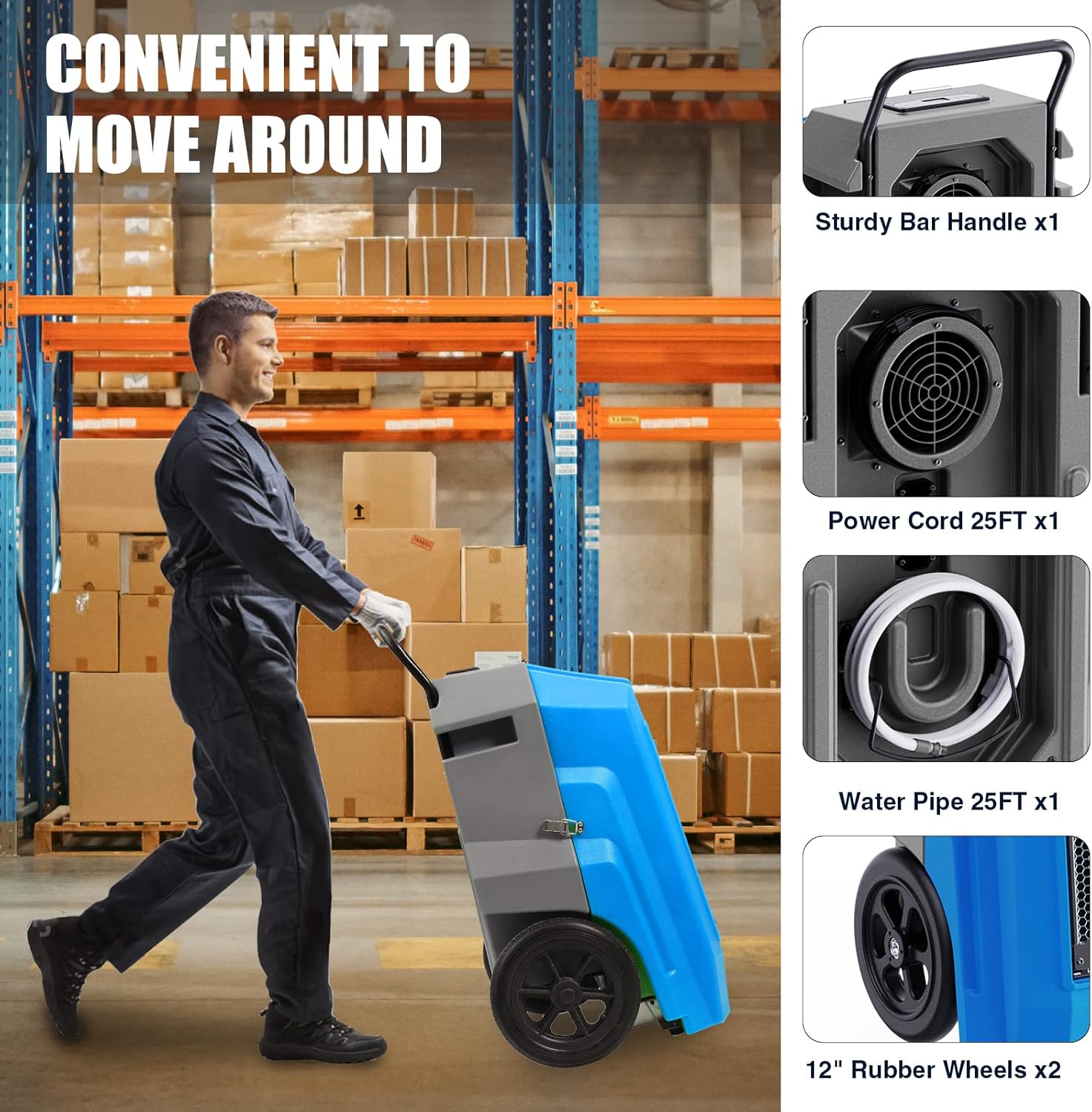
Figure 5: Demonstrates the ease of moving the dehumidifier with its integrated handle and wheels.
Video 1: Official product video demonstrating the unpacking and initial setup of the MOUNTO 180 Pint Dehumidifier, including handle and hose connection.
5. Operating Instructions
- Power On/Off: Press the POWER button on the control panel to turn the unit on or off.
- Set Humidity Level: Use the SET buttons (up/down arrows) to adjust the desired relative humidity (RH) level. The unit will operate until the set humidity is reached, then cycle off.
- Continuous Mode: To operate the dehumidifier continuously, set the humidity level to 'CO' (Continuous Operation).
- Purge Function: Press the PURGE button to manually activate the built-in pump and drain any accumulated water. This is useful before moving the unit or for routine maintenance.
- Menu Options: Press the MENU button to cycle through various display options, including inlet/outlet temperature, relative humidity, grain depression, job hours, and life hours.
- Auto-Restart: The unit features an auto-restart function, allowing it to resume operation with previous settings after a power outage.
Video 2: Official product video demonstrating the control panel and various settings of the ALORAIR Commercial Dehumidifier, including humidity setpoint and real-time data display.
Video 3: Official product video showcasing the ALORAIR Storm Pro 180 Pints Commercial Dehumidifier in operation, highlighting its features and performance.
6. Maintenance
Regular maintenance ensures optimal performance and longevity of your dehumidifier.
- Filter Cleaning: The dehumidifier is equipped with a washable aluminum filter. Regularly remove the filter from the air inlet and clean it with warm, soapy water. Rinse thoroughly and allow to dry completely before reinserting.
- Drain Pump Maintenance: Periodically check the drain hose and pump for any clogs or debris. Use the Purge function to ensure the pump is operating correctly.
- Coil Cleaning: Inspect the evaporator and condenser coils for dust and debris. Clean gently with a soft brush or vacuum cleaner.
- Storage: Before storing the unit, ensure it is thoroughly cleaned and dry. Coil the power cord and secure the drain hose. Store in a cool, dry place.

Figure 6: Exploded view showing the internal components, including the washable filter and copper coils, for maintenance reference.
7. Troubleshooting
- Unit Not Turning On: Check if the power cord is securely plugged into a grounded outlet. Ensure the outlet is functional.
- Reduced Dehumidification: Verify that the air filter is clean and not obstructed. Ensure the air inlet and outlet are clear. Check that the set humidity level is lower than the ambient humidity.
- "Pump" Error Message: This indicates an issue with the built-in pump. Check the drain hose for kinks or clogs. Ensure the pump is not obstructed. If the issue persists, contact customer support.
- Excessive Noise: Ensure the unit is placed on a level surface. Check for any loose parts or obstructions in the fan area.
8. Specifications
| Brand | MOUNTO |
| Model Name | DH95LX |
| Capacity | 180 Pints/Day (95°F, 90% RH) |
| Dehumidification Capacity | 22.5 Gallons per Day |
| Coverage Area | Up to 3000 sq. ft. |
| Air Flow Capacity | 350 Cubic Feet Per Minute (CFM) |
| Built-In Pump | Yes, with 15ft lift head |
| Power Cord Length | 25ft |
| Drain Hose Length | 25ft |
| Voltage | 120 Volts (AC) |
| Wattage | 800 watts |
| Item Weight | 88 Pounds |
| Product Dimensions | 22"D x 22"W x 35"H |
| Material | Roto-Molding |
| Special Features | Built-In Pump, Humidity Setting, Memory Restart |
9. Warranty & Support
Your MOUNTO dehumidifier is backed by a manufacturer's warranty. For specific warranty details and to register your product, please refer to the documentation included with your unit or visit the MOUNTO website.
For technical assistance, troubleshooting, or parts replacement, please contact MOUNTO customer support. Contact information can typically be found in your product packaging or on the official MOUNTO website.