
1. Introduction
Thank you for choosing the EKO CW2236MT-47L Motion Sensor Trash Can. This manual provides essential information for the proper setup, operation, and maintenance of your new trash can. Please read these instructions thoroughly before use to ensure optimal performance and longevity of the product.

Image 1.1: The EKO CW2236MT-47L Motion Sensor Trash Can, showcasing its sleek stainless steel finish and black lid.
2. Safety Instructions
- Do not immerse the lid or any electronic components in water. Clean with a damp cloth only.
- Keep the motion sensor clear of obstructions to ensure proper operation.
- Ensure batteries are inserted with correct polarity. Do not mix old and new batteries, or different types of batteries.
- Remove batteries if the unit will not be used for an extended period.
- This product is designed for indoor use only.
- Keep out of reach of children and pets to prevent accidental activation or injury.
3. Package Contents
Please check the contents of your package. You should find the following:
- EKO CW2236MT-47L Motion Sensor Trash Can (Body and Lid Assembly)
- User Manual (This document)
Note: 6 AA batteries are required for operation and are not included.
4. Setup
4.1 Battery Installation
- Locate the battery compartment on the underside of the lid.
- Open the battery compartment cover.
- Insert 6 new AA batteries, ensuring correct polarity (+/-) as indicated inside the compartment.
- Close the battery compartment cover securely.
4.2 Liner Installation
- Lift the lid of the trash can.
- Place a standard 13-gallon (47L) trash bag into the inner bucket.
- Ensure the top edge of the trash bag is tucked neatly under the liner rim to prevent excess plastic from being visible.
- Lower the lid back into position.
4.3 Deodorizer Holder Usage
The trash can includes a built-in deodorizer holder. Insert a compatible deodorizer packet (not included) into the designated slot on the underside of the lid to help control odors.
4.4 Placement
Place the trash can in your desired indoor location, such as a kitchen or office. Ensure there is adequate space above and in front of the sensor for proper operation.

Image 4.1: The EKO trash can positioned next to a kitchen island, demonstrating suitable placement.
5. Operating Instructions
5.1 Motion Sensor Operation
The EKO CW2236MT-47L features an infrared motion sensor for hands-free operation.
- To open the lid automatically, simply wave your hand or approach the sensor area located on the front of the lid.
- The lid will open smoothly and remain open for a few seconds.
- After a short delay, the lid will close softly and quietly.
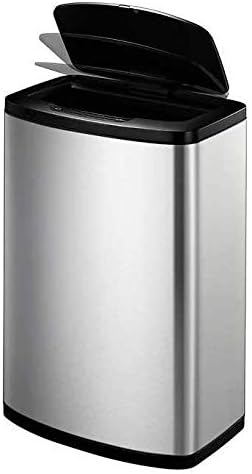
Image 5.1: The lid of the EKO trash can in an open position, demonstrating the motion sensor activation.
5.2 Manual Mode
For extended opening or specific tasks, the trash can can be operated in manual mode.
- Locate the OPEN and CLOSE buttons on the lid, near the sensor.
- Press the OPEN button to keep the lid open indefinitely.
- Press the CLOSE button to close the lid. The motion sensor will reactivate after the lid closes.
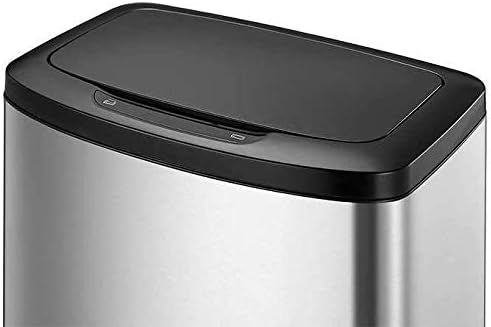
Image 5.2: A detailed view of the trash can lid, highlighting the motion sensor and the manual OPEN/CLOSE buttons.
6. Maintenance
6.1 Cleaning
- Exterior: The fingerprint-resistant stainless steel exterior can be cleaned with a soft, damp cloth and a mild, non-abrasive cleaner. Wipe dry immediately to prevent water spots.
- Lid: Wipe the lid with a damp cloth. Do not submerge the lid in water. Ensure the sensor area is kept clean and free of dust.
- Inner Bucket: The inner bucket can be removed and washed with soap and water. Rinse thoroughly and dry completely before placing it back into the trash can body.
6.2 Battery Replacement
When the lid operation becomes slow or inconsistent, it is time to replace the batteries. Follow the steps in Section 4.1 to replace all 6 AA batteries with new ones.
6.3 Deodorizer Replacement
Replace the deodorizer packet in the holder as needed, typically every 1-3 months depending on usage and odor levels.
7. Troubleshooting
| Problem | Possible Cause | Solution |
|---|---|---|
| Lid does not open or close. |
|
|
| Lid opens unexpectedly. |
|
|
| Lid closes too quickly or slowly. |
|
|
| Unpleasant odors persist. |
|
|
8. Specifications
| Brand | EKO |
| Model | CW2236MT-47L |
| Capacity | 47 Liters / 12.4 Gallons |
| Color | Stainless Steel |
| Opening Mechanism | Motion-Sensor, Manual Buttons |
| Material | Stainless Steel |
| Recommended Use | Indoor |
| Special Features | Fingerprint-Resistant, Soft Close Lid, Built-in Deodorizer Holder |
| Power Source | 6 x AA Batteries (not included) |
| Product Dimensions | 30 x 20 x 10 inches (approximate) |
| Item Weight | 2.64 ounces (approximate) |
9. Warranty and Support
EKO products are designed for quality and durability. For warranty information, product support, or to purchase replacement parts, please visit the official EKO website or contact their customer service department. Please have your model number (CW2236MT-47L) available when contacting support.
For further assistance, please refer to the contact information provided with your purchase or on the manufacturer's website.